
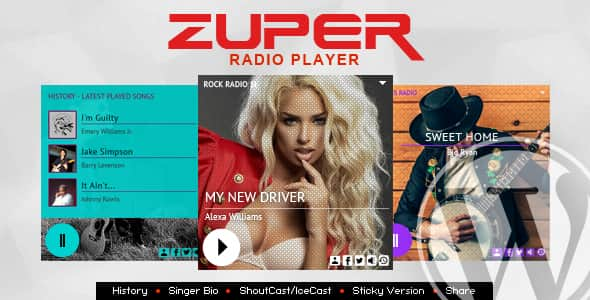
Zuper – Shoutcast and Icecast Radio Player With History – WordPress Plugin
Original price was: $20.00.$4.00Current price is: $4.00.
Embedding live web radio streams into WordPress without breaking layout responsiveness or losing song metadata often frustrates site owners. Zuper solves this by delivering a dedicated HTML5 audio player specifically engineered to parse live stream statistics and track histories dynamically on WordPress sites.
Zuper is a WordPress radio plugin designed for webmasters, online radio stations, and audio broadcasters streaming via ShoutCast, IceCast, or Radio.Co servers. It automatically extracts real-time track metadata, artist artwork, and song histories using jQuery and clean API integrations. It is ideal for broadcasters needing a customizable, sticky web player, though it is not built for offline audio files or self-hosted audio playback.
| Specification | Details |
|---|---|
| Product Type | WordPress Plugin |
| Current Version | 3.6 |
| Supported Streaming Servers | ShoutCast (v2.0+ recommended), IceCast (2.4.1 / 2.3.3 KH11), Radio.Co |
| Audio Formats | MP3 (Primary), AAC (Browser supported) |
| Script Dependencies | jQuery 3.5+, AudioDB API Integration |
| Design Formats | Responsive Grid, Sticky Bar Option, Black & White Skins |
| Mobile Compatibility | iOS and Android OS Compatible |
Key Operational Features
- Multi-Server Stream Support: Connects directly to ShoutCast, IceCast, and Radio.Co streams using standard MP3 format audio URLs.
- Automated Artwork & Bio Fetching: Queries stream metadata alongside the AudioDB API to fetch and render the current singer’s photo and biography during playback.
- Track History Generation: Automatically retrieves past played tracks for ShoutCast streams and dynamically records history logs for active IceCast broadcasts.
- Sticky & Embedded Layout Modes: Toggle between standard in-page placement or fixed sticky positioning to ensure uninterrupted playback while visitors navigate pages.
- Extensive Parameter Control: Over 50 setting toggles allow adjustments for custom color schemes, width dimensions, element visibility, and social sharing options.
- Responsive Interface: Fully adjusts across screen viewports with an optional toggle to disable responsive behavior on fixed-width sites.
Technical Considerations & Browser Restrictions
Operating live audio streams across modern browsers requires strict adherence to security and operating system protocols:
- HTTPS Mixed Content Rules: If your WordPress site uses an SSL certificate (HTTPS), your streaming media URL must also use HTTPS. Modern browsers will block HTTP streams loaded over HTTPS sites.
- Autoplay Policies: iOS, Android, Chrome, Safari, and Firefox strictly restrict unprompted JS media autoplay. Users must manually click play to start audio playback.
- Mobile Volume Controls: Operating systems on mobile devices disable software-based volume control toggles; listeners must use physical device buttons to adjust audio output levels.
- Server Engine Requirements: ShoutCast servers must be running v2.0 or higher for iOS 11+ compatibility. Standard IceCast servers must use version 2.4.1 or KH branch 2.3.3 KH11.
Frequently Asked Questions
Frequently Asked Questions
Why does autoplay fail to trigger when the site loads?
Modern desktop browsers (Chrome, Firefox, Safari) and mobile operating systems (iOS, Android) enforce strict autoplay policies to save user bandwidth. Web audio cannot autostart via JavaScript without prior direct user interaction on the page.
Can I stream an HTTP radio feed on an HTTPS WordPress site?
No. Browsers automatically block HTTP audio streams loaded on secure HTTPS pages due to mixed content security policies. You must provide a secure HTTPS stream URL for your radio player to function correctly on an SSL-enabled site.
How does the history feature track previously played songs?
For ShoutCast streams, the player retrieves song history directly from the streaming server’s history endpoint. For IceCast streams, the player logs and displays the tracks dynamically as they play throughout the active listener session.
1. Click Add to cart

2. Review your items and click Proceed to checkout

3. Fill in your billing details: Name, Email, and Password
4. Choose your preferred payment method
5. Click Pay via Paypal to proceed

6. Access Downloads to get your files

Related products


