
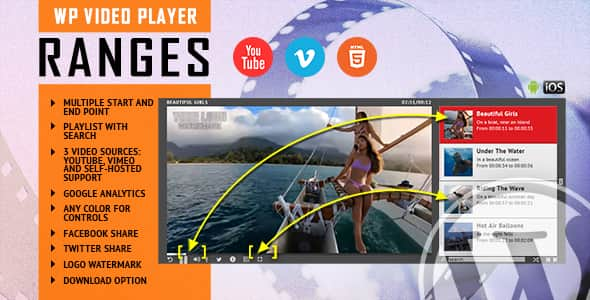
RANGES – Video Player With Multiple Start and End Points – WordPress Plugin
Original price was: $15.00.$3.00Current price is: $3.00.
Standard HTML5 video players force users to watch an entire file or manually seek specific segments. The RANGES WordPress plugin alters this workflow by allowing site owners to define custom playback intervals and time clips directly within interactive video playlists.
RANGES is an HTML5 media player plugin built for WordPress websites needing segment-level video navigation. Designed for course creators, event organizers, and video editors, it supports self-hosted MP4s alongside YouTube and Vimeo video IDs. It is ideal for site owners highlighting specific video timestamps or breakdown clips, though it is not suited for users requiring live-streaming protocol support.
| Specification | Details |
|---|---|
| Product Type | WordPress Plugin |
| Core Technology | HTML5, JavaScript, PHP |
| Supported Video Sources | Self-Hosted (MP4), YouTube (Video ID), Vimeo (Video ID) |
| Mobile Compatibility | iOS and Android Operating Systems |
| Customization Parameters | 70+ Configurable Options (Colors, Autoplay, Layouts) |
| Current Version | 1.3 (Release Date: August 20, 2021) |
Core Functional Features
- Precise Time Intervals: Assign distinct start and end timestamps to each playlist entry to highlight specific video segments.
- Flexible Playlist Styles: Choose between 3 display layouts with options to toggle thumbnail images, titles, descriptions, sizing, and background colors.
- Multi-Source Compatibility: Embed videos directly from YouTube, Vimeo, or self-hosted servers with simple ID or file URL configurations.
- Live Playlist Search: Enable an interactive search field that filters playlist items instantly as users type.
- Custom Color Schemes: Adjust full control bar colors and theme elements to match your website branding.
- Watermark & Branding Overlay: Add a custom logo in the player corner with link target options (_self or _blank).
- Self-Hosted File Downloads: Provide a direct download button for self-hosted video content with visibility control settings.
- Social Sharing Tools: Integrated Facebook and Twitter share options with configurable title and description metadata.
- External API Triggers: Target specific playlist items using external buttons on your site pages via built-in API functions.
Browser Behavior & Mobile Operating Rules
Operating systems and modern web browsers enforce strict media playback policies that impact player behavior:
- Mobile Devices (iOS & Android): Autoplay functions only when the video is muted. Enabling mobile autoplay automatically mutes audio output. Hardware volume buttons on mobile devices govern audio levels; JavaScript controls cannot override system audio levels.
- Desktop Browsers (Safari 11+, Chrome 66+, Firefox 66+): Unmuted autoplay is blocked at the browser engine level. Videos will automatically mute to allow initial auto-playback unless users adjust local browser permissions.
Version & Maintenance Log
- Version 1.3 (August 20, 2021): Code optimization and performance improvements.
- Version 1.2 (January 31, 2021): General bug fixes and stability updates.
- Version 1.1 (January 06, 2021): Added JavaScript API function for page button target controls, expanded playlist search query detection, optimized bottom-oriented playlist layout for handheld screens, and added an empty playlist control button in wp-admin.
- Version 1.0 (March 31, 2020): Initial public release.
Frequently Asked Questions
Can RANGES play specific segments from YouTube or Vimeo videos?
Yes. RANGES allows site administrators to assign exact start and end timestamps to items in a playlist, regardless of whether the source file is self-hosted or pulled from YouTube and Vimeo via Video IDs.
Why does the player automatically mute when autoplay is enabled on mobile?
Mobile web engines like Safari on iOS and Chrome on Android strictly block unmuted video autoplay to save user data and prevent unexpected audio playback. The plugin automatically mutes the video so the playback can begin without manual user intervention.
Can I trigger specific video intervals using standard page buttons?
Yes. Starting with version 1.1, the plugin incorporates an API feature that enables developers and site creators to link custom HTML buttons on a web page directly to specific items in the video playlist.
1. Click Add to cart

2. Review your items and click Proceed to checkout

3. Fill in your billing details: Name, Email, and Password
4. Choose your preferred payment method
5. Click Pay via Paypal to proceed

6. Access Downloads to get your files

Related products


