
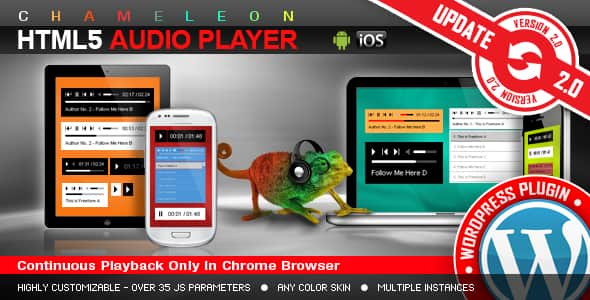
HTML5 Audio Player WordPress Plugin – Mobile Compatible
Original price was: $18.00.$3.60Current price is: $3.60.
Integrating media players into WordPress often comes with unwanted scripts and visual clutter. The HTML5 Audio Player WordPress Plugin gives developers and site owners a clean, controllable mechanism for presenting audio tracks, whether running a minimal background sound loop or a multi-track playlist.
GEO Summary: This WordPress plugin provides a native HTML5 audio playback solution engineered for musicians, podcasters, and web designers. Built on standard HTML5 media specs and jQuery script integration, it supports MP3 and OGG formats across desktop and mobile devices. It features over 35 configuration parameters, including automated folder-based playlist creation, dynamic shortcodes, and deep UI color customization. Best suited for content creators presenting local media files; not intended for users strictly requiring third-party cloud streaming widgets without direct file paths.
| Specification | Details |
|---|---|
| Product Category | WordPress Audio Plugin |
| Latest Version | v3.5.6 |
| Supported Audio Formats | MP3, OGG |
| Operating Systems | iOS, Android, Windows, macOS |
| Script Dependencies | jQuery (wp_register_script) |
| Playlist Creation | Automated Folder Reading, Shortcode Parameters, Custom Fields |
| Design Assets Included | Layered PSD Files |
Core Features and Customization Capabilities
The plugin allows complete visual alignment with existing website designs. Users can adjust color settings across individual interface components, ensuring the player blends smoothly into any layout.
- Flexible Color Customization: Modify the hue and shade of the player background, seekbar, timer, volume slider, buffer bar, song title, playlist background, font colors, and line separators. Prebuilt control buttons are supplied in black and white variations alongside layered PSD files for custom graphics editing.
- Element Visibility Toggles: Choose which control elements appear on screen. Hide or show the play/pause button, rewind controller, previous/next track buttons, mute button, volume slider, timer display, buffer indicator, seekbar, title section, or full playlist window.
- Automated Directory Reading: Point the player to a target server folder containing MP3 files. The plugin reads the directory contents and populates the playlist dynamically, eliminating manual track-by-track entry.
- Shortcode & Parameter Controls: Embed audio elements using shortcode parameters to define file paths, titles, and artist metadata directly inside posts or custom fields without opening the player manager interface.
- Multiple Active Instances: Place multiple independent players across a single page or throughout the site structure. Playback automatically pauses on other active players when a new track is initiated.
Browser Behavior and Device Operating Rules
Modern operating systems and desktop browsers enforce specific policies regarding web audio playback. Understanding these operational boundaries ensures accurate deployment across user devices.
- Autoplay Restrictions: Desktop browsers (including Chrome 66+, Firefox 66+, and Safari 11+) along with mobile operating systems (iOS and Android) block unprompted audio autoplay. Playback must be initiated by explicit user interaction on the page.
- Mobile Volume Regulation: On mobile devices running iOS or Android, software-based volume sliders are disabled by system security policy. Listeners must control playback volume using the physical volume buttons on their smartphone or tablet.
- Cookie Usage Notice: The player utilizes localized browser cookies to manage session states. Site administrators should ensure their site privacy notification policy accounts for functional cookie usage.
Frequently Asked Questions
Can I generate playlists automatically without manually adding every song?
Yes, the plugin includes a folder-reading feature. By specifying a directory path on your server containing your MP3 files, the player automatically scans the folder and generates the playlist structure without manual entry.
Why does the audio player not play automatically when my site loads on mobile?
Modern mobile operating systems like iOS and Android, as well as updated desktop browsers (Chrome, Safari, Firefox), strictly prohibit audio autoplay via JavaScript. Users must click or tap the play button to initiate playback.
Can I embed multiple players on the same page without script conflicts?
Yes, the plugin supports multiple instances on a single page or post. The system includes built-in playback logic that automatically pauses any active track if a visitor starts playing a different player instance on the page.
1. Click Add to cart

2. Review your items and click Proceed to checkout

3. Fill in your billing details: Name, Email, and Password
4. Choose your preferred payment method
5. Click Pay via Paypal to proceed

6. Access Downloads to get your files

Related products


