
Wiloke Countdown Timer for Elementor – FOMO Sales Widget
Original price was: $10.00.$2.00Current price is: $2.00.
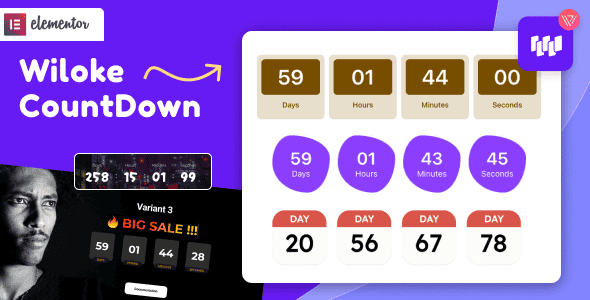
Adding time-sensitive scarcity directly into page builder layouts remains one of the quickest ways to reduce cart abandonment and speed up user decision-making. The Wiloke Countdown Timer for Elementor is a specialized WordPress extension engineered to display customizable, visually engaging urgency timers across landing pages, promotional headers, and sales funnels.
Designed specifically for e-commerce store owners, digital marketers, and agency developers working within the Elementor page builder ecosystem, this plugin solves sluggish conversion rates by creating actionable FOMO (Fear of Missing Out). It is ideal for flash sales, upcoming webinar launches, and holiday event promotions. It is not intended for standalone static HTML sites operating without WordPress and Elementor.
| Technical Specification | Details |
|---|---|
| Product Type | Elementor Widget / WordPress Plugin Addon |
| Framework Compatibility | WordPress & Elementor Page Builder |
| Primary Application | Conversion Rate Optimization (CRO), Scarcity Marketing |
| Design Options | Multiple pre-styled timer templates & full typography controls |
| Target Scenarios | Flash Sales, Product Launches, Webinars, Seasonal Banners |
Driving Higher Conversions with Visual Scarcity
Setting up time-bound incentives encourages website visitors to act before promotional pricing expires. The timer integrates directly into the standard Elementor editing interface, allowing full control over design presets, typography, colors, and layout positioning.
Key Tactical Applications
- Flash Sales & Discounts: Display real-time clocks for limited-time price drops or clearance events to trigger rapid checkouts.
- Scheduled Event Launches: Keep audiences engaged before live webinars, online masterclasses, or virtual meetups start.
- Holiday Promotions: Launch targeted seasonal banners for major shopping events with automated deadline tracking.
- Customizable Call-To-Action Copy: Pair live timers with high-impact messaging such as limited-quantity alerts or imminent price hikes to prompt direct action.
Frequently Asked Questions
Does this countdown timer work without Elementor installed?
No, this widget is built specifically as an extension for the Elementor Page Builder on WordPress. It requires an active WordPress installation with Elementor enabled to function within page layouts.
Can the visual styling of the countdown timer be customized?
Yes, users can adjust typography, colors, borders, spacing, and timer styles directly from the Elementor control panel. No manual CSS or PHP coding is required to adapt the widget to your site’s branding.
Is the timer responsive across mobile devices?
Yes, the countdown widget automatically adapts to various viewport sizes. You can also fine-tune mobile-specific font sizes and alignment settings directly inside Elementor’s responsive design mode.
1. Click Add to cart

2. Review your items and click Proceed to checkout

3. Fill in your billing details: Name, Email, and Password
4. Choose your preferred payment method
5. Click Pay via Paypal to proceed

6. Access Downloads to get your files

Related products


