
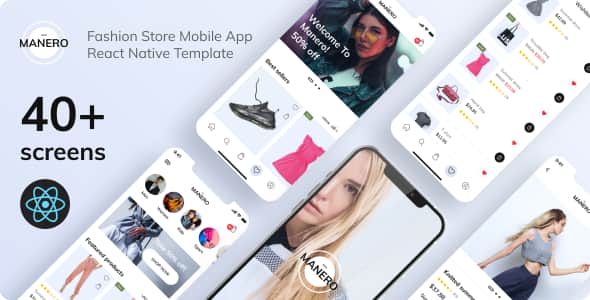
Manero: Fashion Store – React Native E-Commerce App Template
Original price was: $58.00.$11.60Current price is: $11.60.
Setting up mobile e-commerce interfaces from the ground up requires substantial developer effort in UI design, navigation routing, and component architecture. Manero streamlines frontend production by delivering a cross-platform mobile storefront boilerplate designed for fashion retailers and digital agencies.
Manero is a React Native mobile application template compiled with React Native CLI 0.70.6 and full Expo compatibility. Built specifically for fashion e-commerce workflows, it equips frontend engineers with 40 pre-designed screens for both iOS and Android. It addresses the friction of manual UI construction by incorporating Redux Toolkit state management and pure functional components with React Hooks. This product is best suited for mobile developers requiring a turn-key UI client to connect with headless backend APIs (such as Shopify, WooCommerce, or custom REST/GraphQL systems). It is not suited for non-technical users expecting a fully functioning standalone app with an included backend database.
Technical Overview & Specifications
| Component / Spec | Technical Details |
|---|---|
| Framework Version | React Native CLI 0.70.6 (Expo Compatible) |
| React Engine | React 18.1.0 |
| Architecture | Functional Components with React Hooks |
| State Management | Redux Toolkit (^1.9.1) & React Redux (^8.0.5) |
| Navigation | React Navigation Native (^6.0.16) / Stack (^6.3.7) |
| Platform Compatibility | iOS and Android |
| Included Layouts | 40 Unique UI Screens |
| Typography | Mulish Font Family |
| Graphic Assets | Scalable Vector Graphics (SVG) Icons |
Core Technical Features
- Pure Functional Architecture: Engineered exclusively with React functional components and React Hooks for predictable component lifecycles and clean code maintainability.
- Scalable State Management: Integrated with
@reduxjs/toolkitandreact-reduxto manage app-wide state such as cart additions, item deletions, and user wishlist tracking. - Vector Asset Support: Built using
react-native-svgto render sharp, high-density iconography across diverse device screen resolutions. - Smooth UX Utility Packages: Utilizes
react-native-gesture-handler,react-native-modal,react-native-flash-message, andreact-native-collapsiblefor responsive touch feedback and UI transitions. - Cross-Platform Form Handling: Integrates
react-native-keyboard-aware-scroll-viewand@ptomasroos/react-native-multi-sliderfor intuitive checkout forms and product filtering.
Comprehensive Screen Inventory (40 Layouts)
Manero provides structured mobile user flows organized into standard retail navigation patterns:
Authentication & Onboarding
- 02-04 Onboarding Flow (Screens 1, 2, and 3)
- 05 Sign In & 09 Sign Up (including Account Created confirmation)
- 06-08 Password Recovery Flow (Forgot Password, Email Sent, New Password)
- 11-12 Identity Verification (Phone Number Verification & Confirmation Code)
Discovery & Shopping Navigation
- 13-14 Home Layouts (Home V1 & Home V2 variants)
- 15 Drawer / Burger Menu Contacts
- 16 Category Overview & 17 Main Shop Screen
- 18 Product Detail View
- 19-20 Customer Reviews List & Review Submission Screen
- 21 Wishlist Manager & 22 Advanced Product Filter
User Account & Order Management
- 23 Profile Overview & 24 Edit Profile
- 25-26 Payment Method Overview & Add New Card
- 27-28 Saved Addresses & Add New Address
- 29 Order History & 30 Order Tracking Interface
- 31 Sign Out Confirmation Modal
- 32-33 Promocodes Overview (Active & Empty States)
Cart & Checkout Execution
- 34 Cart (Empty State) & 35 Order Overview
- 36-38 Checkout Steps (Main Checkout, Shipping Details, Payment Selection)
- 39 Order Successful & 40 Order Failed Status Views
Frequently Asked Questions
Is Manero a fully functional mobile application with backend services?
No, Manero is strictly a frontend UI template and mobile boilerplate. It contains designed screens, component structures, and state management hooks, but requires integration with your own backend server, REST API, or GraphQL endpoint for real-time order processing and database management.
Which version of React Native does this template utilize?
This project is built using React Native CLI version 0.70.6 alongside React version 18.1.0. It also offers compatibility with Expo for flexible development workflows.
Does the template include vector icons and dynamic screen navigation?
Yes, all icons within the application are implemented using scalable SVG assets via the react-native-svg library. App navigation is managed using React Navigation v6, including full stack navigation setups across all 40 included screens.
1. Click Add to cart

2. Review your items and click Proceed to checkout

3. Fill in your billing details: Name, Email, and Password
4. Choose your preferred payment method
5. Click Pay via Paypal to proceed

6. Access Downloads to get your files

Related products


