
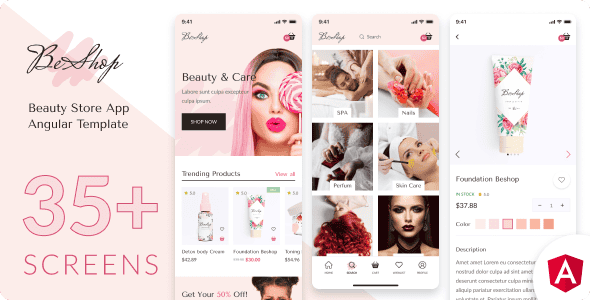
BeShop – Beauty Store & eCommerce Angular Mobile App | PWA
Original price was: $48.00.$9.60Current price is: $9.60.
Building high-performance e-commerce interfaces for beauty brands often requires balancing rich visual design with immediate page loads across mobile networks. BeShop provides a pre-built Progressive Web Application frontend constructed with Angular 19 and TypeScript. It offers online stores, beauty retailers, and frontend developers a ready-to-use mobile web application layout with service-based state management and offline capability via service workers. It is ideal for developers seeking a lightweight Angular e-commerce mobile template, but it is not intended as a fully configured backend server or zero-code standalone store.
Product Specifications
| Parameter | Specification |
|---|---|
| Core Framework | Angular 19 |
| Primary Language | TypeScript (.ts) |
| Styling System | SCSS Support |
| Iconography Format | SVG Format |
| Typography Integration | Free Google Fonts |
| State Architecture | Service-based State Management |
| Application Type | Progressive Web Application (PWA) |
Key Technical Features
- Angular 19 Architecture: Developed using modern Angular conventions with well-structured components and clean code layout.
- Service-Based State Management: Utilizes centralized service patterns to handle application state and screen transitions efficiently.
- PWA Integration: Built with offline caching and service worker capabilities to deliver quick loading times directly in mobile browsers.
- Structured SCSS Support: Styled with organized modular SCSS files for straightforward theme adjustments and layout customization.
- Developer-Focused Assets: Includes complete TypeScript (.ts) source files, SVG icon sets, and standard documentation.
PWA Architecture Advantages
Progressive Web Applications bridge the gap between web platforms and mobile apps. BeShop enables brands to deliver an app-like experience directly within the browser, eliminating the need for app store approvals or manual updates. Advanced caching allows users to view cached products even with unstable connectivity, supporting higher user retention and quick interaction feedback.
Setup Commands
To run the application in a local development environment, execute the standard Angular workspace commands:
npm install– Installs required npm package dependencies.ng serve– Compiles the application and launches a local web server.
Frequently Asked Questions
Does BeShop include backend database integration?
No, BeShop is a frontend Angular 19 template. Developers need to connect their own REST APIs, GraphQL endpoints, or headless e-commerce backends to handle product management, cart persistence, and checkout logic.
How do you launch the application for local testing?
Install Node.js on your machine, open the project directory in your terminal, run npm install to fetch the required modules, and execute ng serve to preview the application locally.
Can this template be viewed across tablet and desktop displays?
Yes, although designed around mobile app navigation patterns, the SCSS responsive layout adjusts smoothly to larger screen viewports on tablets and desktop browsers.
1. Click Add to cart

2. Review your items and click Proceed to checkout

3. Fill in your billing details: Name, Email, and Password
4. Choose your preferred payment method
5. Click Pay via Paypal to proceed

6. Access Downloads to get your files

Related products


