
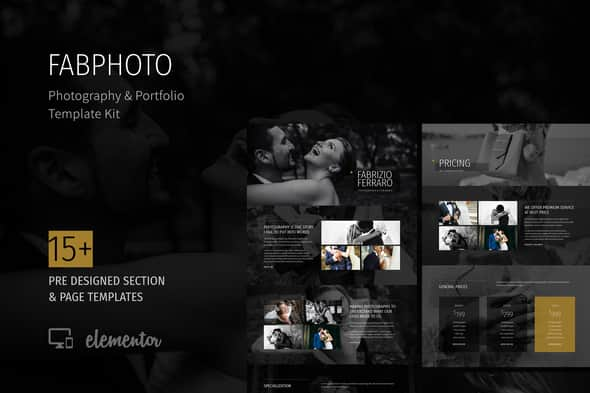
FabPhoto – Photography and Portfolio Template Kit – Elementor Ready
Original price was: $19.00.$3.80Current price is: $3.80.
Photographers and visual artists often struggle with bloated themes when all they need is a clean, structured layout to display high-resolution imagery. FabPhoto provides a lightweight Elementor template kit tailored specifically for portfolio displays, wedding photography, and fashion lookbooks.
FabPhoto is an Elementor template kit designed for professional photographers, modeling agencies, visual creators, and studio owners. Built for the free version of Elementor, it eliminates the need for expensive page builder subscriptions while providing 9 pre-built page layouts and over 15 modular section blocks. It is ideal for visual artists needing a refined digital showcase, but not suited for complex e-commerce stores requiring deep WooCommerce functionality out of the box.
Technical Specifications
| Specification | Detail |
|---|---|
| Product Type | Elementor Template Kit |
| Page Builder Compatibility | Elementor Free (Tested up to v2.9.x) |
| WordPress Version | WordPress 5.3.2+ (WordPress 6.0+ recommended) |
| Base Theme Required | Hello Elementor (Free) |
| Page Layouts Included | 9 Complete Pages |
| Section Blocks Included | 15+ Modular Blocks |
| Server Requirements | PHP 7+, MySQL 5.6+ / MariaDB 10.0+, 512 MB Memory Limit |
| Layout Responsiveness | Fully Responsive / Mobile-Optimized |
Core Features and Included Layouts
FabPhoto combines classic aesthetic proportions with modern layout modularity. The kit features built-in global style controls so you can adjust color schemes and typography across your entire site simultaneously.
Included Full Page Layouts
- Homepage: Balanced hero layout designed to highlight featured shoots and core services immediately.
- About Page: Dedicated section for photographer bios, equipment highlights, and brand storytelling.
- Gallery Pages (2 Variants): Multiple grid styles designed for visual organization and gallery presentations.
- Photo Single: Individual item page built to present single photos or specific client projects in high detail.
- Portfolio Page: Structured showcase for categorizing work samples across different visual disciplines.
- Pricing Page: Clean tier layout for wedding, portrait, or commercial booking rates.
- Testimonials Page: Social proof display for client reviews and agency feedback.
- Contact Page: Functional layout with inquiry forms and location details.
Modular Section Blocks
The kit includes over 15 re-usable section templates, allowing you to build custom pages rapidly using standard drag-and-drop workflows:
- Hero & Header Blocks: High-impact entry banners with customizable action buttons.
- Content & Feature Blocks: Organized grids for highlighting technical capabilities, service packages, and stats counters.
- Social Proof & Media: Logo grids for client publications, testimonial cards, and gallery grids.
Installation and Configuration Guide
Because FabPhoto is an Elementor Template Kit rather than a standalone WordPress theme, setup involves importing the template structure directly into Elementor via the free Envato Elements plugin.
- Step 1: Install and activate the free Hello Elementor theme from the WordPress Theme Repository.
- Step 2: Install the free Envato Elements plugin via the Plugins menu.
- Step 3: Navigate to Elements > Installed Kits and upload the template kit zip file.
- Step 4: Click Import Global Kit Styles first to establish default site settings, typography, and color schemes.
- Step 5: Import individual page and section templates into your Elementor saved templates library.
Frequently Asked Questions
Does FabPhoto require a paid Elementor Pro subscription?
No, all template layouts included in FabPhoto are designed to work with the free version of the Elementor Page Builder. You do not need to purchase Elementor Pro to display these pages correctly.
Is FabPhoto a complete WordPress theme?
No, FabPhoto is a template kit containing layout data for Elementor. It requires a lightweight starter theme such as Hello Elementor to manage overall site structure and global header/footer defaults.
Can I customize fonts and colors across all pages?
Yes, FabPhoto relies on Elementor’s Global Kit Styles. Adjusting primary colors, secondary accent tones, or font families within the site settings updates all imported templates instantly.
1. Click Add to cart

2. Review your items and click Proceed to checkout

3. Fill in your billing details: Name, Email, and Password
4. Choose your preferred payment method
5. Click Pay via Paypal to proceed

6. Access Downloads to get your files

Related products


