
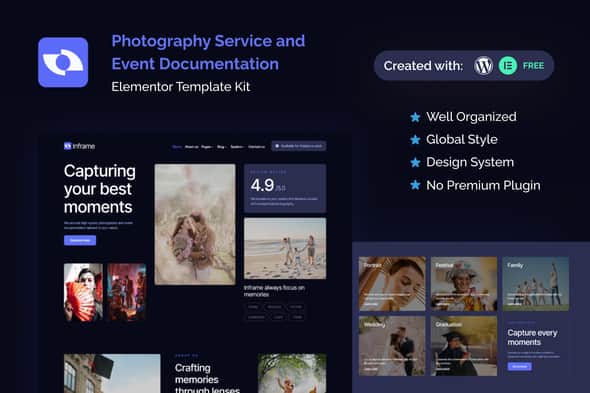
Inframe – Photography Service & Event Documentation Elementor Template Kit
Original price was: $24.00.$4.80Current price is: $4.80.
Building visual portfolios and client booking portals for photo studios often gets bogged down by repetitive layout configuration and complex form setup. Inframe provides a structured, component-driven layout framework built specifically for visual storytelling and commercial photography services without requiring custom code.
Inframe is a specialized Elementor Template Kit engineered for freelance photographers, media agencies, and corporate event documentation teams. Built for WordPress and Elementor, it eliminates layout setup delays by supplying 24+ pre-configured page templates and dynamic lead-capture forms. This kit is ideal for visual content creators needing fast website deployment, though it is not a standalone theme and requires an active WordPress theme alongside Elementor.
| Technical Parameter | Specification / Detail |
|---|---|
| Product Type | Elementor Template Kit |
| WordPress Compatibility | v6.7.1 |
| Elementor Compatibility | v3.25.10 |
| Included Templates | 24+ Pre-designed Layouts |
| Required Plugins | Elementor, ThePlus Addons for Elementor, ElementsKit Lite, Gum Elementor Kit, Metform |
| Typography & Styling | 900+ Google Fonts, Unlimited Custom Colors, Design Guideline Page |
| Browser Compatibility | Chrome, Firefox, Safari, Opera |
| Current Release | v1.0.0 |
Key Design & Layout Features
- 24+ Page Templates: Complete layout set featuring Homepage, Services, Gallery, Portfolios, About Us, Team, Pricing, Reviews, Blog, Single Post, Coming Soon, and 404 Error pages.
- Structured Form Integration: Ready-to-import Metform templates for inquiry forms, contact requests, team applications, and newsletter subscriptions.
- Global Styling Control: Integrated Global Theme Style and Design Guideline templates to maintain color, font, and element consistency site-wide.
- Custom Header & Footer Layouts: Full navigation control using ElementsKit Lite for managing site headers and footers across all posts and pages.
- Responsive Viewport Support: Fully optimized responsive layouts ensuring consistent rendering across mobile screens, tablets, and desktop displays.
- Interactive Features: Built-in scroll-to-top interaction and modern grid layouts structured around a clear design system.
Configuration & Installation Steps
1. Metform Setup
- Import the required Metform block templates into your Elementor template library.
- Open the target page in Elementor and select the Metform widget using the Navigator panel.
- Choose Edit Form, select your imported Metform template from ‘My Templates’, and click Insert.
- Save changes and update the page layout to display the functional form.
2. Header & Footer Management
- Import the Header and Footer templates included in the kit package.
- Navigate to ElementsKit > Header Footer in your WordPress menu and create a new item.
- Set the condition to Entire Site and toggle activation status to On.
- Edit content inside Elementor, import the header or footer template from your saved library, select your primary menu, and save.
Frequently Asked Questions
Is Inframe a standalone WordPress theme?
No, Inframe is an Elementor Template Kit. It contains page layout designs for Elementor and requires a functional base WordPress theme, such as Hello Elementor, to handle core site architecture.
Do I need Elementor Pro to use this template kit?
No, the kit is designed to work with the free version of Elementor alongside the included companion plugins (ElementsKit Lite, Metform, and ThePlus Addons). However, if you already use Elementor Pro, you can manage headers and forms using Pro’s native Theme Builder instead.
Are high-resolution demo images included in the kit?
The kit uses preview images sourced from Envato Elements. To use these specific images live, you must license them separately or swap them out with your own original photography files.
1. Click Add to cart

2. Review your items and click Proceed to checkout

3. Fill in your billing details: Name, Email, and Password
4. Choose your preferred payment method
5. Click Pay via Paypal to proceed

6. Access Downloads to get your files

Related products


