
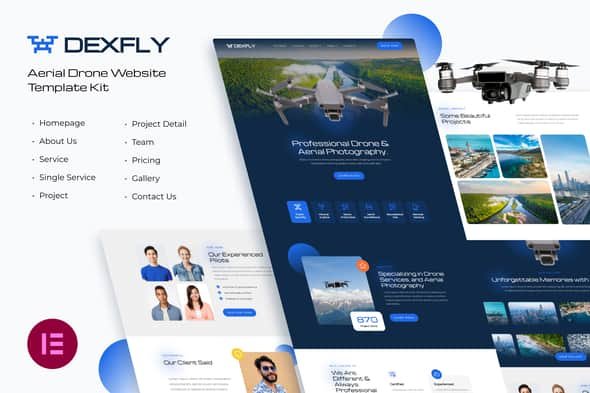
Dexfly | Drone & Aerial Photography Elementor Template Kit – WP Kit
Original price was: $24.00.$4.80Current price is: $4.80.
Building an online portfolio for commercial drone operators and videography crews requires layout structures specifically tailored for high-resolution visual media and video embeds. Dexfly is a pre-designed Elementor template kit tailored specifically for aerial photography agencies, drone operators, production houses, and visual content creators. Built on the lightweight Hello Elementor foundation, this kit streamlines website creation by providing pre-built visual blocks without requiring manual CSS styling or backend development. It is best suited for visual media professionals needing a structured portfolio, while it is not intended for non-Elementor WordPress setups or websites requiring complex e-commerce features out of the box.
| Technical Specification | Details |
|---|---|
| Product Type | Elementor Template Kit |
| Page Template Count | 10 Ready-to-Use Layouts |
| Base Theme Compatibility | Hello Elementor (Recommended) & Most Elementor Themes |
| Required Plugins | Elementor, Elementor Pro (Select Features) |
| Theme Builder Support | Header & Footer Templates Included |
Template Kit Overview & Included Layouts
Dexfly supplies a complete set of ready-made page layouts intended to present visual portfolios, highlight videography packages, and convert site visitors into clients. The structural design emphasizes full-width image presentation, clean grid layouts, and readable content blocks.
- Homepage: Hero layout with call-to-action sections and video showcase blocks.
- About Us Page: Agency background layout for company history and operational credentials.
- Services & Single Service Pages: Structured presentation for drone service offerings and technical capabilities.
- Project & Project Detail Pages: Case study layouts designed to display client work and video reels.
- Team Page: Staff profile display for pilot listings and creative directors.
- Pricing Page: Service tier pricing breakdown tables.
- Gallery Page: Media-focused layout for aerial imagery portfolios.
- Contact Us Page: Inquiry form area and location details.
Theme Builder Integration & Requirements
In addition to individual page templates, Dexfly contains dedicated Header and Footer templates designed to work via Elementor’s Theme Builder feature. This ensures site-wide structural consistency across header navigation menus and footer copyright sections.
While the template kit works natively on top of the free Hello Elementor base theme, certain design elements and advanced features require the Elementor Pro plugin. Users should ensure plugin dependencies are enabled prior to importing full page templates into the WordPress dashboard.
Installation Guide
- Install and activate the Envato Elements plugin via the WordPress Plugins menu.
- Keep the downloaded template kit zip file intact without unzipping.
- Navigate to Elements > Installed Kits in your WordPress backend and click the Upload Template Kit button.
- Select the Install Requirements prompt to automatically enable necessary site plugins before importing pages.
- Import page templates individually to maintain server stability.
- Create a new page under Pages > Add New, set page settings to Elementor Full Width, and hide the default page title.
- Open the Elementor editor, click the folder icon to access My Templates, and insert the desired page template.
Frequently Asked Questions
Does Dexfly require Elementor Pro to function?
Yes, specific templates and dynamic display features within this kit rely on Elementor Pro modules. Ensure you have an active Elementor Pro setup installed to access full Theme Builder capabilities.
Can I customize the colors and fonts without editing code?
Yes. All typography, color schemes, and layout spacing are controlled directly through the Elementor drag-and-drop interface and Site Settings panel, requiring no custom CSS code.
Are the demo images included with the template download?
The kit uses placeholder imagery from Envato Elements. You must acquire licenses for those specific demo images or replace them with your own aerial photos and media assets during setup.
1. Click Add to cart

2. Review your items and click Proceed to checkout

3. Fill in your billing details: Name, Email, and Password
4. Choose your preferred payment method
5. Click Pay via Paypal to proceed

6. Access Downloads to get your files

Related products


