
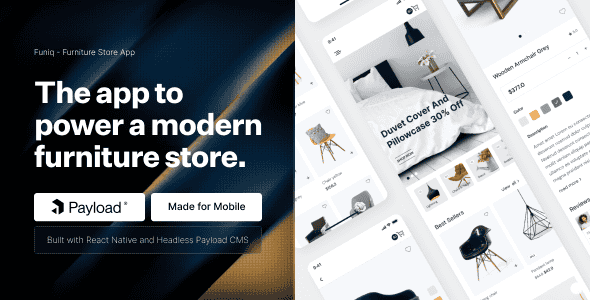
Funiq – Modern Furniture App with Payload CMS (Expo version)
Original price was: $98.00.$19.60Current price is: $19.60.
Launching an e-commerce mobile app often gets bogged down in backend setup and UI state management. Funiq provides a ready-to-deploy React Native codebase paired directly with a headless Payload CMS instance, streamlining mobile store creation across iOS and Android platforms.
Funiq is a full-stack React Native Expo mobile e-commerce template designed specifically for online furniture stores and home decor retailers. Powered by Expo 54, TypeScript, Redux Persist, and an integrated Payload CMS admin panel, this template bridges mobile UI design and backend content management. It is best suited for mobile developers, digital agencies, and startup founders looking for a structured cross-platform storefront foundation. It is not intended for non-technical users seeking a web-based drag-and-drop site builder.
| Technical Property | Specification Details |
|---|---|
| Framework & Version | React Native, Expo 54 |
| Language Format | TypeScript (.tsx) |
| State Management | Redux & Redux Persist |
| Content Management | Payload CMS Admin Panel |
| Platform Support | iOS & Android |
| Assets & Fonts | SVG Icons, Mulish (Google Font) |
| Data Schemas / APIs | products.json, promocodes.json |
| Component Architecture | Functional Components & React Hooks |
Core Architectural Features
- Expo 54 Ecosystem: Built on top of React Native Expo 54 for unified, cross-platform compilation targeting iOS and Android devices.
- Payload CMS Admin Dashboard: Manage mobile store inventory, categories, and promotional offers from a pre-configured Payload CMS panel.
- Strict TypeScript Setup: Developed entirely with .tsx files, functional components, and React Hooks to maintain code predictability and straightforward extension.
- Persistent Store Data: Integrates Redux Persist alongside standard Redux architecture to retain cart contents and customer preferences across app reboots.
- Vector Asset Design: Features vector SVG icons and Google’s Mulish font to render crisp interfaces across high-density mobile screens.
Package Contents
- React Native Expo Source Code: Clean, organized project files written in TypeScript (.tsx).
- Payload CMS Configuration: Pre-configured admin backend environment ready for product management.
- Developer Documentation: Step-by-step setup guides covering environment preparation, local execution, and deployment.
Frequently Asked Questions
What technology stack is required to run and build Funiq?
Funiq requires Node.js, the Expo CLI, and standard React Native development tooling. The codebase uses TypeScript (.tsx), functional components, and React Hooks, making it compatible with standard mobile development toolchains for iOS and Android.
How does Payload CMS connect with the mobile application?
Payload CMS serves as the headless administration backend where products and discounts are managed. The React Native front-end interacts with structured data models such as products.json and promocodes.json to serve content to the app.
Does the template save user cart items when the app closes?
Yes. The state management setup includes Redux Persist alongside Redux, which saves active cart data and app states to the device’s local storage automatically.
1. Click Add to cart

2. Review your items and click Proceed to checkout

3. Fill in your billing details: Name, Email, and Password
4. Choose your preferred payment method
5. Click Pay via Paypal to proceed

6. Access Downloads to get your files

Related products


