
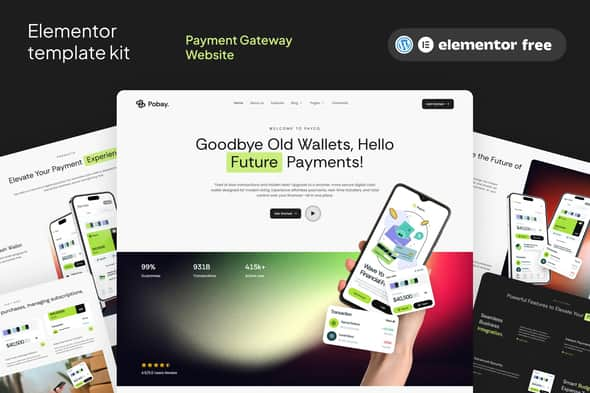
Pobay – Online Payment Gateway Mobile Apps Elementor Template Kit
Original price was: $25.00.$5.00Current price is: $5.00.
Deploying a trusted web front-end for financial platforms usually demands strict adherence to UI hierarchy and clear mobile presentation. Pobay simplifies this process by delivering a modern set of pre-designed wireframes built explicitly for payment solutions, fintech applications, and digital wallet services.
Pobay is an Elementor Template Kit engineered for fintech startups, digital wallet providers, mobile banking platforms, and online payment processing services. Built for WordPress v6.7.2 and Elementor v3.27.5, this kit provides a complete visual architecture to showcase secure transaction features, pricing structures, and application download channels without manual custom code development. It is best suited for agencies and developers building frontend layouts for financial tech platforms, but it is not a standalone WordPress theme and requires the free Elementor plugin alongside supporting addons for layout rendering.
Technical Specifications
| Parameter | Details |
|---|---|
| Product Type | Elementor Template Kit (Not a Theme) |
| WordPress Compatibility | v6.7.2 |
| Elementor Compatibility | v3.27.5 (Free Version Supported) |
| Required Addons | ElementsKits Lite, Gum Elementor Addon, MetForm |
| Template Count | 16 Ready-to-use Layouts |
| Typography & Color | 900+ Google Fonts, Unlimited Color Palette Options |
| Browser Support | Chrome, Firefox, Safari, Opera |
| Layout Specs | Fully Responsive, Design-System Based |
Core Structural Features
- Complete Page Suite: Includes pre-styled layouts for Homepage, About Us, Feature Overview, Pricing & Plans, How It Works, Testimonials, Team, Blog, Single Post, FAQ, Contact Us, 404, and Download pages.
- Header & Footer Builders: Fully integrated global Header and Footer templates managed via ElementsKits Lite or Elementor Pro Theme Builder.
- Form Integration: Pre-built MetForm block templates for capturing leads, inquiries, and customer contact requests efficiently.
- Typography Control: Access to over 900 Google Fonts paired with a global style guide for unified brand identity management.
- Cross-Device Optimization: Fluid breakpoint scaling tested across modern mobile, tablet, and desktop viewports.
Setup and Installation Overview
Because Pobay is an Elementor Template Kit rather than a standalone WordPress theme, installation requires a base theme (such as Hello Elementor) alongside the free Envato Elements plugin or Elementor’s native template importer.
Importing Form Templates (MetForm)
- Import the MetForm block templates into your WordPress dashboard.
- Open the targeted page template in Elementor and activate the Navigator panel.
- Select the MetForm widget, click Edit Form, choose New, then launch the form builder interface.
- Click the gray template folder icon, navigate to the My Templates tab, and insert the corresponding MetForm template.
- Save and update the form settings to display the interactive inputs.
Configuring Global Headers and Footers
- Import the dedicated header and footer templates from the kit.
- Navigate to ElementsKit > Header Footer and create a new item configured for “Entire Site” activation.
- Edit the content within Elementor, load the imported header/footer block from your template library, select your primary menu, and publish changes.
Frequently Asked Questions
Is Pobay a standalone WordPress theme?
No, Pobay is an Elementor Template Kit. It contains page designs and visual layouts intended to be imported into an active WordPress installation running Elementor and its required helper plugins.
Do I need Elementor Pro to use this kit?
No, Pobay works with the free version of Elementor. The kit uses free complementary plugins such as ElementsKits Lite and MetForm to handle headers, footers, and custom contact forms.
Are the stock images shown in the preview included in the download?
The template kit uses demonstration images from Envato Elements. To use those exact images live on your website, you must license them separately or replace them with your own brand media assets.
1. Click Add to cart

2. Review your items and click Proceed to checkout

3. Fill in your billing details: Name, Email, and Password
4. Choose your preferred payment method
5. Click Pay via Paypal to proceed

6. Access Downloads to get your files

Related products


