
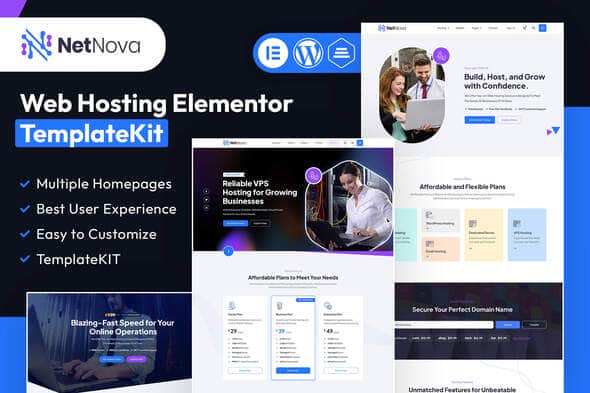
NetNova – Web Hosting Elementor Template Kit – Cloud Hosting UI
Original price was: $19.00.$3.80Current price is: $3.80.
Setting up a hosting company site often requires organizing complex pricing tables, server spec comparisons, and domain search interfaces. NetNova provides a structured layout collection built for Elementor, allowing agencies and infrastructure providers to assemble a clear, professional web presence without writing custom CSS or PHP templates.
NetNova is a dedicated Elementor Template Kit engineered specifically for web hosting providers, domain registrars, VPS sellers, and cloud infrastructure companies. Built on Elementor with support for WHMCS integration widgets and MetForm, this kit streamlines page construction for technical services. It is best suited for WordPress developers and web host startups seeking pre-built wireframes for server plans; it is not suited for users expecting a standalone WordPress theme or non-Elementor page builders.
Technical Specifications
| Parameter | Specification |
|---|---|
| Product Type | Elementor Template Kit (Not a WordPress Theme) |
| Primary Builder | Elementor Free / Recommended Theme: Hello Elementor |
| Total Layouts | 16 Page Templates |
| Homepage Variations | 03 Styles |
| Required Plugins | Elementor, Jeg Elementor Kit, MetForm, Elementor WHMCS Elements |
| Target Niche | Web Hosting, VPS Infrastructure, Cloud Services, Domain Sales |
Core Features & Page Architecture
- Complete Hosting Layout Suite: Includes dedicated templates for Shared Hosting, Dedicated Servers, VPS Plans, and Reseller Hosting.
- Global Styling Control: Modify site-wide typography, brand colors, and container spacing through the core Elementor site settings panel.
- Functional Header & Footer Layouts: Contains 2 header and 2 footer variations customizable via the Jeg Elementor Kit builder.
- Form & WHMCS Integration: Compatible with MetForm for contact queries and Elementor WHMCS Elements for direct billing integration.
- Responsive Design: Layout structures are pre-configured to stack fluidly across mobile browsers and tablets.
- Essential Service Pages: Out-of-the-box templates for About Us, Services, Pricing Tables, FAQ, Blog, Single Posts, Coming Soon, and 404 pages.
Import and Setup Workflow
1. Template Kit Installation
Install and activate the Envato Elements plugin inside WordPress. Navigate to Elements > Installed Kits, upload the kit ZIP file, and click ‘Install Requirements’ to activate necessary auxiliary plugins like MetForm and Jeg Elementor Kit.
2. Form Import via MetForm
Import the MetForm block templates first. When editing a page with a form widget, launch the MetForm editor, open ‘My Templates’, and insert the corresponding form layout. Save changes before updating the main page container.
3. Header & Footer Setup
If using the Jeg Elementor Kit headers, navigate to Jeg Elementor Kit > Header Template, create a new header template set to display on ‘All Site’, and insert the pre-built header layout from the template folder.
Frequently Asked Questions
Frequently Asked Questions
Is NetNova a standalone WordPress theme?
No, NetNova is an Elementor Template Kit. It contains page layouts and design templates for the Elementor page builder, not theme core files. It works best installed over the free Hello Elementor base theme.
Can I integrate WHMCS with this template kit?
Yes, the kit requires and supports the Elementor WHMCS Elements plugin, allowing you to display hosting packages and connect call-to-action buttons directly to your WHMCS billing system.
Are the images included in the template kit free to use?
The kit uses stock images from Envato Elements for demonstration purposes. You must license these images through Envato Elements or replace them with your own server and infrastructure assets before going live.
1. Click Add to cart

2. Review your items and click Proceed to checkout

3. Fill in your billing details: Name, Email, and Password
4. Choose your preferred payment method
5. Click Pay via Paypal to proceed

6. Access Downloads to get your files

Related products


