
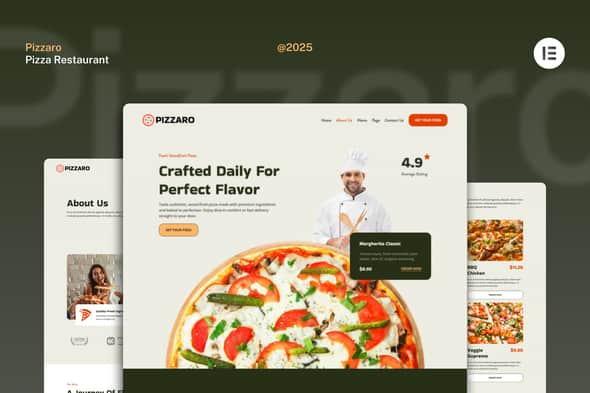
Pizzaro – Pizza Restaurant & Delivery Services Website Elementor Template Kit
Original price was: $29.00.$5.80Current price is: $5.80.
Setting up a functional web storefront for a pizzeria or fast-food shop usually involves piecing together custom menu layouts, ordering call-outs, and delivery details. Pizzaro simplifies this setup process by supplying a pre-designed collection of Elementor page layouts tailored specifically for food service operations.
Pizzaro is a specialized Elementor Template Kit designed for pizzerias, local food delivery services, fast-food outlets, and dining establishments. Built on the Elementor page builder ecosystem alongside Jeg Elementor Kit and Metform, it provides quick visual layout assembly without writing custom code. This kit is ideal for food business owners and WordPress developers needing rapid deployment of delivery menus and promotional pages. It is not a standalone WordPress theme and requires a functional WordPress installation with Elementor to operate.
Technical Specifications Overview
| Specification | Details |
|---|---|
| Product Category | Elementor Template Kit |
| Required Builder | Elementor Visual Builder |
| Included Pages | 10 Pre-designed Templates |
| Plugin Dependencies | Jeg Elementor Kit, Metform, The Plus Add-On |
| Code Requirements | Zero Coding (Drag-and-Drop) |
| Layout Responsiveness | Fully Mobile & Desktop Optimized |
Core Features & Functional Highlights
- Global Styling Control: Adjust typography, brand colors, and structural spacing globally across all pages or customize individual element instances.
- 10 Page Layout Variations: Features purpose-built templates for Homepage, About Us, Menu, Delivery, Our Chef, Gallery, Events, Help Center, 404 Error, and Contact Us.
- Form Integration: Built-in structural compatibility with Metform for handling form submissions, customer queries, and booking inquiries.
- Header & Footer Construction: Full structural control over site headers using the Jeg Elementor Kit plugin interface or standard Elementor Pro Theme Builder.
- Cross-Theme Compatibility: Designed to load efficiently on top of lightweight, standard WordPress themes such as Hello Elementor.
Setup and Import Instructions
How to Import Metform Blocks
- Import the provided Metform block templates via your WordPress dashboard.
- Open the page template containing the form inside Elementor and enable the Navigator.
- Locate the Metform widget, select Edit Form, choose New, and open the builder.
- Click the gray folder icon to open My Templates, choose your imported Metform template, and click Insert.
- Save your changes by clicking Update & Close.
Setting Up Headers with Jeg Elementor Kit
- Navigate to Jeg Elementor Kit > Header Template in the WordPress dashboard.
- Click Add New Header, set the display condition to All Site, and click Create.
- Open the template editor, access the My Templates tab, select your header layout, and insert it.
- Customize the navigation links and save the layout.
Frequently Asked Questions
Frequently Asked Questions
Is Pizzaro a standalone WordPress theme?
No, Pizzaro is an Elementor Template Kit. It contains page layout structures and visual design data for the Elementor page builder, meaning it must be imported into an active WordPress installation running Elementor and a base theme like Hello Elementor.
Do I need coding skills to modify these layouts?
No coding knowledge is required. All text blocks, layout structures, menu sections, and color schemes are customized visually using Elementor’s drag-and-drop editor interface.
Can I use Elementor Pro instead of the included form plugins?
Yes. If you have Elementor Pro active on your site, you can skip the installation of Metform and construct your custom forms, headers, and footers directly using the native Elementor Pro Theme Builder tools.
1. Click Add to cart

2. Review your items and click Proceed to checkout

3. Fill in your billing details: Name, Email, and Password
4. Choose your preferred payment method
5. Click Pay via Paypal to proceed

6. Access Downloads to get your files

Related products


