
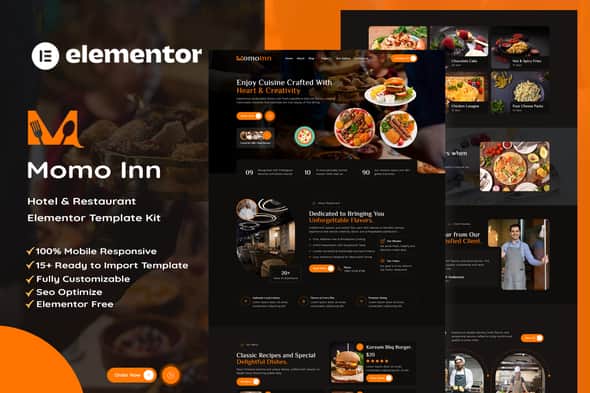
MomoInn – Hotel & Restaurant Elementor Template Kit – Mobile Ready
Original price was: $20.00.$4.00Current price is: $4.00.
Building a complete web layout for a hospitality business from scratch often takes days of custom styling and form configuration. MomoInn resolves this by offering a structured set of Elementor page templates specifically designed for hotels, eateries, and food service brands.
This collection of 15+ pre-designed page templates is engineered for WordPress site creators utilizing the free Hello Elementor theme. It integrates custom forms for reservations and contact requests without requiring paid Elementor Pro subscriptions. Ideal for developers and agency owners constructing restaurant or hotel websites; not suitable for non-WordPress platforms or custom static HTML workflows.
| Specification | Details |
|---|---|
| Product Type | Elementor Template Kit |
| Target Niche | Hotels, Restaurants, Cafes & Food Businesses |
| Recommended Base Theme | Hello Elementor (Free) |
| Template Count | 15+ Ready-to-Use Page Layouts |
| Required Plugins | Elementor, ElementsKit Lite, Jeg Elementor Kit, Skyboot, MetForm |
| Pro Requirement | None (Works with Free Plugins) |
| Form Integration | MetForm (Contact, Reservation, Newsletter) |
| Layout Architecture | 100% Responsive & Cross-Browser Compatible |
Core Features & Layout Structure
- Complete Page Package: Includes dedicated layouts for Home, About Us, Our Chief, Our Menu, Photo Gallery, Contact Us, Blog, Single Post, FAQs, and a custom 404 Error page.
- Global Style Controls: Customize sitewide typography and color palettes centrally using standard Elementor Kit Style settings.
- Header & Footer Templates: Features pre-built Header V1 and Footer V1 structures managed through the Jeg Elementor Kit extension.
- Functional MetForm Layouts: Includes styled form templates for customer contacts, online reservations, and newsletter signups.
- No Code Customization: Adjust visual spacing, typography, graphics, and layout structures entirely through drag-and-drop controls.
Setup and Import Guidance
Template kits store visual layout configurations for Elementor rather than operating as standalone WordPress themes. Ensure the free Hello Elementor theme and required plugins are installed before importing kit files via the Envato Template Kit Import plugin or direct Elementor tools.
Header & Footer Setup
- Navigate to Jeg Elementor Kit > Header Template in the WordPress admin panel.
- Add a new header, assign the condition to All Site, and create the entry.
- Edit the template with Elementor, open My Templates via the folder icon, and insert Header V1.
- Ensure your target pages use the Elementor Full Width layout setting to display headers correctly.
MetForm Import Process
- Open a page with a form widget inside the Elementor editor and click Edit Form.
- Select New, choose a blank form layout, and open the form editor window.
- Access My Templates via the folder icon, choose the desired MetForm template (Contact, Reservation, or Newsletter), and select Insert.
- Save and update the form instance.
Note: Demo stock photographs are sourced from Envato Elements and should be licensed or replaced with your own media assets prior to site launch.
Frequently Asked Questions
Frequently Asked Questions
Is Elementor Pro required to use this template kit?
No, MomoInn is constructed to work using free plugins. Header and footer builder functionality is powered by Jeg Elementor Kit, meaning an active Elementor Pro license is not required.
Is MomoInn a standalone WordPress theme?
No, this is an Elementor Template Kit containing layout data for the Elementor page builder. It must be applied on top of a base WordPress theme such as Hello Elementor.
How are table reservations managed with this kit?
Reservations are handled using the free MetForm plugin. The kit includes a pre-designed MetForm Reservation layout that can be imported directly into form widgets on any page.
1. Click Add to cart

2. Review your items and click Proceed to checkout

3. Fill in your billing details: Name, Email, and Password
4. Choose your preferred payment method
5. Click Pay via Paypal to proceed

6. Access Downloads to get your files

Related products


