
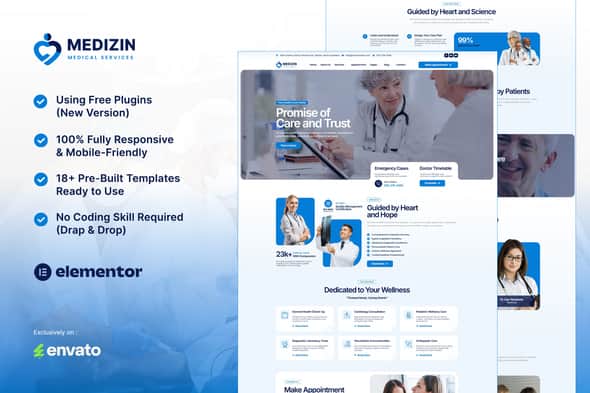
Medizin – Medical Services Elementor Template Kit | Healthcare UI
Original price was: $24.00.$4.80Current price is: $4.80.
Building a professional clinic or healthcare website often involves complex form configurations and repetitive page design. Medizin simplifies this workflow by offering a targeted UI framework built specifically for Elementor page builders.
Medizin is a specialized Elementor Template Kit engineered for healthcare providers, medical clinics, doctors, and digital agencies building medical websites. Utilizing the lightweight Hello Elementor theme alongside ElementsKit Lite and MetForm, it provides pre-designed layouts and custom functional form templates. This kit is ideal for developers and non-coders seeking rapid deployment, but it requires an active WordPress site with Elementor installed rather than acting as a standalone theme.
| Attribute | Specification |
|---|---|
| Product Type | Elementor Template Kit |
| Base Theme Compatibility | Hello Elementor (Free) |
| Required Addons | Elementor, ElementsKit Lite, MetForm |
| Template Quantity | 18+ Pre-built Layouts |
| Design Architecture | 100% Responsive & Retina-Ready |
| Custom Form Types | Appointment Booking & Contact Forms |
Key Technical Features
Medizin is structured to streamline the development process for medical service websites without requiring custom code.
- 18+ Pre-Built Templates: Complete page layouts including Home, About Us, Services, Service Detail, Appointment, Projects, Doctors Directory, Doctor Profile, Testimonials, FAQs, 404 Page, Blog, Single Post, and Contact.
- Global Styling System: Easily modify typography and site-wide color schemes from a centralized Global Kit Style interface.
- Custom Form Integrations: Includes specialized MetForm templates for patient appointments and contact inquiries.
- Header & Footer Layouts: Dedicated structural components integrated via ElementsKit Lite for site navigation.
- Responsive Layout Engine: Optimized for crisp display on high-DPI Retina screens and across desktop, tablet, and mobile viewports.
Included Layout Kits
The template kit provides structural design data for essential medical and clinic pages:
- Main Home Overview
- About Us & Facility Details
- Doctor Directory & Individual Practitioner Profiles
- Medical Services List & Service Details
- Patient Appointment Booking & Inquiry Layouts
- Case Projects & Patient Testimonials
- Standard Utility Pages (FAQ, 404 Error, Blog, Single Post, Contact)
Setup & Configuration Details
MetForm Custom Form Import
To implement custom forms, edit your target page inside Elementor to locate the MetForm widget. Click to edit the form, create a new blank form, and select the gray folder icon. Navigate to the My Templates tab, insert the corresponding imported Medizin form template, and update your page.
Header & Footer Setup via ElementsKit Lite
Navigate to ElementsKit Header Footer in your WordPress menu, create a new template, and set the toggle status to active. Edit the template content inside Elementor, open the My Templates library, and insert your header or footer layout. Ensure all pages built with Elementor use the Elementor Full Width layout setting so global headers and footers render properly.
Frequently Asked Questions
Is Medizin a standalone WordPress theme?
No, Medizin is an Elementor Template Kit. It contains visual page layout data for the Elementor page builder and must be imported onto a WordPress installation running a base theme such as Hello Elementor.
Do I need programming experience to use these templates?
No coding experience is required. Layouts, typography, global color palettes, and structural elements are completely customizable via visual drag-and-drop controls in Elementor.
How are patient booking forms managed within this kit?
Forms are powered by the free MetForm addon. The kit includes pre-styled template files for medical appointments and contact requests that import directly into the MetForm builder.
1. Click Add to cart

2. Review your items and click Proceed to checkout

3. Fill in your billing details: Name, Email, and Password
4. Choose your preferred payment method
5. Click Pay via Paypal to proceed

6. Access Downloads to get your files

Related products


