
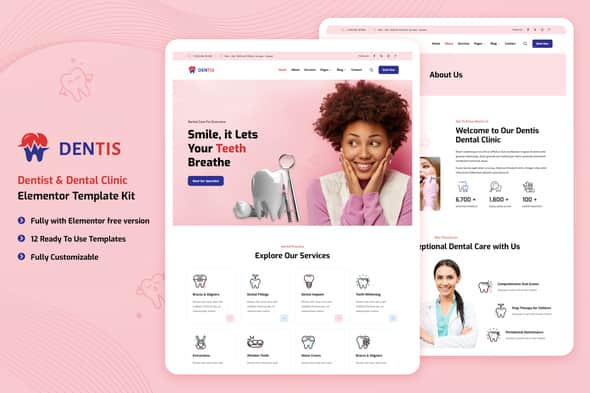
Dentis – Dentist & Dental Clinic Elementor Template Kit | Responsive
Original price was: $25.00.$5.00Current price is: $5.00.
Setting up a functional online presence for a dental practice requires a clean visual presentation and reliable patient communication tools. Dentis is an Elementor Template Kit structured for dental clinics, orthodontists, and general healthcare providers. Operating on the lightweight Hello Elementor base theme, this kit supplies a structured set of over 30 page and block templates integrated with MetForm for handling appointment requests. It is best suited for web designers and agency teams building WordPress sites for medical practices, but it is not a standalone theme and requires the Elementor page builder for deployment.
| Technical Property | Specification |
|---|---|
| Product Type | Elementor Template Kit |
| Primary Compatibility | WordPress / Hello Elementor Theme |
| Total Asset Count | 13 Pre-made Demos + Section Blocks (30+ Components) |
| Form Engine | MetForm (Appointment, Inquiry, Newsletter) |
| Bundled Dependencies | ElementsKit Lite, FontFlow Custom Icons, Jeg Elementor Kit, MetForm |
| Layout Responsiveness | Fully Mobile-Optimized Layouts |
Core Features & Layout Breakdown
The Dentis template kit offers pre-designed assets tailored to healthcare marketing, allowing teams to construct client sites without coding custom layouts from scratch.
- Complete Page Setups: Includes ready-to-use page layouts for Home, About Us, Services, Doctor Profiles, Single Doctor Details, Photo Gallery, Pricing Plans, Appointment Booking, FAQ, Blog Index, Blog Details, and Contact.
- Specialized Dental Sections: Features dedicated blocks for Dental Procedures, Before/After Image Compare sliders, Process Walkthroughs (How It Works), Client Testimonials, and Team Rosters.
- Integrated Form Templates: Pre-configured MetForm assets for direct appointment scheduling, main contact forms, and newsletter subscription blocks.
- Header & Footer System: Includes modular header and footer templates managed through the Jeg Elementor Kit plugin or Elementor Pro Theme Builder.
- Visual Customization: Built using clean, modern typography and color palettes that can be adjusted site-wide through Elementor’s Global Style settings.
Template Kit Installation & Page Setup Guide
Because template kits contain design data rather than standard WordPress theme functionality, specific steps are required during installation:
- Ensure the base Hello Elementor theme is installed and active on your WordPress installation.
- Verify that Elementor and the Envato Elements plugin are activated and updated to their latest versions.
- Navigate to Elements > Installed Kits in your WordPress dashboard and upload the kit file (ZIP archive). Do not extract the file before uploading.
- Click Install Requirements on the notification banner to activate all required auxiliary plugins (ElementsKit Lite, FontFlow, Jeg Elementor Kit, MetForm).
- Import the Global Kit Styles first to configure global colors, typography, and layout settings across the site.
- Import individual page and section templates sequentially. These will save to your Elementor Saved Templates library.
- To create a page, add a new WordPress page, set the template layout to Elementor Full Width in the page settings, open the Elementor builder, and insert your imported template from the My Templates tab.
Frequently Asked Questions
Does this kit work with the free version of Elementor?
Yes, the Dentis kit can be imported and edited using the free version of Elementor along with the bundled free helper plugins (ElementsKit Lite and Jeg Elementor Kit). However, using Elementor Pro unlocks additional options for global header and footer management via the Theme Builder.
Are demo stock photos included in the template download?
The templates utilize placeholder images sourced from Envato Elements. While the design structure and image positions remain intact upon import, you will need to license those specific stock photos or replace them with your own practice photos.
How are patient booking forms managed within this kit?
Booking forms are powered by the MetForm plugin. The kit includes pre-designed MetForm templates that you import directly into the designated form widgets inside the page layouts.
1. Click Add to cart

2. Review your items and click Proceed to checkout

3. Fill in your billing details: Name, Email, and Password
4. Choose your preferred payment method
5. Click Pay via Paypal to proceed

6. Access Downloads to get your files

Related products


