
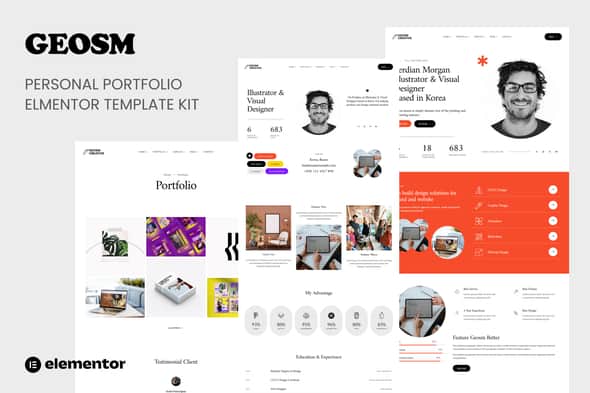
Geosm – Personal Portfolio Elementor Template Kits: Modern & Clean Design
Original price was: $22.00.$4.40Current price is: $4.40.
Crafting a distinctive online portfolio or business presence demands a design that is both visually appealing and effortlessly manageable. Geosm presents a premium collection of Elementor Template Kits, meticulously designed to help professionals, agencies, and freelancers showcase their work and services with clarity and style.
Designed for Versatile Online Portfolios
Geosm is an ideal solution for individuals and businesses requiring a professional digital storefront. Its creative, minimal, and clean design aesthetic makes it perfectly suited for personal portfolios, CVs, resumes, studios, and agencies looking to present projects and services in a compelling manner. It provides a robust foundation for anyone needing a polished web presence without the complexities of building from scratch.
It is important to note that Geosm functions as a Template Kit for the Elementor page builder, not a standalone WordPress theme. These templates are optimized for seamless integration with the free Hello Elementor theme but are also compatible with most WordPress themes that support Elementor.
Key Advantages of Geosm
- Effortless Setup: Benefit from a streamlined one-click installation process, getting your site ready faster.
- Integrated Styling: Global Theme Styles are included, ensuring consistent branding and design across all your pages.
- Extensive Template Library: Explore over 10 professionally designed Elementor templates to cover all your essential web pages.
- Adaptive Responsiveness: Features a 100% fluid responsive layout, guaranteeing your portfolio looks impeccable on desktops, tablets, and mobile devices.
- Intuitive Customization: Easy-to-use controls within Elementor allow for straightforward customization to match your unique brand identity.
- Broad Browser Compatibility: Tested and supported across all major web browsers, including Chrome, Firefox, Safari, Edge, and Opera, for a consistent user experience.
Comprehensive Template Collection
The Geosm kit includes a diverse range of pre-built pages to cover every aspect of a professional portfolio or business website:
- Home Page (Style 1)
- Home Page (Style 2)
- Portfolio Overview
- Detailed Portfolio Item Page
- Service Listing Page
- Detailed Service Page
- Contact Information Page
- Frequently Asked Questions (FAQ) Page
- Custom 404 Error Page
- Pricing Plans Page
- Custom Header & Footer Templates
Required Plugin for Full Functionality
To ensure all features of the Geosm Template Kit operate as intended, the Jeg Elementor Kit plugin is required and will be installed automatically with the kit.
Activating Your Template Kit
Getting started with Geosm is straightforward:
- Install and activate the “Envato Elements” plugin from your WordPress dashboard under Plugins > Add New.
- Download your Geosm kit file, but do not unzip it.
- Navigate to Elements > Installed Kits and click the “Upload Template Kit” button. Alternatively, link your Elements subscription via “Connect Account” and import directly from Elements > Template Kits.
- Look for the orange banner at the top of the screen and click “Install Requirements” to load any necessary plugins.
- Begin by importing the Global Kit Styles to apply base typography and color schemes.
- Proceed to import individual templates one at a time. These will be stored in Elementor under Templates > Saved Templates.
- Create a new page in WordPress, then click “Edit with Elementor.”
- Within the Elementor builder, click the gear icon in the lower-left corner to access page settings. Choose “Elementor Full Width” and hide the page title.
- Click the gray folder icon to open the “My Templates” tab, and then import the desired page template for customization.
For advanced customization of headers and footers, users with Elementor Pro can manage these sections directly under the Theme Builder options.
Support and Asset Information
Should you require assistance, comprehensive support resources are available through the Elementor > Get Help menu within your WordPress dashboard. Please note that this Template Kit utilizes demo images sourced from Envato Elements. To use these images on your live website, you will need to obtain appropriate licenses from Envato Elements or replace them with your own custom imagery.
1. Click Add to cart

2. Review your items and click Proceed to checkout

3. Fill in your billing details: Name, Email, and Password
4. Choose your preferred payment method
5. Click Pay via Paypal to proceed

6. Access Downloads to get your files

Related products


