
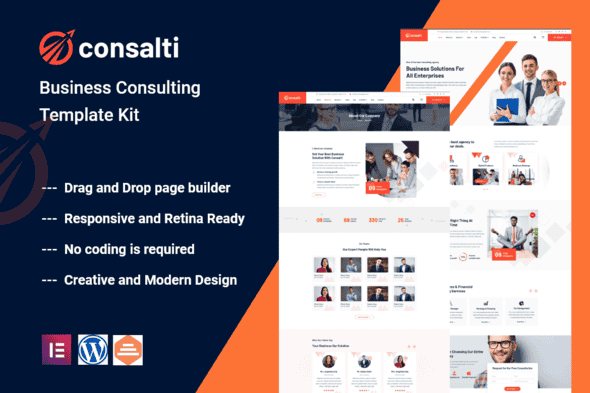
Consalti – Consultancy & Business Elementor Template Kit, Professional
Original price was: $29.00.$5.80Current price is: $5.80.
Achieving a distinguished online presence for your consultancy or business service is made straightforward with Consalti. This dedicated Elementor Template Kit is engineered to provide a robust and visually appealing foundation for professionals and firms in various sectors.
Tailored for Professional Services
Consalti serves as a comprehensive solution for business coaching and consulting services, offering a feature-rich and beautiful online appearance. It is an ideal choice for a diverse range of professionals, including: Business Consultants, Financial Advisors, Corporate Strategists, Accountants, Insurance Brokers, and Digital Agencies. The kit’s flexible and user-friendly design ensures that any relevant website can project a professional image with ease.
Essential Plugins for Seamless Integration
To fully leverage the capabilities of the Consalti Template Kit, the following plugins are required:
- Elementor
- Themesflat Addons For Elementor
- MetForm
- ElementsKit Lite
Core Features for a Dynamic Website
The Consalti Template Kit is equipped with a suite of features designed to facilitate efficient website development and management:
- No Coding Expertise Required: Build and customize your site without needing to write any code.
- Integrated Header & Footer Builder: Design and manage your website’s header and footer sections with included tools.
- Streamlined One-Click Demo Import: Quickly set up your site by importing demo content with a single click.
- Distinctive and Contemporary Aesthetics: Features a unique, modern, and professional design style.
- Uncluttered and Professional Layout: Enjoy a clean and clear site structure for optimal user experience.
- Extensive Cross-Browser Compatibility: Ensures your website performs consistently across various web browsers.
- Dedicated Post Content Widget: Utilize a specialized widget for displaying blog posts and articles.
- Versatile Carousel Slide Box: Create dynamic sliders with diverse content types.
- Fully Responsive and Retina-Ready Design: Your site will look sharp and adapt flawlessly on all devices and screen resolutions.
- Broad Compatibility with WordPress Themes: Works effectively with most existing WordPress themes.
- Engineered for Enhanced Search Engine Visibility: Optimized to improve your site’s ranking potential on search engines.
Installation and Setup Guidance
To install and begin customizing your Consalti Template Kit, follow these steps:
- Install and activate the “Envato Elements” plugin directly from the Plugins > Add New section in your WordPress dashboard.
- Do not extract the downloaded kit file; upload it as is.
- Navigate to Elements > Installed Kits and click the “Upload Template Kit” button to upload your kit.
- Before importing any template, ensure all required plugins are activated by clicking the “Install Requirements” button.
- For optimal results, import one template at a time to prevent conflicts.
- Create a new page in WordPress, then click “Edit with Elementor.”
- Within the Elementor builder, access page settings via the gear icon (lower-left), select “Elementor Full Width,” and hide the page title.
- Click the gray folder icon, go to the “My Templates” tab, and import the desired page template for customization.
A detailed guide is available for further assistance. For additional support, access Elementor > Get Help within your WordPress menu.
Configuring MetForm Templates
To integrate and customize MetForms within your kit:
- Import the MetForm block templates.
- Import the page template that will display the form, then right-click to activate the Navigator.
- Locate and select the MetForm widget, then click “Edit Form.” Choose “New,” then “Edit Form,” which will open the builder.
- Click the “Add Template” gray folder icon.
- Switch to the “My Templates” tab.
- Select your imported MetForm template and click “Insert” (choose “No” for page settings).
- Once the template loads, apply any desired customizations and click “Update & Close.” The form will then appear in your template.
- Finally, click “Update” on the page.
Global Header and Footer Configuration with ElementsKit
To set up your site-wide header and footer:
- Import both the header and footer templates from the kit.
- Go to ElementsKit > Header Footer, select “Header,” and click “Add New.”
- Provide a title, ensure “Entire Site” is selected, and toggle “Activation” to On.
- Click the template title and then “Edit Content.”
- Click the gray folder icon, select your imported header template, and click “Update.”
- Repeat this process for your footer template.
Important Note on Imagery
This Template Kit utilizes demo images sourced from Envato Elements. To use these images on your live website, you will need to acquire appropriate licenses from Envato Elements, or alternatively, replace them with your own images.
Recent Enhancements
Version 1.0.1 – May 24, 2023
- Resolved issues related to live demo import functionality.
1. Click Add to cart

2. Review your items and click Proceed to checkout

3. Fill in your billing details: Name, Email, and Password
4. Choose your preferred payment method
5. Click Pay via Paypal to proceed

6. Access Downloads to get your files

Related products


