
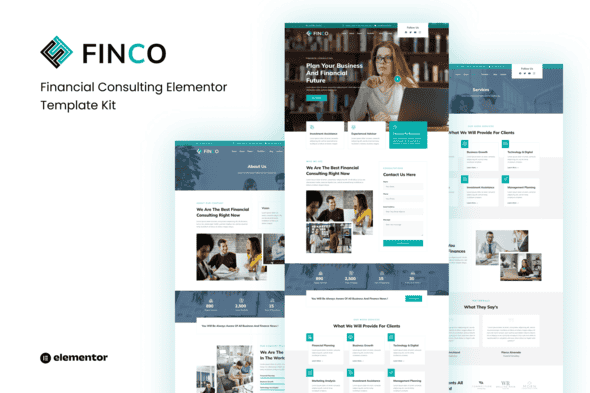
Finco – Financial Consulting Elementor Template Kit – Clean Design
Original price was: $21.00.$4.20Current price is: $4.20.
Setting up a professional web presence for financial advisory services often involves repetitive layout adjustments and custom design work. Finco streamlines this workflow by providing a structured layout system specifically tailored for corporate consultants, accounting firms, asset managers, and business advisors.
Finco is an Elementor Template Kit built to run entirely on the free version of Elementor, removing the requirement for premium plugin licenses. It is best suited for web developers, agencies, and independent advisors who need a responsive, ready-to-deploy structure for client websites. It is not a standalone WordPress theme and cannot be installed via the standard WordPress theme uploader; it requires an active WordPress environment with the Elementor plugin installed.
Technical Specifications
| Product Type | Elementor Template Kit |
|---|---|
| Page & Layout Count | 16+ Pre-designed Templates |
| Page Builder Compatibility | Elementor (Free Version) |
| Required Plugins | Elementor, ElementsKit Lite, Elementor Header & Footer Builder, MetForm |
| Design Standard | Responsive, Retina Ready, Mobile-First |
| Coding Required | No coding skills needed |
Included Templates & Core Capabilities
The kit covers all essential pages and site sections needed for a complete financial service website:
- Global Theme Style: Centralized typography and color settings for site-wide consistency.
- Homepage: Professional landing page designed to establish immediate trust and highlight core services.
- About Page: Dedicated layout for firm history, mission statements, and corporate values.
- Services & Pricing: Clear structural layouts to outline advisory packages, fee tiers, and service details.
- Advisor & Portfolio Pages: Individual and grid layouts to feature team members, case studies, and project details.
- Blog & FAQ: Content-focused pages designed for educational articles and client self-service.
- Contact & Form Layouts: Integrated MetForm templates for inquiry forms and consultation requests.
- Site Headers, Footers & 404 Page: Global site components for uniform navigation across all screen sizes.
Installation & Setup Instructions
To import and configure the Finco kit correctly, follow these technical steps:
Template Kit Import
- Navigate to Plugins > Add New in your WordPress dashboard, search for Template Kit Import by Envato, then install and activate it.
- Go to Tools > Template Kit.
- Upload your Finco Template Kit ZIP file.
- Click Install Requirements to automatically activate necessary helper plugins.
- Import the Global Kit Styles first before importing individual page templates.
MetForm Custom Form Configuration
- Import the required MetForm template from the kit list.
- Open the page containing the form inside the Elementor editor.
- Click on the MetForm widget within the column, then select Edit Form.
- Choose New, keep the blank option selected, and click the Edit Form button.
- Click the grey folder icon (Add Template), navigate to the My Templates tab, select your imported MetForm template, and click Insert.
- Save and update the page once the form loads.
Frequently Asked Questions
Frequently Asked Questions
Can I import this template kit using WordPress Tools > Import?
No, the standard WordPress importer handles WXR XML data files. This product is an Elementor Template Kit and must be loaded using the Template Kit Import plugin located under Tools > Template Kit in your WordPress admin menu.
Is an Elementor Pro license required to use Finco?
No, Finco is designed to function using the free version of Elementor along with supporting free add-ons like ElementsKit Lite and MetForm. You do not need to purchase Elementor Pro.
Why does my imported page look unstyled compared to the demo?
Unstyled pages usually occur when the Global Kit Styles are skipped. Ensure you click Install Requirements and explicitly import the Global Kit Styles template before importing individual page layouts.
1. Click Add to cart

2. Review your items and click Proceed to checkout

3. Fill in your billing details: Name, Email, and Password
4. Choose your preferred payment method
5. Click Pay via Paypal to proceed

6. Access Downloads to get your files

Related products


