
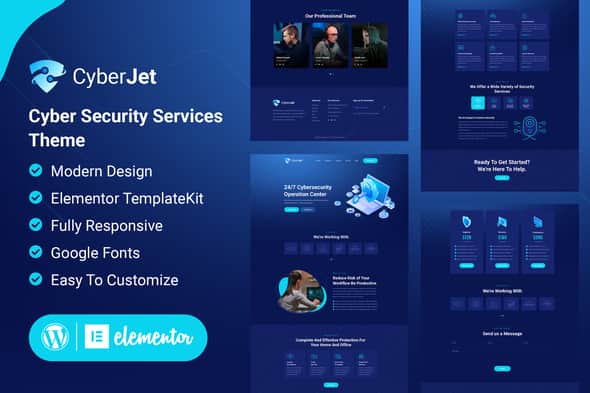
CyberJet – Web Security Elementor Template Kit | Clean Layouts
Original price was: $23.00.$4.60Current price is: $4.60.
Cybersecurity agencies and web protection service providers often require structured, professional layouts to communicate technical security features and service tiers effectively. CyberJet provides a pre-designed collection of Elementor page templates built for WordPress, allowing security teams and web developers to assemble functional agency websites without custom programming.
This kit is designed specifically for cybersecurity firms, MSSPs, network protection consultants, and IT infrastructure specialists using the free Hello Elementor base theme. It is an Elementor Template Kit rather than a standalone WordPress theme, making it best suited for users working within the Elementor page builder framework and less suited for those seeking a single-click theme installer.
| Technical Property | Specification Details |
|---|---|
| Product Type | Elementor Template Kit |
| Primary Framework | WordPress Page Builder (Elementor) |
| Recommended Base Theme | Hello Elementor (Free) |
| Required Dependencies | Elementor, ElementsKit Lite, Essential Addons for Elementor, MetForm |
| Editing Interface | Drag-and-Drop Visual Builder |
| Design Architecture | Global Style Kit, Full-Width Layouts, Mobile Responsive |
Core Functional Features
- Centralized Design System: Edit typography rules, color palettes, and global button styles in one control panel or adjust settings on specific visual containers.
- Drag-and-Drop Editor: Modify layouts, update content blocks, and reorder page components directly inside the visual canvas without editing raw template files.
- Custom Form Layouts: Includes styled MetForm block templates designed to capture client inquiries, audit requests, and security assessment bookings.
- Global Header & Footer Management: Configured via ElementsKit Lite, enabling persistent site navigation menus and footer content across all active pages.
- Theme Compatibility: Optimized for the lightweight Hello Elementor theme, while maintaining functional compatibility with most standard WordPress themes supporting Elementor.
Template Import & Setup Overview
Deploying CyberJet involves a straightforward process through the WordPress administrative dashboard:
- Plugin Preparation: Ensure Elementor, ElementsKit Lite, Essential Addons for Elementor, and MetForm are active on your site.
- Kit Import: Upload the template kit archive via the Envato Elements plugin interface or Elementor import settings without unzipping the source file.
- Global Styles First: Import the Global Kit Styles prior to importing individual page layouts to preserve intended font hierarchies and color variables.
- Page Configuration: Create new pages set to the Elementor Full Width template layout, then insert saved templates from your library.
- Header and Footer Deployment: Assign the imported header and footer templates inside the ElementsKit Header Footer manager and toggle activation to On for site-wide coverage.
Frequently Asked Questions
Is CyberJet a standalone WordPress theme?
No, CyberJet is an Elementor Template Kit. It contains page layouts and structural designs for the Elementor Page Builder and requires an active WordPress site running Elementor and a compatible base theme like Hello Elementor.
How are contact and inquiry forms handled in this kit?
Forms are integrated using the free MetForm plugin. You can import the included form block templates into your MetForm library and edit fields, labels, and form actions directly inside the Elementor editing interface.
Do I need advanced coding skills to modify these templates?
No custom CSS or PHP code is required. All visual elements, responsive breakpoints, content alignment, and layout spacing are managed through Elementor’s standard visual settings panel.
1. Click Add to cart

2. Review your items and click Proceed to checkout

3. Fill in your billing details: Name, Email, and Password
4. Choose your preferred payment method
5. Click Pay via Paypal to proceed

6. Access Downloads to get your files

Related products


