
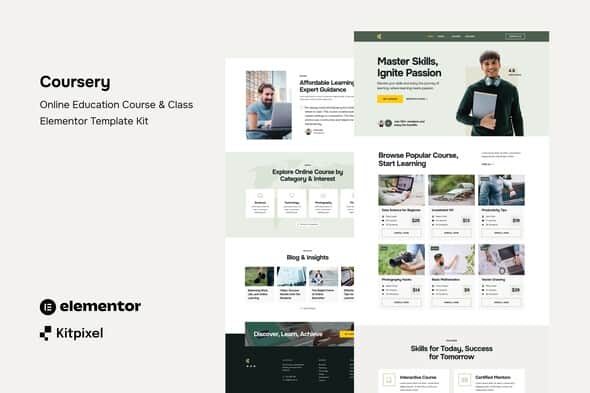
Coursery – Online Education Course & Class Elementor Template Kit
Original price was: $19.00.$3.80Current price is: $3.80.
Building structured learning portals often gets bogged down by manual layout adjustments and repetitive CSS styling. Coursery addresses this workflow bottleneck by delivering a clean set of pre-designed Elementor wireframes tailored specifically for digital learning platforms and educational hubs.
Coursery is a lightweight Elementor Template Kit designed for online course providers, individual tutors, bootcamps, and training academies using WordPress. Built around the free Hello Elementor theme structure and powered by ElementsKit Lite, it provides a cohesive interface for publishing course directories, lesson overviews, and school profiles without custom code.
Best for: Web designers, education agencies, and WordPress site owners looking for a rapid visual deployment strategy for online class websites.
Not suited for: Users who expect a standalone, all-in-one WordPress theme, or those seeking native LMS backend functionality without installing dedicated learning management plugins.
| Specification | Details |
|---|---|
| Product Type | Elementor Template Kit |
| Required Builder | Elementor (Free or Pro) |
| Recommended Base Theme | Hello Elementor |
| Required Add-ons | ElementsKit Lite |
| Template Count | 10+ Pre-designed Templates |
| Customization Type | No-Code Drag-and-Drop Visual Builder |
| Layout Responsiveness | Fully Mobile & Tablet Optimized |
Core Features & Capability Overview
- 10+ Pre-designed Templates: Complete set of layouts covering front-page promotion, course directory listings, detailed course descriptions, and contact forms.
- Global Styling Control: Modify site-wide typography, brand colors, and element spacing from a single central style settings sheet.
- Header & Footer Builder Support: Includes global structural components integrated directly with ElementsKit Lite.
- Clean Visual Footprint: Minimalist UI layout engineered for crisp readability and fast loading behavior across modern browsers.
- Flexible Theme Interoperability: Works with Hello Elementor as well as most standard Elementor-supported WordPress themes.
Included Layout Templates
- Home Page
- Courses Directory
- Single Course View
- Features Overview
- About Us
- Blog Index Layout
- Single Post Template
- Contact Page
- Global Site Header
- Global Site Footer
- Global Kit Style Settings
Setup and Import Workflow
- Ensure WordPress permalinks are configured to Post Name under Settings.
- Install and activate the Hello Elementor theme alongside the Elementor and ElementsKit Lite plugins.
- Navigate to Elements > Installed Kits in your WordPress dashboard and upload the unextracted kit file.
- Click Install Requirements on the top notice banner to activate any required module extensions.
- Import the Global Kit Styles template first to establish global colors and font settings.
- Import individual page templates sequentially and assign them to new pages set to the Elementor Full Width template canvas.
Frequently Asked Questions
Does Coursery include backend LMS features like student tracking or quizzes?
No, Coursery is purely a visual UI template kit for Elementor. It does not contain backend database tools for student enrollment, video hosting, or quizzes. To handle student registrations or course progression, integrate the kit with a WordPress LMS plugin such as LearnDash, Tutor LMS, or LifterLMS.
Is Elementor Pro required to use this kit?
No, this template kit is designed to function using the free version of Elementor combined with ElementsKit Lite. However, if you already hold an active Elementor Pro license, you can also assign the header and footer templates using the native Theme Builder.
Can I replace the demo images with my own branding?
Yes, all sample imagery can be swapped directly inside the Elementor editor canvas. The demo asset placement serves as a visual guide and can be updated with your custom course graphics and media assets.
1. Click Add to cart

2. Review your items and click Proceed to checkout

3. Fill in your billing details: Name, Email, and Password
4. Choose your preferred payment method
5. Click Pay via Paypal to proceed

6. Access Downloads to get your files

Related products


