
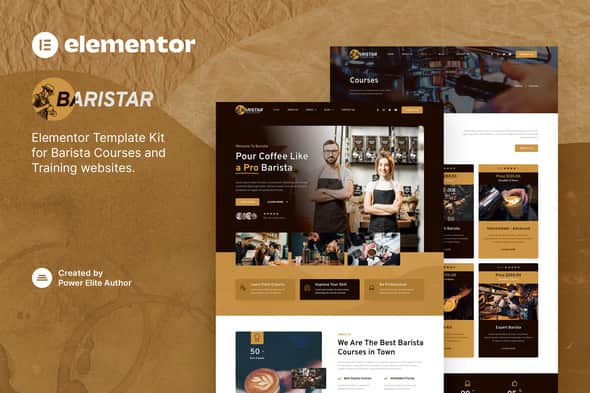
Baristar – Barista Courses & Training Elementor Template Kit
Original price was: $29.00.$5.80Current price is: $5.80.
Launching a dedicated site for a coffee academy or specialty cafe requires clean page structures for displaying course schedules and staff credentials. Baristar provides a pre-designed set of Elementor layouts built specifically for barista training centers, coffee shops, and beverage academies. Operating entirely on the free version of Elementor, this template kit eliminates custom coding while offering pixel-perfect layouts for course details, trainer profiles, and event registration. It is ideal for WordPress agency developers and coffee business owners seeking a quick deployment, but it is not intended for full-scale e-commerce stores requiring complex custom backend workflows out of the box.
| Specification | Details |
|---|---|
| Product Type | Elementor Template Kit |
| Page Builder Support | Elementor (Free Version) |
| Template Count | 14+ Pre-Designed Layouts |
| Required Plugins | Elementor, MetForm, Jeg Elementor Kit |
| Responsive Design | Fully Responsive & Retina Ready |
| Browser Compatibility | Google Chrome, Mozilla Firefox, Apple Safari, Opera |
Core Features & Design Highlights
- No Pro License Needed: Designed strictly with free plugins, eliminating the requirement for Elementor Pro.
- Complete Page Suite: Contains 14+ templates covering home, training catalogs, single course overviews, team lists, and contact pages.
- Fully Responsive Layouts: Configured to render crisply across desktop, tablet, and mobile displays with retina-ready assets.
- Custom Form Integration: Works with MetForm to handle course inquiries and general site communication seamlessly.
- Global Style Controls: Includes a global theme style template for rapid adjustments to brand typography and color palettes.
Included Layout Templates
- Home
- About Us
- Courses (Catalog View)
- Courses Detail
- Trainers
- FAQ
- Blog
- Single Post
- Contact Us
- MetForm Contact Us Template
- 404 Page
- Header Template
- Footer Template
- Global Theme Style
Installation & Import Guide
- Navigate to Plugins > Add New in your WordPress dashboard and install the Envato Elements plugin.
- Go to Elements > Installed Kits and click the Upload Template Kit button to select your downloaded ZIP file.
- Click the Install Requirements banner at the top to auto-install necessary dependency plugins (MetForm, Jeg Elementor Kit).
- Import the Global Kit Styles first to establish global site settings.
- Import individual page templates one by one. These will save into your Elementor saved templates library.
- Create a new WordPress page, click Edit with Elementor, set page layout settings to Elementor Full Width, and hide the default page title.
- Open the template library folder inside the builder, navigate to My Templates, and insert your desired page layout.
MetForm Setup Instructions
- Import the MetForm block template from your kit library.
- Open the target contact page within Elementor and activate the Navigator panel.
- Select the MetForm widget, click Edit Form, choose New, and open the builder popup.
- Click the folder icon, navigate to My Templates, and insert the imported MetForm template.
- Save your changes and update the page to activate live form submissions.
Frequently Asked Questions
Does this template kit require an active Elementor Pro license?
No, Baristar is built to function using free WordPress plugins, including the free edition of Elementor. You do not need to purchase Elementor Pro to load or customize these page layouts.
How are the contact and inquiry forms handled in Baristar?
Forms are powered by the MetForm plugin, which is automatically configured when importing the kit requirements. You can insert form blocks directly into pages and edit field parameters visually inside Elementor.
Can I use the demo stock photos on my live website?
The demo content uses stock images sourced from Envato Elements for preview purposes. You must license those stock photos individually or swap them out for your own high-resolution media before going live.
1. Click Add to cart

2. Review your items and click Proceed to checkout

3. Fill in your billing details: Name, Email, and Password
4. Choose your preferred payment method
5. Click Pay via Paypal to proceed

6. Access Downloads to get your files

Related products


