
-80%
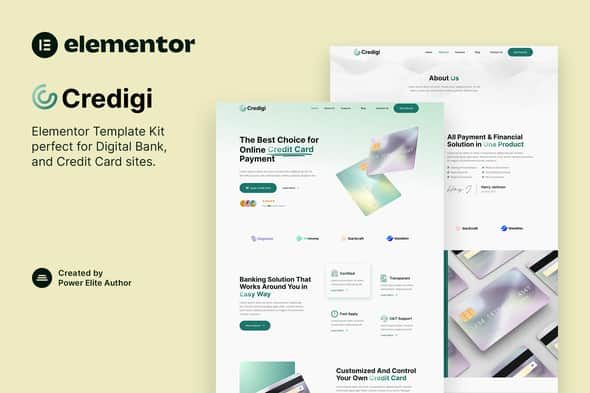
Credigi – Digital Bank & Credit Card Elementor Template Kit | Fintech
Original price was: $29.00.$5.80Current price is: $5.80.
Financial institutions and online payment gateways often struggle to present complex financial services through clear, mobile-ready web interfaces. Credigi provides a pre-designed Elementor Template Kit tailored for digital banking startups, credit card providers, insurance agencies, and fintech platforms. Built to function without requiring Elementor Pro, this package includes 14 pre-built page layouts that allow agencies and web designers to structure a visual-first financial portal quickly. It is best suited for WordPress administrators building fintech sites using Elementor, and not suited for non-WordPress platforms or static HTML environments.
| Technical Specification | Details |
|---|---|
| Product Type | Elementor Template Kit |
| Layout Count | 14+ Ready-to-use Templates |
| Core Page Builder | Elementor (Free) |
| Required Plugins | Elementor, Jeg Elementor Kit, Metform |
| Design Architecture | 100% Responsive, Retina Ready |
| Browser Compatibility | Chrome, Firefox, Safari, Opera |
Key Functional Features
- Zero Premium Dependencies: Operates entirely on free plugins without requiring an active Elementor Pro subscription.
- Comprehensive Layout Set: Includes 14+ templates covering homepages, product breakdowns, company careers, team showcases, and contact interfaces.
- Form Integration: Pre-configured with Metform block templates for structured user inquiries and application forms.
- Cross-Browser Rendering: Uniform rendering across standard modern browsers including Firefox, Chrome, Safari, and Opera.
- Global Styling Control: Ships with a Global Theme Style template to manage typography and color palettes centrally.
Included Layouts & Templates
- Home Page
- About Us
- Product Page
- Career
- Team
- Blog & Single Post
- 404 Page
- FAQ
- Contact Us
- MetForm Contact Us Template
- Header & Footer Templates
- Global Theme Style
Step-by-Step Template Import Process
- Install and activate the free Envato Elements plugin via the WordPress dashboard under Plugins > Add New.
- Upload your template kit zip file under Elements > Installed Kits (do not unzip the file before uploading).
- Click Install Requirements on the top notification banner to automatically activate the necessary free plugins.
- Import the Global Kit Styles first to establish baseline visual defaults.
- Import individual templates one at a time.
1. Click Add to cart

2. Review your items and click Proceed to checkout

3. Fill in your billing details: Name, Email, and Password
4. Choose your preferred payment method
5. Click Pay via Paypal to proceed

6. Access Downloads to get your files

Related products
-80%

Original price was: $26.00.$5.20Current price is: $5.20.
-80%

Original price was: $20.00.$4.00Current price is: $4.00.
-80%

Original price was: $24.00.$4.80Current price is: $4.80.
-80%

Original price was: $18.00.$3.60Current price is: $3.60.
-80%

Original price was: $29.00.$5.80Current price is: $5.80.
-80%

Original price was: $29.00.$5.80Current price is: $5.80.
-80%

Original price was: $24.00.$4.80Current price is: $4.80.
-80%

Original price was: $19.00.$3.80Current price is: $3.80.
