
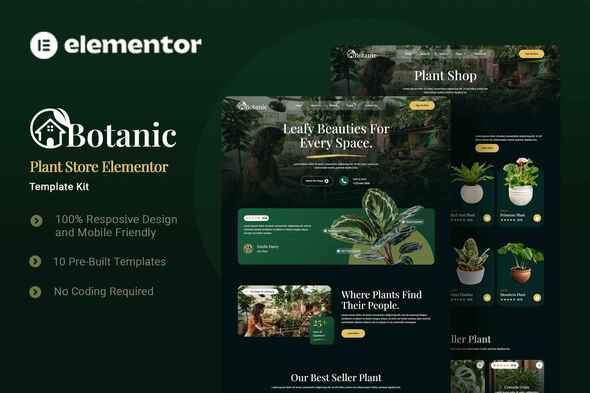
Botanic – Plant Store Elementor Template Kit – Fast Loading
Original price was: $24.00.$4.80Current price is: $4.80.
Setting up a fresh online nursery or plant retail site often slows down when building layouts from scratch. Botanic offers a ready-made visual structure built specifically for flora shops, houseplant boutiques, and green businesses running on WordPress.
Botanic – Plant Store Elementor Template Kit is a pre-designed set of Elementor page layouts tailored for botanical shops, plant nurseries, and organic e-commerce ventures. Built to work alongside the lightweight Hello Elementor base theme, it helps web builders deploy a structured site using free core plugins like ElementsKit and Metform. It is ideal for agency designers and store operators who want an organized layout system without writing custom CSS, but it is not a standalone theme and requires an active Elementor setup to function.
Technical Specifications
| Metric / Feature | Specification |
|---|---|
| Product Type | Elementor Template Kit |
| Base Theme Compatibility | Hello Elementor (Recommended) |
| Total Page Layouts | 10 Templates |
| Typography Used | Playfair Display, Roboto |
| Required Plugins | Elementor, ElementsKit, Jeg Elementor Kit, Metform |
| Layout Style | Responsive Grid Layout |
Included Templates & Page Layouts
- Home: Structured storefront landing layout for featuring plant categories and promotions.
- Plant Shop: Clean product display grid tailored for displaying plant inventory.
- Service: Detailed breakdown for plant care, landscaping, or consultation offerings.
- About Us: Brand story and mission layout for green businesses.
- Our Team: Grid section for highlighting store staff and botanical experts.
- Blog: Clean editorial layout for posting gardening guides and care tips.
- Testimonial: Customer feedback block for displaying social proof.
- FAQ: Accordion-style layout for common care instructions and shop policies.
- Contact Us: Communication layout paired with integrated form styling.
- 404 Page: Custom error page to keep lost visitors browsing.
Integration & Setup Notes
Template kits contain page design data for Elementor rather than standalone theme code. Follow these steps to implement core functions during setup:
Configuring Form Blocks (Metform)
- Import the Metform block templates into your layout library.
- Open your page in Elementor, activate the Navigator, and locate the Metform widget.
- Select Edit Form, choose New, and launch the builder window.
- Click the Template folder icon, select My Templates, and insert the imported form design.
- Save your edits and update the page. (Elementor Pro users can bypass this step by building forms in Theme Builder).
Header Setup via Jeg Elementor Kit
- Navigate to Jeg Elementor Kit in your WordPress menu and open Header Template.
- Create a new header, assign the display condition to All Site, and launch the editor.
- Access My Templates, select the kit’s header template, and apply your changes.
Frequently Asked Questions
Is Botanic a standalone WordPress theme?
No, Botanic is an Elementor Template Kit containing visual page layouts and component styles. It must be imported onto a WordPress site that has the Elementor page builder and a companion base theme, such as Hello Elementor, installed.
Do I need Elementor Pro to use this template kit?
No, this kit is structured to work with free plugins, including the basic version of Elementor, Metform, and ElementsKit. However, if you already use Elementor Pro, you can manage headers, footers, and forms through Theme Builder instead.
Are the preview images included in the template import?
The kit uses sample images from Envato Elements for demonstration. You can license those specific images for commercial production or replace them directly with your own plant photos using the Elementor media manager.
1. Click Add to cart

2. Review your items and click Proceed to checkout

3. Fill in your billing details: Name, Email, and Password
4. Choose your preferred payment method
5. Click Pay via Paypal to proceed

6. Access Downloads to get your files

Related products


