
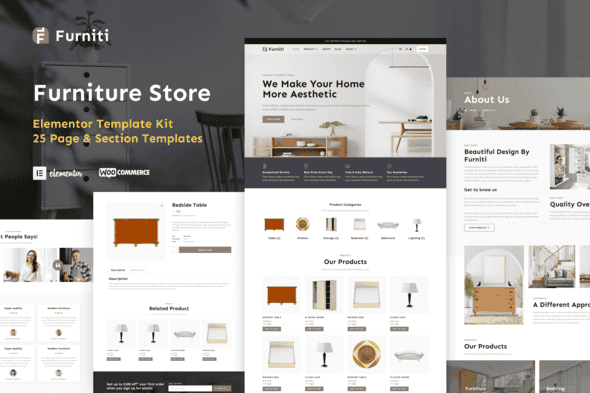
Furniti – Furniture & Home Decor Store Elementor Pro Template Kit
Original price was: $29.00.$5.80Current price is: $5.80.
Building e-commerce sites for boutique furniture brands often demands custom archive layouts and styled shop components without bloated page builders. Furniti provides a ready-to-import layout collection crafted specifically for online furniture shops, interior design studios, and home decor retailers using Elementor Pro.
Direct Overview: Furniti is an e-commerce Elementor Pro template kit built for WordPress websites in the home decor and furniture sector. Running on the lightweight Hello Elementor theme, it streamlines shop deployment with 25 pre-designed layouts spanning product catalogs, cart workflows, and account pages. It is ideal for agency developers and site builders launching WooCommerce stores quickly without custom code, though it is not suited for non-Elementor sites or users seeking a standalone theme file.
| Technical Property | Specification Details |
|---|---|
| Product Type | Elementor Template Kit |
| Compatible Platform | WordPress / WooCommerce |
| Page & Layout Count | 25 Ready-to-Use Templates |
| Required Page Builder | Elementor Free + Elementor Pro Upgrade |
| Recommended Base Theme | Hello Elementor |
| Design Focus | Furniture, Interior Design & Home Decor E-Commerce |
Core Technical Features
- Drag-and-Drop Customization: Full visual control over typography, global color palettes, and element styling without custom CSS coding.
- WooCommerce Component Integration: Dedicated templates for shop archives, single product displays, cart, checkout, and order tracking pages.
- Performance-Oriented Layouts: Clean code output designed to support fast asset loading and stable Core Web Vitals scores when paired with lightweight themes.
- Complete Site Design System: Includes global headers, footers, and unified style presets for consistent site-wide branding.
Included Layout Templates (25 Total)
- Global Kit Styles, Global Header, Global Footer
- Homepage, About Us, Our Team, Our Locations
- Shop, Single Product, Archive Product
- Cart, Checkout, My Account, Track Order
- Blog, Single Post, Archive Blog
- Pricing, Testimonials, FAQ, Contact Us
- Login Page, Coming Soon, 404 Page, Popup Banner
Setup and Import Workflow
- Install and activate the Envato Elements plugin in your WordPress admin dashboard.
- Upload your template kit file under Elements > Installed Kits without unzipping the archive.
- Click the Install Requirements banner to enable any required dependencies.
- Import the Global Kit Styles first, then import individual page layouts.
- Create a new page in WordPress, set the page layout to Elementor Full Width in page settings, and load your template via the My Templates tab.
Frequently Asked Questions
Is Furniti a standalone WordPress theme?
No, Furniti is an Elementor Template Kit, not a traditional standalone theme. It contains page content and layout structures designed for the Elementor page builder and works best when used alongside the free Hello Elementor theme.
Do I need Elementor Pro to use this kit?
Yes, several templates included in this kit—such as global headers, footers, single product views, and category archives—depend on Theme Builder functionality available exclusively in Elementor Pro.
Are sample shop products included with the kit import?
No, product data and images are not pre-packaged. You will need to create products within WooCommerce before content populates inside the shop and archive templates. Demo images require separate licensing or replacement with your own media assets.
1. Click Add to cart

2. Review your items and click Proceed to checkout

3. Fill in your billing details: Name, Email, and Password
4. Choose your preferred payment method
5. Click Pay via Paypal to proceed

6. Access Downloads to get your files

Related products


