
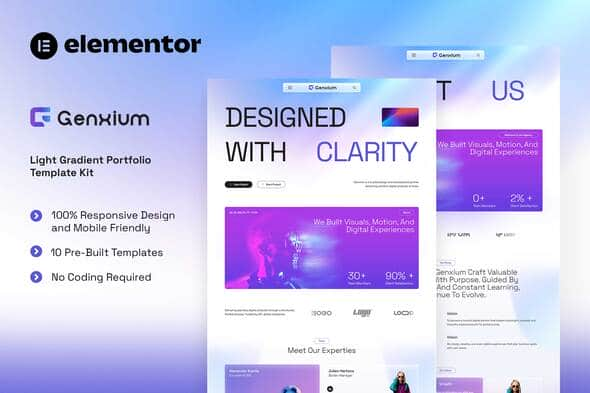
Genxium – Light Gradient Portfolio Elementor Template Kit – Modern UI
Original price was: $24.00.$4.80Current price is: $4.80.
Setting up a visual portfolio or agency portal often requires extensive custom layout configuration that slows down project deployment. Genxium addresses this workflow bottleneck by providing a structured series of pre-designed Elementor page layouts tailored specifically for creative agencies, digital freelancers, and technical consultancies.
Genxium is an Elementor Template Kit built for WordPress and optimized for the free Hello Elementor base theme. It supplies 10 ready-to-import layout templates utilizing a clean light-gradient visual design. This kit is best suited for web developers and design studios seeking rapid client setup without building layouts from scratch. It is not a standalone WordPress theme and requires Elementor along with supporting add-on plugins to operate correctly.
Technical Specifications
| Attribute | Specification |
|---|---|
| Product Type | Elementor Template Kit |
| Base Theme Compatibility | Hello Elementor (Free) |
| Primary Builder Engine | Elementor (Free) |
| Included Templates | 10 Page Layouts |
| Typography System | Space Grotesk |
| Required Plugins | Elementor, Jeg Kit for Elementor, MetForm, Premium Addons for Elementor, Ultimate Addons for Elementor (UAE) |
| Layout Characteristics | Fully Responsive, Light Gradient Styling |
Included Template Layouts
- Home: Main presentation page featuring high-impact service overviews.
- About: Layout structured for company history and core capabilities.
- Services: Detailed breakdown section for client offerings.
- Team: Profile grid for agency staff and personnel.
- Work: Portfolio gallery layout for displaying completed projects.
- Project Detail: Case study structure for deep-dive work showcases.
- Blog: Editorial grid layout for content publishing.
- Process: Step-by-step workflow presentation template.
- Contact: Interactive communication page pre-configured for MetForm.
- 404: Custom error page template.
Setup and Installation Notes
Because Genxium is a template kit rather than a theme, installation must be completed via the Envato Template Kit Import plugin or directly within the Elementor panel on an active WordPress installation. Ensure all global pages are assigned the Elementor Full Width layout setting so headers and footers render across the full screen width.
For custom global headers via the Jeg Elementor Kit plugin:
- Navigate to Jeg Elementor Kit > Header Template in the WordPress dashboard.
- Select Add New Header, set the display condition to All Site, and create the container.
- Click the edit button to open the Elementor canvas.
- Access your imported assets under the My Templates tab, select the header layout, and apply changes.
If you are utilizing Elementor Pro, global headers and footers can alternatively be assigned via the native Theme Builder panel.
Media Licensing
The layout files include placeholder imagery sourced from Envato Elements. These assets require separate licensing from the source provider for commercial site launches, or they can be replaced directly with your own customized media assets during editing.
Frequently Asked Questions
Frequently Asked Questions
Is Genxium a standalone WordPress theme?
No, Genxium is an Elementor Template Kit containing layout data for Elementor. It must be imported into an active WordPress installation running Elementor and a compatible theme like Hello Elementor.
Does this template kit require Elementor Pro?
No, Genxium is configured to work with the free version of Elementor alongside free supporting plugins like MetForm and Jeg Kit. However, users with Elementor Pro can also manage headers and footers via Theme Builder if preferred.
Are custom fonts required for this layout kit?
The template kit uses Space Grotesk as its primary typography choice. The font settings import automatically through Elementor’s global style configuration without requiring manual font downloads.
1. Click Add to cart

2. Review your items and click Proceed to checkout

3. Fill in your billing details: Name, Email, and Password
4. Choose your preferred payment method
5. Click Pay via Paypal to proceed

6. Access Downloads to get your files

Related products


