
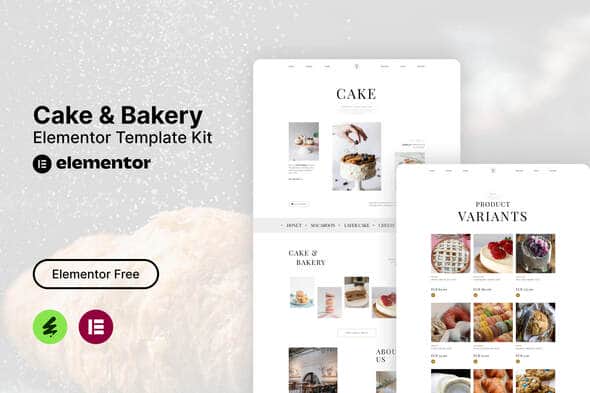
Tiffa – Cake & Bakery Elementor Template Kit | Responsive Cafe Layouts
Original price was: $29.00.$5.80Current price is: $5.80.
Launching a website for an artisanal bakery, pastry shop, or cafe often demands quick deployment without building layouts from scratch. Tiffa provides a pre-designed collection of page layouts tailored for cake boutiques, sweet shops, and food service businesses operating on WordPress.
Tiffa is a responsive Elementor Template Kit built for bakeries, cake decorators, coffee shops, and catering services. It runs on the free version of Elementor paired with lightweight third-party add-ons, eliminating the need for an Elementor Pro subscription. This package is ideal for business owners and web designers needing a structured layout, though it is not a standalone WordPress theme and requires a functional WordPress installation with Elementor.
| Specification | Details |
|---|---|
| Product Type | Elementor Template Kit |
| Primary Builder | Elementor (Free Version) |
| Total Templates | 15 Ready-to-Use Layouts |
| Layout Style | Clean, Modern, Fully Responsive |
| Coding Required | No coding required |
| Required Plugins | Elementor, The Plus Addons for Elementor, Ultimate Addons for Elementor – Lite, MetForm, Icon Element |
| Recommended Theme | Hello Elementor (or compatible Elementor base theme) |
Key Features and Core Functionality
- Budget-Friendly Architecture: Structured using free companion plugins so you do not need to purchase an Elementor Pro license.
- Responsive Layouts: Menus, product galleries, and booking sections scale dynamically across mobile devices, tablets, and desktop displays.
- Visual Customization: Adjust colors, fonts, and grid spacing directly inside the Elementor drag-and-drop builder without editing code.
- Form Integration: Includes ready-to-import form layouts built for MetForm, handling customer inquiries, cake orders, and newsletter signups.
Included Ready-to-Import Templates
This kit includes 15 distinct layout components for your bakery website structure:
- Global Header & Footer
- Homepage Layout
- About Us Page
- Services & Custom Order Overview
- Team / Bakers Profile Page
- Photo & Product Gallery
- Bakery Menu & Single Item Menu Layouts
- Blog Index & Single Blog Post Layouts
- Contact & Order Form Structures
- Newsletter Subscription Section
Installation and Import Guide
To set up this kit on your WordPress installation, follow these standard steps:
- Go to Plugins > Add New in your WordPress dashboard, then install and activate the Envato Elements plugin.
- Navigate to Elements > Installed Kits and click the Upload Template Kit button (do not unzip the downloaded archive).
- Click Install Requirements at the top of the interface to automatically install and activate required plugins.
- Import templates individually to ensure steady server processing.
Integrating Forms via MetForm
- Import the MetForm template included in the kit.
- Open the page where your form should appear and edit it inside Elementor.
- Select the MetForm widget inside your column, click Edit Form, select a blank form, and open the editor window.
- Click the folder icon to open My Templates, insert your imported MetForm design, and click Update.
Frequently Asked Questions
Is Tiffa a complete WordPress theme?
No, Tiffa is an Elementor Template Kit, not a stand-alone WordPress theme. It contains page designs and content blocks that import directly into the Elementor builder on top of a lightweight base theme like Hello Elementor.
Do I need to purchase Elementor Pro to use this kit?
No, this kit is designed specifically to work with the free version of Elementor. Essential design extensions and form capabilities are powered by free add-ons like MetForm and The Plus Addons.
Are the demo images included with the template download?
The kit uses stock images from Envato Elements as design placeholders. You can license those specific images separately or swap them out with your own bakery photos during the visual customization process.
1. Click Add to cart

2. Review your items and click Proceed to checkout

3. Fill in your billing details: Name, Email, and Password
4. Choose your preferred payment method
5. Click Pay via Paypal to proceed

6. Access Downloads to get your files

Related products


