
Minima – Creative & Professional Joomla Template | SP Page Builder
Original price was: $48.00.$9.60Current price is: $9.60.
Deploying a clean portfolio or corporate website on Joomla often gets bogged down by rigid template structures. Minima solves layout constraints by pairing the T3V3 Framework with SP Page Builder, giving developers and site owners granular control over their design presentation.
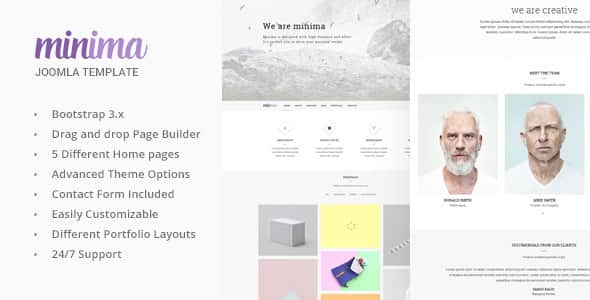
Minima is a responsive Joomla template engineered for corporate agencies, creative portfolios, and freelance professionals. Built on Bootstrap with validated HTML5 and CSS3, it offers drag-and-drop structural controls, multiple homepage designs, and complete layout flexibility. It is ideal for agency developers needing rapid client deployments with a QuickStart pack, but is not suited for simple static websites that do not require layout builders or T3 framework features.
| Technical Specification | Details |
|---|---|
| Platform | Joomla |
| Core Framework | T3V3 Framework |
| Page Builder | SP Page Builder (Drag-and-Drop) |
| CSS Framework | Bootstrap Base |
| Web Standards | HTML5 (Validated) & CSS3 |
| Homepage Options | 5 Layout Variations |
| Portfolio Formats | 1 to 4 Columns (Multiple Styles) |
| Included Assets | QuickStart Pack, Documentation, Contact Form |
Key Capabilities and Technical Features
- Visual Drag-and-Drop Layouts: SP Page Builder integration enables effortless composition of complex layouts using resizable blocks and customizable UI elements.
- QuickStart Deployment Pack: Replicate the complete live demo layout during installation to minimize initial site setup time.
- Advanced Theme Options: Manage template configurations, switch color parameters, and upload custom backgrounds using the centralized options panel.
- Flexible Portfolio Displays: Highlight work using structured 1, 2, 3, or 4-column portfolio configurations tailored for creative displays.
- Toggleable Responsive Controls: Built on a responsive Bootstrap foundation, with options inside the options panel to enable or disable mobile adaptation as needed.
- Built-in Page Modules: Includes functional contact forms, distinct blog configurations, and organized documentation for hassle-free customization.
Frequently Asked Questions
Is technical coding required to edit template pages?
No. Minima incorporates SP Page Builder, which allows you to modify page structures, adjust column widths, and position elements using direct visual controls in the backend.
Does the template include demo installation data?
Yes. Minima includes a QuickStart Pack that installs all sample content, modules, and database structures to recreate the demo site immediately upon installation.
Can mobile responsive features be disabled?
Yes. The integrated T3V3 framework control panel includes settings that allow administrators to enable or disable responsive grid behavior depending on layout requirements.
1. Click Add to cart

2. Review your items and click Proceed to checkout

3. Fill in your billing details: Name, Email, and Password
4. Choose your preferred payment method
5. Click Pay via Paypal to proceed

6. Access Downloads to get your files

Related products


