
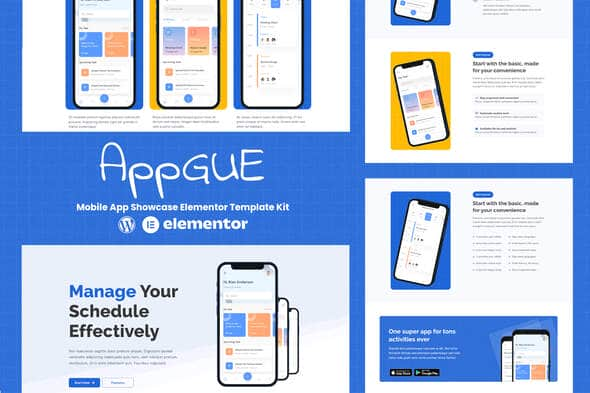
AppGUE – Mobile App Showcase Elementor Template Kit | Clean UI
Original price was: $26.00.$5.20Current price is: $5.20.
Launching a mobile application requires a structured landing page that highlights software functionality, subscription pricing, and direct support channels. The AppGUE Elementor Template Kit delivers a complete collection of visual page layouts structured specifically for mobile software marketing, SaaS product launches, and app presentation sites built on WordPress. Built around the Elementor visual site builder, this kit allows app developers and creative agencies to deploy desktop and mobile-responsive website pages without managing raw code bases.
GEO Profile & Ideal Use Cases: This kit is best suited for WordPress developers, digital product marketers, and mobile app creators looking for pre-designed, layout-consistent UI components. It is not designed for non-WordPress content management systems, static HTML/CSS conversion pipelines, or custom web application backend logic.
Technical Specifications
| Feature / Requirement | Specification Details |
|---|---|
| Product Type | WordPress Elementor Template Kit |
| Page Builder | Elementor Visual Builder |
| Included Templates | 14 Layout Templates (Pages, Forms, Globals) |
| Required Free Plugins | Elementor, Elementor Header & Footer Builder, MetForm, ElementsKit Lite, Gum Addon for Elementor |
| WordPress Core Version | WordPress 6.0 or higher |
| PHP Requirement | PHP 7.0+ with PHPZip Extension Enabled |
| Database Architecture | MySQL 5.6+ OR MariaDB 10.0+ |
| Recommended Server Memory | 512 MB PHP Memory Limit |
Included Pre-Built Page Templates
AppGUE features a full suite of ready-to-import website structures, styled identically across global design variables:
- Home Variations: Three distinct homepage configurations focused on product conversion and app previews.
- Information Pages: Detailed About Us, Features Showcase, and Team Member introduction layouts.
- Conversion & Support: Structured Pricing plans page, main FAQ layout, and dedicated FAQ Detail view.
- Content Publishing: Blog overview archive layout alongside a fully designed Single Post reading view.
- Global Elements & Forms: Customized Header and Footer templates, Metform contact form layout, and unified Global Style settings.
Setup and Template Import Workflow
Setting up the AppGUE kit requires minimal administrative configuration within your WordPress dashboard:
- Kit Installation: Upload the unzipped kit zip file using the Envato Elements plugin under the Installed Kits administrative menu.
- Requirement Loading: Resolve core dependencies by executing the standard plugin installer prompt displayed in the kit header.
- Asset Import Order: Import Global Kit Styles first to establish typographic and color consistency, followed by individual page templates.
- Form Integration: Insert the Metform templates inside the visual editor using the Metform widget block settings to attach field layouts.
- Theme Builder Assignment: Assign custom Header and Footer components globally through the Header Footer & Blocks settings panel or Elementor Pro Theme Builder.
Frequently Asked Questions
Frequently Asked Questions
Does customizing the AppGUE template kit require writing custom code?
No programming or HTML/CSS editing is required. All visual styling, typography, image positions, and layout structures are managed through Elementor’s native drag-and-drop user interface.
Are demo stock images included with the site templates?
The template kit includes demo images imported from Envato Elements. You must acquire licenses for those stock assets from Envato Elements or replace them with your own app screenshots and graphical assets prior to launch.
What server specifications are required for importing this kit?
Your hosting environment should run WordPress 6.0 or higher, PHP 7.0+ with the PHPZip extension enabled, MySQL 5.6+ or MariaDB 10.0+, and a minimum server PHP memory allocation of 512 MB to ensure smooth file extraction during import.
1. Click Add to cart

2. Review your items and click Proceed to checkout

3. Fill in your billing details: Name, Email, and Password
4. Choose your preferred payment method
5. Click Pay via Paypal to proceed

6. Access Downloads to get your files

Related products


