
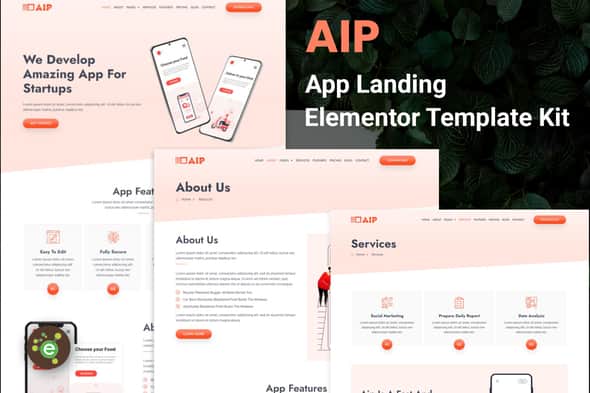
Aip – App Landing Elementor Template Kit | Mobile Showcase
Original price was: $29.00.$5.80Current price is: $5.80.
Deploying a dedicated web showcase for mobile applications or SaaS products often gets bogged down in custom interface design. Aip provides a structured UI collection built specifically for application launches, software showcases, and mobile game landing pages using WordPress.
Direct Overview: Aip is a 14-layout Elementor Template Kit designed for app developers, software start-ups, and digital product agencies. Built around the Elementor visual builder framework, it streamlines the creation of high-converting app display pages without manual backend coding. This template kit is ideal for project teams needing fast-loading, mobile-optimized presentation pages. It is not a standalone WordPress theme and requires a functional base theme such as Hello Elementor alongside Elementor Pro integration.
Technical Specifications
| Product Type | Elementor Template Kit (Not a WP Theme) |
|---|---|
| Total Templates | 14 Page & Block Layouts |
| Page Builder Compatibility | Elementor (Free) & Elementor Pro |
| Required Plugins | Elementor, ElementsKit Lite |
| Recommended Base Theme | Hello Elementor (compatible with most WP themes) |
| Customization System | Drag-and-Drop Visual Builder / Global Style Controls |
| Typography Support | Google Fonts Integration (600+ font options) |
Included Page Templates & Structural Blocks
- Home Page: Main conversion-focused landing design for app highlights and download calls-to-action.
- About & Feature Pages: Dedicated sections for showcasing core app functionality, technical specs, and software updates.
- Service & Service Details Pages: Structured layouts to explain backend services, API integrations, or platform tiers.
- Pricing & Screens Pages: Clean UI grids to display app interface screenshots and subscription pricing tables.
- Blog & Single Post Layouts: Full content marketing structures for team updates, developer notes, and articles.
- Utility Pages: Testimonial Page, FAQ Page, Download Page, Contact Page, and 404 Error Page.
- Global Theme Elements: Header Template and Footer Template for site-wide consistency.
Core Features & Customization Options
- Global Typography & Color Controls: Adjust site-wide colors and font pairings from a single control menu or fine-tune styling on specific visual elements.
- No-Code Layout Building: Full visual drag-and-drop customization allows fast page composition without touching CSS or PHP files.
- Performance Optimized: Lightweight markup ensuring quick load times and smooth mobile interaction.
- Font Flexibility: Built-in compatibility with Google Fonts for typography management across all pages.
Setup and Import Instructions
- Install and activate the Envato Elements plugin via the WordPress admin dashboard under Plugins > Add New.
- Upload the kit ZIP file directly into WordPress without extracting the file contents.
- Navigate to Elements > Installed Kits and locate the uploaded kit. Alternatively, link an active subscription to import directly.
- Click the “Install Requirements” button on the notification bar to ensure all dependent plugins (such as ElementsKit Lite) are active.
- Import the Global Kit Styles first to establish global design settings.
- Import individual templates one by one. Imported items save directly under Templates > Saved Templates.
- Create a new WordPress page, open it with Elementor, set the Page Layout to “Elementor Full Width”, and insert your desired template from the My Templates tab.
Frequently Asked Questions
Is Aip a complete WordPress theme?
No, Aip is an Elementor Template Kit containing pre-designed page content for the Elementor page builder. You must have WordPress and a standard base theme like Hello Elementor installed to use these templates.
Do I need Elementor Pro to use this kit?
Yes, Elementor Pro is required to access specific advanced features, custom headers, footers, and dynamic visual components included in some of the template layouts.
Can I use my own graphics and application screenshots?
Yes. While the kit includes placeholder images for demonstration purposes, you can easily swap out all media files with your own app screenshots, icons, and illustrations using the visual editor.
1. Click Add to cart

2. Review your items and click Proceed to checkout

3. Fill in your billing details: Name, Email, and Password
4. Choose your preferred payment method
5. Click Pay via Paypal to proceed

6. Access Downloads to get your files

Related products


