
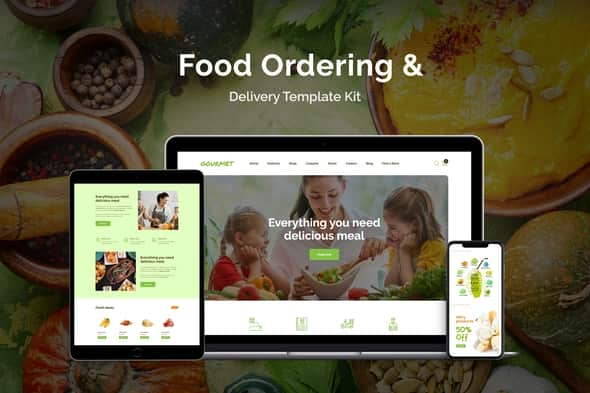
Gourmet – Food Ordering & Delivery Elementor Template Kit | WordPress
Original price was: $14.00.$2.80Current price is: $2.80.
Setting up a full-service restaurant or food delivery portal usually requires building custom menus, order flows, and responsive page layouts from scratch. Gourmet provides a pre-structured kit of WordPress template pages designed specifically for local eateries, dark kitchens, and food ordering platforms using Elementor and WooCommerce.
Direct Summary: Gourmet is a specialized Elementor Template Kit designed for web designers, restaurant owners, and agency developers building online food delivery portals or restaurant websites. Built for WordPress using Elementor and WooCommerce, this kit eliminates the need to manually build custom menu displays and ordering interfaces. It is best suited for freelancers seeking rapid client deployment, though it is not a standalone WordPress theme and requires the Elementor page builder plugin to function.
Technical Specifications
| Attribute | Specification Details |
|---|---|
| Product Category | Elementor Template Kit |
| Platform | WordPress |
| Page Builder | Elementor (Elementor Pro required for select features) |
| Required Plugins | Elementor, ElementsKit Lite, Extensions For Elementor, WooCommerce |
| Included Layouts | 15+ Pre-designed Page Templates |
| Recommended Theme | Hello Elementor (Compatible with most Elementor-supported themes) |
| Browser Compatibility | Chrome, Firefox, Safari, Opera |
| Layout Characteristics | Ultra-Responsive, Retina-Ready, SEO Optimized |
Core Features & System Capabilities
- 15+ Pre-Designed Layouts: Complete template set covering homepages, menus, ordering workflows, and service details.
- WooCommerce Integration: Pre-configured store structures to present menu items, pricing, and checkout sequences directly.
- Lightweight Codebase: Built with minimal overhead to maintain fast rendering speeds and strong performance scores.
- Fully Customizable Interface: Adjust global styles, colors, typography, and spacing without writing custom CSS code.
- Cross-Browser Rendering: Tested across Firefox, Chrome, Safari, and Opera for reliable cross-platform presentation.
Installation & Setup Guide
- Install and activate the Envato Elements plugin via Plugins > Add New inside your WordPress admin dashboard.
- Do not unzip the downloaded template kit file.
- Navigate to Elements > Installed Kits and click the Upload Template Kit button.
- Click Install Requirements to automatically activate all required plugins before importing pages.
- Import templates one at a time to prevent server timeout issues.
- Create a new page in WordPress, set the page layout setting to Elementor Full Width, hide the default page title, and select Edit with Elementor.
- Click the folder icon inside the Elementor builder canvas, navigate to My Templates, and import your selected layout.
Frequently Asked Questions
Does this kit include a full standalone WordPress theme?
No, Gourmet is an Elementor Template Kit rather than a standalone WordPress theme. It contains page designs meant to be imported directly into the Elementor builder. It works best when paired with lightweight themes such as Hello Elementor.
Is Elementor Pro required to use all features in this kit?
While core page structures work with the free version of Elementor, certain dynamic features, header/footer blocks, and advanced widgets require an active Elementor Pro upgrade.
Can I use my own menu photography and graphics?
Yes. The stock images included in the kit are demo placeholders from Envato Elements. You can substitute these demo assets with your own food photography, logos, and promotional graphics directly inside the visual editor.
1. Click Add to cart

2. Review your items and click Proceed to checkout

3. Fill in your billing details: Name, Email, and Password
4. Choose your preferred payment method
5. Click Pay via Paypal to proceed

6. Access Downloads to get your files

Related products


