
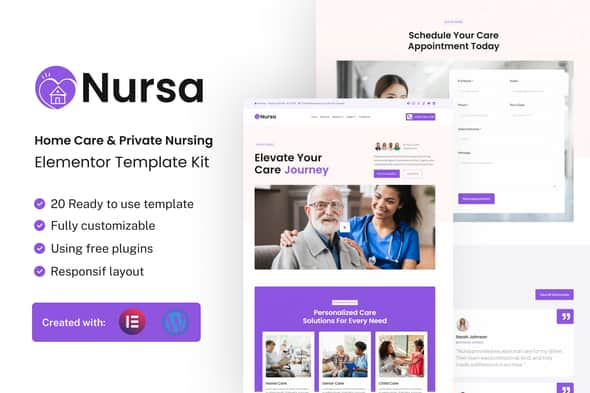
Nursa – Home Care & Private Nursing Services Elementor Template Kit
Original price was: $21.00.$4.20Current price is: $4.20.
Launching a web portal for private nursing or home health agencies requires clear service breakdowns, direct contact points, and accessible layouts for families evaluating care options. Nursa is an Elementor Template Kit built specifically for home care agencies, private nurses, elder care providers, and palliative assistance professionals using WordPress. It leverages free plugins like Elementor Free and MetForm to deliver 20 pre-built page layouts and functional form blocks. Nursa is ideal for healthcare agencies needing structured service pages without writing custom CSS, though it is not a standalone WordPress theme and requires a base theme like Hello Elementor.
| Technical Specification | Details |
|---|---|
| Product Category | Elementor Template Kit (Not a WP Theme) |
| WordPress Compatibility | v6.x |
| Elementor Compatibility | v3.26.x |
| Total Templates Included | 20 Ready-to-Use Templates |
| Required Free Plugins | Elementor, ElementsKit Lite, MetForm, The Plus Addons for Elementor, Sticky Header Effects |
| Form Builder Integration | MetForm (Appointment, Contact, Subscribe, General) |
| Layout Architecture | Fully Responsive, Design System Based |
| Browser Compatibility | Chrome, Firefox, Safari, Opera |
Layout Specifications & Kit Capabilities
Nursa is built around a consistent healthcare design system, ensuring uniform typography, spacing, and color palettes across every page. The kit minimizes dependency overhead by utilizing standard free plugins to handle sticky headers, modular add-ons, and customized form submissions. Pages scale across mobile, tablet, and desktop viewports, maintaining clear readability for senior visitors and family members alike.
Instead of relying on commercial plugins, Nursa integrates directly with MetForm to manage client intake, appointment bookings, and newsletter signups. Each form template imports as an individual block that can be modified visually in Elementor and embedded into target service pages.
Included Templates & Structural Components
- Core Pages: Home, About Us, All Services, Pricing, Our Team, Appointment, Career, Blog, Single Post, FAQ, Error 404, Contact, Design Guideline
- Global Theme Elements: Header, Footer, Global Theme Style
- MetForm Blocks: Contact Form, Appointment Form, Subscribe Form, Subscribe Form Blog, General Form
Setup and Import Procedure
Because Nursa is a Template Kit rather than a traditional WordPress theme, setup involves importing layout data directly into Elementor:
- Base Environment: Install and activate the free Hello Elementor theme via Appearance > Themes. Ensure Permalinks are set to Post Name under WordPress Settings.
- Plugin Activation: Install Elementor and the Envato Elements plugin. Upload the unopened template kit zip file under Elements > Installed Kits.
- Requirement Loading: Click Install Requirements on the kit banner to automatically pull in ElementsKit Lite, MetForm, The Plus Addons, and Sticky Header Effects.
- Style & Template Import: Import Global Kit Styles first to establish site-wide styling. Import page templates individually under Saved Templates, then assign your static front page under Settings > Reading.
- Header & Footer Configuration: Create new header and footer instances in ElementsKit > Header Footer, set them to display across the entire site, and load the corresponding Nursa layout template inside the builder.
Frequently Asked Questions
Is Elementor Pro required to use the Nursa template kit?
No, Nursa operates fully using free WordPress plugins. It relies on Elementor Free alongside helper tools like ElementsKit Lite and MetForm to power headers, footers, and interactive form modules without requiring an active Elementor Pro subscription.
Can Nursa be installed directly as a WordPress theme zip file?
No, Nursa contains design data for Elementor rather than theme files. You must install a lightweight parent theme such as Hello Elementor first, then import the Nursa zip file using the Envato Elements plugin or Elementor’s native template importer.
How are the appointment and contact forms configured?
Forms are created using MetForm templates included in the kit. After importing the specific MetForm block, open the page containing the form widget, select Edit Form, choose your imported template, and update the settings within the MetForm editor interface.
1. Click Add to cart

2. Review your items and click Proceed to checkout

3. Fill in your billing details: Name, Email, and Password
4. Choose your preferred payment method
5. Click Pay via Paypal to proceed

6. Access Downloads to get your files

Related products


