
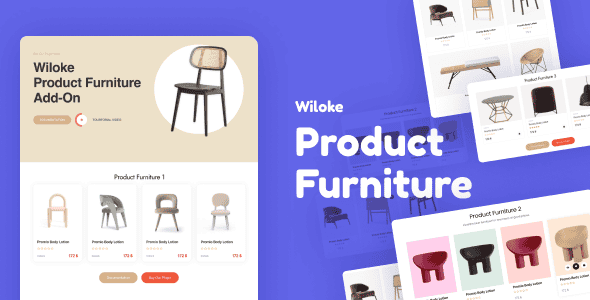
Elementor WooCommerce Product Furniture – Carousel & Filter Plugin
Original price was: $15.00.$3.00Current price is: $3.00.
Displaying furniture catalogs effectively requires quick product filtering, flexible carousel layouts, and instant cart functionality. Wiloke Product Furniture extends Elementor and WooCommerce to help store owners showcase items across landing pages, homepages, or custom archive layouts without writing custom code.
Wiloke Product Furniture is a WordPress plugin designed for WooCommerce store owners using the Elementor page builder. It simplifies catalog presentation by offering pre-built dynamic carousels, stock-status filters, and custom sorting parameters. Best suited for e-commerce sites selling furniture, home decor, or physical merchandise that need flexible display grids; it is not intended for non-Elementor page builders or headless commerce setups without WooCommerce.
| Technical Property | Specification |
|---|---|
| Platform Compatibility | WordPress, WooCommerce |
| Page Builder | Elementor |
| Catalog Display Styles | 5 Distinct Layouts + Carousel Effect |
| Filtering Options | On Sale, In Stock, Out of Stock, Category, Brand |
| Sorting Parameters | Author, Title, Publish Date, Product ID, Comment Count |
| Developer | Wiloke |
Key Features for Furniture Catalog Optimization
Multiple Catalog Presentation Layouts
Choose from five pre-designed presentation styles to fit your storefront’s visual design. Built-in carousel effects allow shoppers to scroll through collections fluidly, featuring essential data like review ratings, quick Add to Cart buttons, and regular or sale pricing badges.
Granular Visual Customization
Maintain consistent brand identity without editing CSS files. Adjust primary and secondary colors, typography, call-to-action text, and image framing directly from the Elementor control interface.
Advanced Product Sorting and Filtering
Help customers pinpoint specific items quickly with direct filtering controls. Filter items by stock status (In Stock, Out of Stock, On Sale) or group them by specific brands and categories to reduce purchasing friction.
Targeted Catalog Sorting
Organize items on any landing page using structural sorting logic. Query products by Author, Title, Release Date, ID, or active Comment Count to highlight trending inventory or featured releases.
Frequently Asked Questions
Can I customize the styling of the product carousels?
Yes. You can adjust typography, color schemes, image dimensions, and button text directly through the standard Elementor widget panel to match your storefront visual style.
Does this plugin allow filtering products by availability?
It includes stock-level criteria that allow shoppers to group items by On Sale, In Stock, and Out of Stock, as well as broader categories and brand attributes.
1. Click Add to cart

2. Review your items and click Proceed to checkout

3. Fill in your billing details: Name, Email, and Password
4. Choose your preferred payment method
5. Click Pay via Paypal to proceed

6. Access Downloads to get your files

Related products


