
Zavona – Hair & Beauty Salon Elementor Template Kit – No Code Needed
Original price was: $21.00.$4.20Current price is: $4.20.
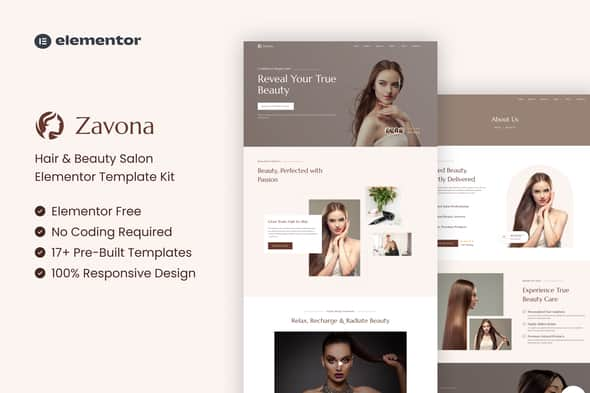
Setting up a functional web presence for beauty professionals often fails when generic WordPress themes add unnecessary system bloat. Zavona provides a structured Elementor Template Kit tailored specifically for hair salons, barbershops, wellness centers, and aesthetics studios. Built for the free version of Elementor alongside Jeg Elementor Kit and MetForm, this package includes 17 pre-designed page layouts and component templates. It allows salon owners and agency developers to assemble service menus, team profiles, and online booking workflows without writing custom code.
Best For: Independent hair stylists, beauty parlors, barbershops, spa facilities, and web design agencies building client sites.
Not Suited For: Users looking for standalone WordPress themes (ZIP installs via Appearance > Themes) or websites relying on non-Elementor builders like Divi or Gutenberg.
| Technical Specification | Details |
|---|---|
| Product Type | Elementor Template Kit |
| Page Builder Compatibility | Elementor (Free Version) |
| Required Free Plugins | Jeg Elementor Kit, MetForm, Template Kit Import |
| Total Included Templates | 17+ Ready-to-Use Layouts |
| Primary Niche | Hair Salons, Barbershops, Spa & Wellness |
| Design Responsiveness | Fully Responsive (Mobile, Tablet, Desktop) |
Included Page & Component Layouts
Zavona comes pre-configured with all essential layouts required to publish a complete salon website:
- Global Kit Style: Site-wide typography, color palettes, and button styles.
- Homepage: Modern hero section, service highlights, and booking triggers.
- About Us: Brand story, interior gallery previews, and business values.
- Services & Service Detail: Detailed service lists with pricing breakdowns.
- Pricing: Structured rate cards for salon treatments.
- Gallery: High-resolution portfolio grid for haircut and styling showcases.
- Blog & Single Blog: Editorial layouts for hair care tips and announcements.
- FAQ & Contact Us: Customer help accordion and business location info.
- Metform Contact & Appointment: Pre-styled form templates for client inquiries.
- Utility Templates: Custom 404 Page and Coming Soon landing layout.
- Site Headers & Footers: Reusable header and footer blocks managed via Jeg Elementor Kit.
Setup and Import Instructions
Because this package is an Elementor Template Kit rather than a traditional WordPress theme, follow these steps to set up your pages correctly:
1. Importing Kit Layouts
- Install and activate the free Template Kit Import plugin by Envato via Plugins > Add New.
- Navigate to Tools > Template Kit in your WordPress dashboard.
- Upload your template kit ZIP archive.
- Click Install Requirements to activate necessary plugin dependencies automatically.
- Import the Global Kit Styles first to establish site typography and colors, then import individual page templates as needed.
2. Setting Up Appointment Forms (Metform)
- Import the Metform custom template from the kit interface.
- Open the page where your booking form resides inside the Elementor editor.
- Click the Metform widget area, select Edit Form, choose a blank form configuration, and click the gray folder icon to open My Templates.
- Select your imported Metform template, insert it, and save your changes.
3. Configuring Site Headers and Footers
- Navigate to Jeg Elementor Kit > Header Template in your admin sidebar.
- Add a new header, set the display condition to Entire Site, and edit with Elementor.
- Load your saved header layout from the My Templates tab inside the Elementor editor.
Frequently Asked Questions
Do I need to purchase Elementor Pro to use this kit?
No, Zavona is built to function fully using the free version of Elementor. All special layout blocks, headers, footers, and contact forms rely on free bundled add-ons, specifically Jeg Elementor Kit and MetForm.
Why doesn’t my imported page match the demo layout immediately?
This usually happens if Global Kit Styles were skipped during setup. Make sure to open Tools > Template Kit, click Install Requirements, and import the Global Kit Styles prior to importing individual page templates.
Can I import this template kit using the default WordPress importer?
No, using Tools > Import in WordPress will result in an error because template kits do not contain XML post data. You must use the free Template Kit Import plugin to process the kit ZIP file.
1. Click Add to cart

2. Review your items and click Proceed to checkout

3. Fill in your billing details: Name, Email, and Password
4. Choose your preferred payment method
5. Click Pay via Paypal to proceed

6. Access Downloads to get your files

Related products


