
WordPress Tooltip Ultimate – Customisable Tooltip Generator | Plugin
Original price was: $12.00.$2.40Current price is: $2.40.
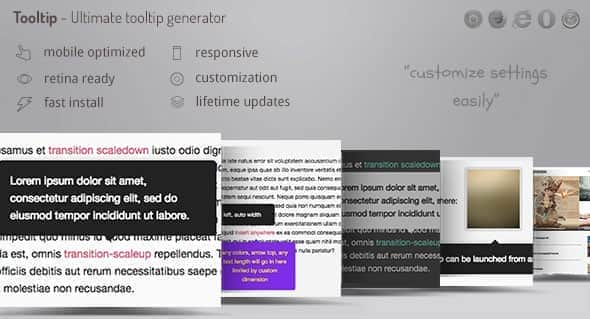
Adding tooltips to WordPress content often requires cumbersome manual HTML markup or custom JavaScript handlers. WordPress Tooltip Ultimate (DZS Tooltip) streamlines this workflow by integrating a dedicated generator engine directly into the visual editor interface.
This lightweight WordPress plugin enables site administrators, technical writers, and digital publishers to attach customizable contextual popups to text and media elements without writing code. Built for universal theme compatibility, it features an interface generator and Gutenberg block support. It is best suited for online documentation, blogs, and eCommerce product specs requiring immediate term definitions, but it is not designed for complex multi-step user onboarding tours.
Technical Specifications
| Attribute | Specification |
|---|---|
| Plugin Identifier | WordPress Tooltip Ultimate (DZS Tooltip) |
| Software Category | WordPress Utility Plugin |
| Editor Compatibility | Gutenberg Block Editor (Classic Block), Classic Editor |
| Theme Interoperability | Universal (Works with standard-compliant WordPress themes) |
| Latest Tracked Version | v1.02 |
| Primary Functions | Text tooltips, automated image wrapper (title/alt tags), shortcode generator |
Core Functionality
- Visual Shortcode Generator: Highlight any text within the WordPress editor, launch the interface, and apply tooltips without memorizing shortcode syntax.
- Image Attribute Detection: Automatically wraps target images with contextual tooltips whenever title or alt attributes are present.
- Theme Standardization: Operates cleanly across any standard-compliant theme environment without causing script conflicts.
- Gutenberg Block Integration: Integrates with the modern block editor via a Classic Block button for quick workflow access.
Version Revision History
- Version 1.02: Added Gutenberg editor integration through the Classic Block interface with an inline action button.
- Version 1.01: Introduced image tooltip wrapping using title and alt attributes, alongside general bug fixes.
Frequently Asked Questions
How are tooltips created inside the Gutenberg editor?
Insert a Classic Block inside the Gutenberg editor to reveal the plugin toolbar button. Selecting text and clicking the button opens the generator to set your popup text instantly.
Can the plugin apply tooltips to image assets automatically?
Yes, as long as an image contains standard title or alt HTML attributes, the plugin can wrap the image element to display tooltips on hover.
Is web development experience required to style or manage tooltips?
No programming expertise is needed. The visual shortcode generator handles code generation, making it accessible for non-technical site owners while maintaining low resource overhead.
1. Click Add to cart

2. Review your items and click Proceed to checkout

3. Fill in your billing details: Name, Email, and Password
4. Choose your preferred payment method
5. Click Pay via Paypal to proceed

6. Access Downloads to get your files

Related products


