
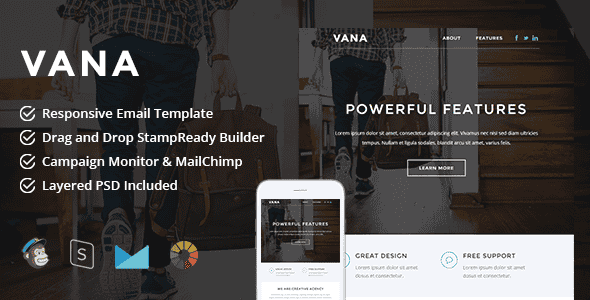
Vana – Responsive Email + StampReady Builder | HTML Email Template
Original price was: $19.00.$3.80Current price is: $3.80.
Designing custom email newsletters across fragmented client ecosystems often leads to rendering bugs and broken layouts. Vana addresses this workflow friction by providing a modular, multi-platform HTML email template powered by the StampReady builder interface.
Vana is an HTML newsletter template engineered for email marketers, developers, and digital agencies executing corporate or promotional campaigns. Built with full platform compatibility for MailChimp, Campaign Monitor, and StampReady, it includes customizable data modules such as bar charts and flexible content blocks. It is ideal for teams needing rapid multi-platform email production, but requires technical consideration when targeting legacy clients like Outlook.
| Specification | Details |
|---|---|
| Current Version | v1.1 |
| Compatible Builder | StampReady Drag & Drop Builder |
| ESP Tag Compatibility | MailChimp, Campaign Monitor, StampReady |
| File Formats Included | Raw HTML, StampReady HTML, MailChimp HTML, Campaign Monitor HTML, Layered PSD (1 file) |
| Tested Email Clients | Apple Mail, Gmail (Web), Outlook (2000–2013), Yahoo Mail, Thunderbird, AOL Mail, Hotmail |
| Mobile Device Support | iPhone, iPad, Android (Native Mail Apps) |
Core Features and Email Builder Integration
- StampReady Builder Support: Build and reorder content blocks visually with full drag-and-drop functionality directly within StampReady.
- Multi-Platform HTML Files: Separate pre-tagged files ensure correct functionality when imported into MailChimp or Campaign Monitor.
- Custom Module Collection: Includes data display options such as a dedicated chart bar module, along with unlimited color customization options.
- Layered Source Files: Includes 1 fully editable PSD design file for custom layout adjustments and branding alignment.
- Comprehensive Documentation: Provided HTML documentation walks through template installation, block editing, and integration settings.
Platform-Specific Tag Support
Vana includes template files pre-coded with platform-native tags to ensure smooth integration with your preferred Email Service Provider (ESP):
- MailChimp Integration: Uses native platform tags including
mc:edit,mc:repeatable,mc:hideable, andmc:variantfor in-app template editing. - Campaign Monitor Integration: Fully formatted with structural tags including
singleline,multiline,editable,repeater, andlayout. - Plain HTML: Standard clean HTML files are provided for custom back-end deployments or secondary email systems.
Client Rendering Limitations
Due to technical differences in how desktop and mobile applications parse HTML email standards, take note of the following platform behaviors:
- Microsoft Outlook: Outlook versions 2000 through 2013 do not natively render background images due to rendering engine constraints.
- Gmail Mobile App: The Gmail application on Android devices does not support fluid responsive media queries. Non-responsive fallbacks apply.
- Preview Media: Stock imagery sourced from Unsplash, Death to the Stock Photo, Kaboompics, and Flickr is used strictly for presentation and is not included in the download package.
Changelog
- Version 1.1: Resolved MailChimp integration bugs, updated Google Font links to secure HTTPS protocols, corrected block alignment and spacing issues for Outlook clients, completely revamped codebase across all template files, and updated HTML documentation.
- Version 1.0: Initial product release.
Frequently Asked Questions
Can Vana be edited without using the StampReady builder?
Yes. In addition to StampReady files, the package contains plain HTML files as well as pre-tagged templates specifically structured for direct upload and editing within MailChimp and Campaign Monitor.
Why are background images hidden when viewed in Microsoft Outlook?
Microsoft Outlook relies on Microsoft Word’s rendering engine, which does not support CSS background image rules. Color fallbacks display automatically to ensure text readability across affected Outlook clients.
Are stock photos included in the download file?
No. Preview images from third-party sources like Unsplash are included for demonstration purposes only. You must replace them with your own images or assets before broadcasting your campaign.
1. Click Add to cart

2. Review your items and click Proceed to checkout

3. Fill in your billing details: Name, Email, and Password
4. Choose your preferred payment method
5. Click Pay via Paypal to proceed

6. Access Downloads to get your files

Related products


