
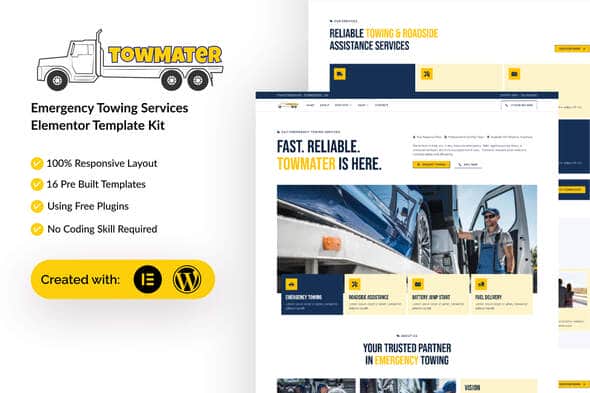
Towmater – Emergency Towing Service Elementor Template Kit | WordPress
Original price was: $30.00.$6.00Current price is: $6.00.
Launching a functional site for road assistance and vehicle recovery businesses often gets bogged down in custom page building and complex styling setup. Towmater delivers a pre-designed collection of layout assets built specifically for emergency towing fleets, auto repair shops, and roadside assistance providers. Built on top of WordPress and Elementor, this template kit enables web developers and shop owners to publish a structured, mobile-responsive service portal without writing custom CSS or PHP code. It is best suited for auto service businesses looking for a fast site build using drag-and-drop builders, but it is not a standalone WordPress theme and requires an active Elementor installation to function.
| Specification | Details |
|---|---|
| Product Type | Elementor Template Kit |
| Platform Support | WordPress |
| Included Layouts | 16 Ready-to-Use Templates |
| Container Type | Elementor Flexbox Containers |
| Required Plugins | Elementor, ElementsKit Lite, MetForm, Gum Elementor Addon, UAE Lite |
| Typography & Color Control | 900+ Google Fonts, Global Color Palette Options |
| Cross-Browser Support | Chrome, Firefox, Safari, Opera |
Layout Architecture & Included Page Templates
The kit is built using modern Elementor Flexbox Containers, ensuring lightweight page loads and efficient responsive scaling across mobile devices and tablets. Every section is organized to highlight urgent contact details, service coverage areas, and pricing structures critical for towing operations.
Towmater includes 16 complete page and block templates ready for immediate deployment:
- Global Theme Style: Centralized site-wide typography and brand color configurations.
- Homepage: Conversion-focused main landing page with prominent call-to-action blocks.
- About Us: Company history, mission, and fleet background.
- Services & Service Details: Dedicated pages detailing flatbed towing, battery jumpstarts, winch-outs, and lockout assistance.
- Booking Page & Booking Form: Custom-styled forms powered by MetForm for dispatch requests.
- Pricing & FAQ: Transparent service rates and quick answers to common customer questions.
- Team & Contact Us: Staff profiles, location maps, direct phone shortcuts, and contact forms.
- Blog & Single Post: Content layouts built to display company news and maintenance tips.
- Error 404 Page: Custom error page matching the site design.
- Header & Footer Layouts: Site-wide navigation blocks compatible with free header management plugins.
Setup and Import Instructions
Because template kits contain Elementor design data rather than standard theme files, they are imported directly into an existing WordPress site using the Template Kit Import plugin or standard Elementor tools.
Form Configuration with MetForm
- Import the individual MetForm block templates provided in the kit.
- Import the page template where the form belongs and open the Elementor Navigator.
- Select the MetForm widget, choose to edit or create a form, and open the form builder interface.
- Access the folder icon, navigate to the My Templates tab, select the imported form block, and insert it.
- Save your changes and update the page layout.
Header and Footer Integration
When using free plugins like Ultimate Addons for Elementor Lite, navigate to the header/footer builder menu, create a new item set to display across the entire website, edit it with Elementor, and load the corresponding header or footer template from your saved library.
Frequently Asked Questions
Is Towmater a standalone WordPress theme?
No, Towmater is an Elementor Template Kit containing saved page layouts and structural designs. It requires a active WordPress installation with the Elementor page builder and its supporting free add-on plugins installed on top of a lightweight base theme like Hello Elementor.
Do I need Elementor Pro to use this kit?
No premium upgrades are required. All templates in this kit are configured to work using free add-ons, including ElementsKit Lite, MetForm, and Ultimate Addons for Elementor Lite. If you already use Elementor Pro, you can optionally manage headers, footers, and forms directly through the native Pro Theme Builder.
Are the demo images included with the layout download?
The layout files use placeholder stock images from Envato Elements for demonstration purposes. To use the exact preview images, you will need to license them separately, or you can swap them out with your own emergency response and vehicle photographs directly within the editor.
1. Click Add to cart

2. Review your items and click Proceed to checkout

3. Fill in your billing details: Name, Email, and Password
4. Choose your preferred payment method
5. Click Pay via Paypal to proceed

6. Access Downloads to get your files

Related products


