
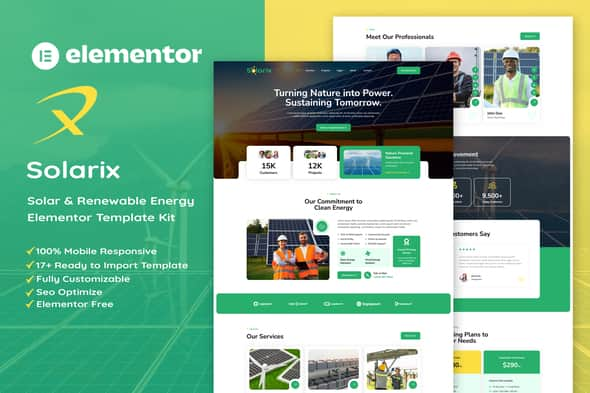
Solarix – Solar & Renewable Energy Elementor Template Kit – Responsive
Original price was: $20.00.$4.00Current price is: $4.00.
Launching a clean, professional web presence for green energy providers often stalls during the design phase. Solarix provides a pre-designed collection of 17+ Elementor page layouts tailored specifically for solar installers, wind turbine maintenance crews, and renewable energy startups.
Built to run on the lightweight Hello Elementor theme, this kit allows agencies and web builders to construct complete service portals using drag-and-drop mechanics without editing core PHP or CSS code. It is ideal for freelancers and green tech businesses seeking rapid deployment, but it is not a standalone WordPress theme and will not work without Elementor installed.
| Attribute | Specification |
|---|---|
| Product Type | Elementor Template Kit |
| Base Theme Compatibility | Hello Elementor (Free) |
| Required Builder | Elementor (Free Version) |
| Total Templates Included | 17+ Ready-to-use Layouts |
| Included Third-Party Plugins | Elementor, ElementsKit Lite, Skyboot, MetForm |
| Layout Responsiveness | 100% Mobile, Tablet & Desktop Responsive |
| Design Architecture | Global Kit Style (Centralized Colors & Fonts) |
Key Layout Features & Included Templates
Solarix includes pre-configured layouts that cover standard corporate operations, project portfolios, and technical service breakdowns.
- Complete Page Suite: Access ready-to-import layouts for Home, About, Services, Service Details, Projects, Project Details, Our Team, Pricing, Blog, Single Post, FAQ, and 404 Error pages.
- Header & Footer Structures: Includes Header V1 and Footer V1 templates managed directly through ElementsKit Lite.
- Custom Form Integrations: Pre-built MetForm containers tailored for lead generation and newsletter signups.
- Global Style Controls: Adjust site-wide typography and color schemes from a centralized Elementor panel.
- No Code Required: Fully visual customization using native Elementor drag-and-drop widgets.
Setup & Configuration Instructions
This template kit utilizes standard import workflows through Elementor and helper plugins for custom form handling and header management.
Importing MetForm Templates
- Open the target page in Elementor and locate the Metform widget within the panel.
- Click Edit Form, select New, leave blank selected, and launch the form editor.
- Click the gray folder icon to open the My Templates tab.
- Choose your imported MetForm template (Contact or Newsletter), select Insert, and save updates.
Configuring Global Headers & Footers
Ensure your page layouts are set to Elementor Full Width in the page settings panel so global headers and footers render correctly across all display resolutions.
- Navigate to ElementsKit > Header Footer in your WordPress dashboard.
- Add a new template, set the toggle status to Active, and launch the content editor.
- Click the gray folder icon to access My Templates, select the Header or Footer template, and publish.
Frequently Asked Questions
Does Solarix require Elementor Pro to function?
No. Solarix is built entirely using free plugins, including the base version of Elementor, ElementsKit Lite, and MetForm. You do not need a paid Elementor Pro subscription to import or use these layouts.
Is Solarix a standalone WordPress theme?
No, Solarix is an Elementor Template Kit containing structural design data. It must be imported into an active WordPress installation running Elementor and a base theme like Hello Elementor.
Are the demo images included with the template download?
The kit uses stock images from Envato Elements for demonstration purposes. You can replace these images with your own media assets or license the demo images directly through Envato Elements.
1. Click Add to cart

2. Review your items and click Proceed to checkout

3. Fill in your billing details: Name, Email, and Password
4. Choose your preferred payment method
5. Click Pay via Paypal to proceed

6. Access Downloads to get your files

Related products


