
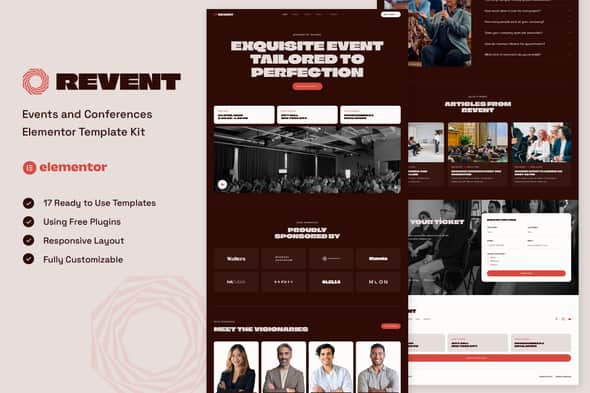
Revent – Events & Conferences Elementor Template Kit | Clean UI
Original price was: $24.00.$4.80Current price is: $4.80.
Organizing event websites often gets bogged down by bloated themes and complex theme settings. Revent provides a streamlined, code-free visual design framework tailored specifically for conferences, conventions, program schedules, and corporate meetups built on WordPress.
Designed for event managers, web agencies, and digital marketers, this kit works directly with the free version of Elementor without requiring a paid Pro subscription. It provides 13 full-page layouts and 17 individual block templates to display speaker profiles, present multi-day agendas, feature event sponsors, and manage ticket inquiries. It is best suited for fast-turnaround event landing pages, but not intended for users seeking a standalone traditional WordPress theme or deep database backend customization outside of Elementor.
| Specification | Details |
|---|---|
| Product Category | Elementor Template Kit (Requires Elementor Builder) |
| Page Count | 13 Pre-designed Pages |
| Template Count | 17 Block & Theme Templates |
| Page Builder Required | Elementor (Free Version Compatible) |
| Required Addons | ElementsKit Lite, MetForm, Gum Elementor Addon |
| Layout Architecture | Flexbox Container Compatible, 100% Mobile Responsive |
| Cross-Browser Support | Google Chrome, Mozilla Firefox, Apple Safari, Opera |
Core Features & Included Templates
Revent focuses on presenting event details clearly to prospective attendees. The included layouts feature structured speaker cards, dynamic schedule timelines, tiered sponsor blocks, and conversion-oriented ticket booking forms.
Included Page Layouts:
- Home Page: Main landing page featuring event highlights, countdown timers, and quick links.
- About Page: Overview of the event’s history, mission, and host organization.
- Schedule Page: Clean timeline breakdown for single-day or multi-day agendas.
- Speakers & Speaker Detail: Individual profile pages for keynote presenters and panel guests.
- Tickets Page: Structured pass pricing options integrated with contact forms.
- Sponsors Page: Categorized logo grid for corporate partners and supporters.
- FAQs Page: Accordion layout addressing venue details, travel, and registration rules.
- Blog & Single Post: Content pages for event announcements, news, and updates.
- Career, Contact & 404 Pages: Utility layouts complete with interactive inquiry forms.
Included Component Templates:
- Global Site Styles & Color Palette
- Header & Footer Layouts (Managed via ElementsKit Lite)
- Custom Ticket Form & Contact Form Templates (Powered by MetForm)
Installation & Technical Guidelines
Because Revent is an Elementor Template Kit, it must be imported directly into an active WordPress installation using the Template Kit Import plugin or native Elementor tools.
- Base Theme Setup: Install and activate the free Hello Elementor theme to serve as a lightweight canvas.
- Enable Flexbox Containers: Navigate to Elementor > Settings > Features in your WordPress dashboard and ensure the Flexbox Container feature is set to Active prior to importing.
- Import Sequence: Import Global Theme Styles first to establish typography and brand colors across the site, then import individual page layouts as needed.
- Form Customization: Use the MetForm widget to load and insert the included ticket and contact form templates onto your designated pages.
Frequently Asked Questions
Does Revent require a paid Elementor Pro license?
No, Revent is fully functional using the free version of Elementor. All necessary structural elements, forms, and headers are powered by free companion plugins like ElementsKit Lite and MetForm.
Can this template kit be installed as a standard WordPress theme?
No, this is an Elementor Template Kit, not a standalone theme zip file. You must first install a lightweight base theme like Hello Elementor, then import these design assets through the Template Kit Import plugin.
Are the demo images included in the template kit export?
The kit contains placeholder images from Envato Elements. You can license these graphics through Envato Elements or replace them with your own high-resolution event media directly inside the Elementor editor.
1. Click Add to cart

2. Review your items and click Proceed to checkout

3. Fill in your billing details: Name, Email, and Password
4. Choose your preferred payment method
5. Click Pay via Paypal to proceed

6. Access Downloads to get your files

Related products


