
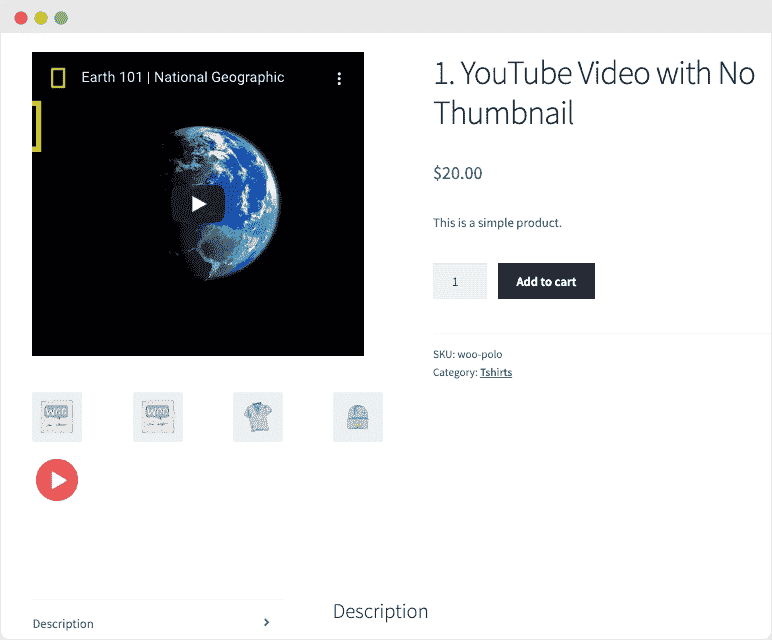
Product Video for WooCommerce – Video Gallery & Featured Video
Original price was: $54.00.$10.80Current price is: $10.80.
Static product images often fail to convey the true value of physical goods, leading to abandoned carts and missed sales opportunities. Modern online shoppers expect dynamic visual demonstrations before making a purchase decision. By integrating high-quality video content directly into your store, you bridge the gap between digital browsing and physical product experiences, significantly boosting customer confidence and conversion rates.
Flexible Video Integration for Every Product Page
This extension offers a robust way to enrich your product presentation by supporting both self-hosted uploads and third-party embeds. You can effortlessly display videos from popular platforms including YouTube, Vimeo, Dailymotion, Facebook, and Metacafe. If you prefer hosting your own media, the plugin supports a wide array of formats such as MP4, MKV, AVI, MOV, FLV, and WMV, giving you complete control over your content delivery.
Featured Videos and Interactive Galleries
Captivate your visitors the moment they land on your page. You can choose to replace the primary product image with a dedicated featured video, or append multiple videos directly to the native WooCommerce product gallery.
- Featured Video Placement: Swap out static thumbnails for a high-impact featured video on the product page. You can even choose to show or hide these featured videos on archive and listing pages.
- Multi-Video Galleries: Combine photos and videos in a unified gallery. Assign custom thumbnail images to each video to maintain a clean, professional aesthetic before the user clicks play.
- Bulk Association: Save time during setup by attaching a single gallery video to multiple products simultaneously, while managing unique featured videos on an individual product level.
Optimized Playback Modes for Seamless UX
To ensure your site remains fast and user-friendly, this tool provides multiple playback configurations tailored to your layout needs:
- Interactive Lightbox Popups: Launch your gallery videos in an attractive, responsive popup that keeps users focused on the media without leaving the product page.
- On-Page Playback: Allow customers to play featured videos directly inline. Users can easily toggle full-screen mode with native browser controls for an immersive viewing experience.
Advanced Gallery Templates
With the release of version 1.4.0, store owners can select from two distinct gallery styles to match their theme’s design language:
1. HTML5 Lightbox Gallery Template
This layout plays your featured video directly on the main product and shop pages, while secondary gallery items and images open in a clean, distraction-free popup window. Check out the HTML5 Gallery Demo Link to see this option in action.
2. Woo Custom Gallery Template
Display all gallery images and videos directly within the primary featured box instead of using lightboxes. This template allows you to position gallery thumbnails at the top, bottom, right, or left side of the main viewing area, with adjustable limits on the number of displayed items. Explore the Woo Custom Gallery Demo Link for a live preview.
Detailed Customization and Control Settings
Configure your media exactly how you want with separate settings panels for self-hosted files and third-party embeds:
Self-Hosted Video Settings
- Toggle automatic playback on page load.
- Set videos to loop continuously.
- Mute audio automatically to comply with modern browser autoplay policies.
- Show or hide default player controls.
- Define custom dimensions (adjusting width in percentage and height in pixels) for both shop and product pages.
Embedded Video Settings (Featured & Gallery)
- Enable or disable autoplay and mute settings for external URLs.
- Control full-screen permissions for your users.
- Show or hide related videos at the end of YouTube playbacks.
- Benefit from auto-adjusted thumbnails for external video links.
Frequently Asked Questions
Does this extension modify the default WooCommerce gallery layout?
Due to technical limitations, adding video capabilities requires replacing the default WooCommerce gallery framework. To ensure your storefront maintains its visual appeal, the plugin includes both a custom gallery template and a default WooCommerce-styled layout. If your theme uses a highly customized image gallery, minor CSS or template adjustments may be required. Our dedicated support team is always available to assist with any alignment tweaks.
1. Click Add to cart

2. Review your items and click Proceed to checkout

3. Fill in your billing details: Name, Email, and Password
4. Choose your preferred payment method
5. Click Pay via Paypal to proceed

6. Access Downloads to get your files

Related products


