
Product Gallery Slider, Additional Variation Images for WooCommerce pro
Original price was: $46.00.$9.20Current price is: $9.20.
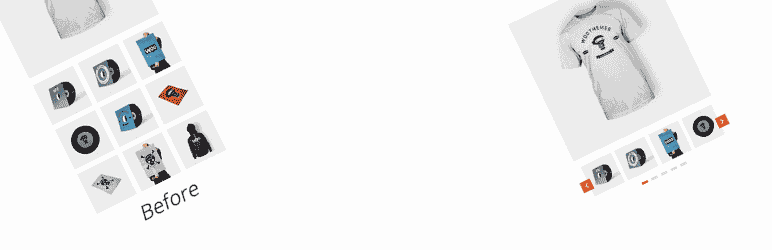
WooCommerce stores often struggle to display multiple images for specific product variations, leaving buyers guessing about color, texture, or design details. The default setup limits variation displays to a single image, which can hurt conversions when customers want to see a product from multiple angles. Replacing the static default gallery with an interactive, responsive carousel changes how customers interact with your inventory.
Live Demo | Support | Upgrade To Pro »
Overcoming the Single-Image Variation Limitation
By default, WooCommerce restricts each product variation to just one image. When selling items with diverse styles, colors, or materials, this limitation prevents a complete visual showcase. This plugin unlocks the ability to upload an unlimited number of additional images for every variation. When a shopper selects a different color or size, the gallery instantly updates to show the specific set of images chosen for that option. This keeps the layout organized while providing the thorough visual information buyers need to make a confident purchase.
Responsive Architecture for Mobile Commerce
With a massive share of e-commerce traffic coming from handheld devices, having a mobile-optimized gallery is no longer optional. This gallery slider is built with a responsive layout that adapts to screens of all sizes, including tablets and smartphones. Touch-friendly navigation ensures that mobile users can swipe through images without friction, helping to maintain high conversion rates across all devices.
Integration with Popular Page Builders
Building custom product layouts is straightforward because this plugin integrates with the industry’s most widely used page builders. Whether you design your single product pages using Elementor Pro, Divi, Beaver Builder, or WP Bakery, the gallery slider integrates smoothly into your custom templates.
Core Features for Enhanced Product Displays
- Mobile-Ready Layout: Adapts automatically to any screen resolution.
- Navigation Controls: Easy-to-use arrows and pagination for user-friendly browsing.
- Autoplay Settings: Configure the carousel to slide automatically at your preferred speed.
- Horizontal Carousel: Classic row-based thumbnail layout below the main image.
- Unlimited Variation Media: Add multiple images for each individual product variation.
- Adjustable Thumbnail Count: Define exactly how many preview images display at once.
- Infinite Looping: Allows continuous sliding without hitting a hard stop.
- Adaptive Height: Automatically adjusts the slider height based on the active image size.
- Mouse Drag Support: Enables desktop users to click and drag through the gallery.
- Lightbox Customization: Toggle the lightbox popup on or off for thumbnail previews.
- WooCommerce Zoom Control: Easily enable or disable the default hover-zoom effect.
- Image Captions: Display descriptive text directly within the lightbox view.
- Flexible Image Sizes: Set custom dimensions for your gallery images to match your theme.
- Custom CSS Field: Add your own styles directly to override default designs.
- Shortcode Compatibility: Place the slider anywhere on custom templates using simple shortcodes.
- Theme Harmony: Tested to work reliably with major premium WooCommerce themes.
- RTL Text Support: Fully compatible with right-to-left language layouts.
Extended Options in the Pro Edition
- All Core Features Included: Access all basic slider functions out of the box.
- Vertical Gallery Layouts: Position thumbnails vertically on the left or right side of the main image.
- Video Integration: Embed YouTube, Vimeo, or self-hosted videos directly into the product gallery.
- Hide Thumbnails: Clean up the interface by hiding thumbnail previews when necessary.
- Animated Navigation: Add engaging transition effects to navigation arrows.
- Granular Lightbox Settings: Gain complete control over how the lightbox behaves.
- Lightbox Thumbnail Placement: Position thumbnail previews inside the lightbox interface.
- Autostart Lightbox: Configure the lightbox slider to begin playing automatically upon opening.
- Transition Animations: Apply custom open, close, and sliding effects to lightbox images.
- Advanced Zoom Configurations: Fine-tune hover zoom behaviors for highly detailed product inspections.
Live Demo | Support | Upgrade To Pro »
What Store Owners Are Saying
“Great plugin and been using it for a long now. Still great!”
– vlavur
“Nice plugin – does exactly what you expect; the support is even better!”
– vanbrel
“Used the plugin and does exactly what I need and when I had an issue the guys response and solution was quick and swift”
– theonlytjn
“An awesome plugin which request a smaller amount of time and effort to get the output, can be recommended for professional ecommerce sites”
– sabari1992
All Reviews
Explore More WooCommerce Tools
If you want to add more practical features to your online store, consider exploring these specialized plugins:
- Deposits for WooCommerce: Enable customers to purchase items using partial payments or fixed deposits.
- WooCommerce Wishlist: A lightweight tool that lets shoppers save their favorite products for later.
- Show Stock for WooCommerce: Keep customers informed by displaying clear inventory levels on your store.
- Order Status Control for WooCommerce: Take charge of order processing with automated status updates.
1. Click Add to cart

2. Review your items and click Proceed to checkout

3. Fill in your billing details: Name, Email, and Password
4. Choose your preferred payment method
5. Click Pay via Paypal to proceed

6. Access Downloads to get your files

Related products


