
Product Condition for WooCommerce – Show Item Status & Boost SEO
Original price was: $27.00.$5.40Current price is: $5.40.
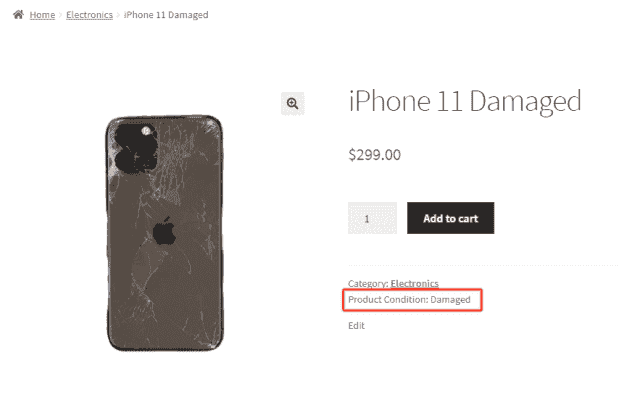
Selling refurbished, pre-owned, or open-box items on your online store requires complete transparency to build trust with potential buyers. This extension solves that challenge by displaying the exact state of your inventory directly on your product and shop pages. By clearly labeling whether an item is brand new, gently used, or refurbished, you give shoppers the confidence they need to complete their purchase while reducing customer support inquiries and return rates.
Boost Search Engine Visibility with Structured Data
Search engines actively filter search results based on product states, as many shoppers look specifically for budget-friendly used or refurbished alternatives rather than brand-new items. When you define these parameters, search crawlers read the structured data of your pages more accurately. This helps your store appear in highly targeted organic search queries, driving qualified buyers directly to your catalog.
Key Features for Better Store Transparency
- Store-Wide Default Settings: Define a global state for your entire catalog to save time during initial setup.
- Individual Product Overrides: Assign unique states to specific items on their edit screen to override the global setting.
- Shop Page Integration: Display the status directly on archive and catalog loop pages, allowing customers to filter visually while browsing.
- Rich Snippet Optimization: Supply search engines with precise metadata to improve organic click-through rates.
- Custom Status Options: Go beyond standard labels by adding your own specialized descriptions.
Over 20 Ready-to-Use Status Labels
To save you setup time, the plugin comes loaded with over 20 pre-defined, industry-standard classifications ready to be assigned to your inventory:
- New, Brand New, and New Other
- Certified Pre-Owned and Pre-Owned
- Like New, Very Good, Good, and Acceptable
- Manufacturer Refurbished and Seller Refurbished
- Remanufactured and Retread
- Damaged and For Parts
- Specific packaging variations (New with Box, New without Box, New with Tags, New without Tags, and New with Defects)
Developer-Friendly Architecture
Managing large inventories or custom backend workflows is straightforward with built-in action and filter hooks. Developers can programmatically add, remove, or modify the default list of states to match unique business requirements, custom ERP integrations, or external inventory sync tools.
1. Click Add to cart

2. Review your items and click Proceed to checkout

3. Fill in your billing details: Name, Email, and Password
4. Choose your preferred payment method
5. Click Pay via Paypal to proceed

6. Access Downloads to get your files

Related products


