
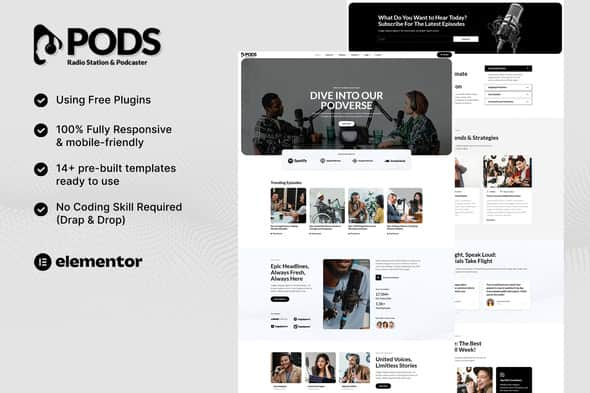
Potshow – Radio Station & Podcaster Elementor Template Kit | Clean UI
Original price was: $24.00.$4.80Current price is: $4.80.
Broadcasters and audio creators looking to establish an online streaming web presence can deploy pre-designed page layouts without writing custom code. The Potshow Elementor Template Kit provides a complete UI toolkit tailored specifically for internet radio stations, audio podcasters, and digital media producers using WordPress and the free Hello Elementor theme. Designed for visual editing via drag-and-drop builder components, it eliminates the need to construct episode archives, program schedules, and show landing pages from scratch.
Best suited for: Radio stations, independent podcasters, vloggers, and streaming media networks seeking rapid layout deployment with visual styling control.
Not suited for: Developers looking for standalone non-WordPress code bases or static HTML/CSS templates without Elementor dependency.
| Technical Specification | Details |
|---|---|
| Product Type | Elementor Template Kit |
| Base Theme Requirement | Hello Elementor (Free) |
| Template Count | 14+ Pre-built Templates |
| Required Plugins | Elementor, ElementsKit Lite, MetForm |
| Layout Responsiveness | 100% Mobile-Friendly & Responsive Grid |
| Style Management | Global Kit Style (Centralized Colors & Typography) |
| Form System Integration | MetForm Block Templates Included |
Core Features & Layout Capabilities
- Global Style Management: Centralized color palettes and typography controls managed directly through Elementor’s Global Kit Style system.
- 14+ Modular Templates: Pre-designed structural page layouts geared for audio episode directories, individual podcast posts, host bios, and station schedules.
- Form Integration: Includes built-in form template blocks designed for seamless operation with MetForm plugin workflows.
- Responsive Grid Architecture: Layouts automatically scale to match mobile devices, tablets, and wide desktop displays without layout breakage.
Included Layout Templates
- Home Podcast & Home Radio Station Variations
- About Us Layouts (2 Unique Designs)
- Podcasts Directory & Single Podcast Episode Page
- Programs Schedule & Single Program Details
- Our Team / Presenters Roster
- Media Gallery & Blog Archive Layouts
- FAQ, Contact Us, and Custom 404 Error Page
- Global Header & Footer Template Components
Installation & Form Configuration Guidance
To import the layout kit, activate the free Envato Elements plugin inside your WordPress dashboard and upload the zipped kit file directly under the Installed Kits menu. Execute the requirement installation prompt to ensure Elementor, ElementsKit Lite, and MetForm are activated. Always import Global Kit Styles prior to loading individual page templates onto blank Elementor Full Width pages.
To configure contact and inquiry forms, open the MetForm menu in the WordPress sidebar, add a new form entry, and open the Elementor editor canvas. Select the pre-designed form block from your saved template library to insert the pre-styled form controls.
Frequently Asked Questions
Does this kit require coding skills or Elementor Pro?
No coding background is required. Every structural component can be adjusted visually via Elementor’s drag-and-drop interface. The kit works entirely with the free version of Elementor and the free Hello Elementor theme, though users with Elementor Pro can optionally manage headers and footers using the Pro Theme Builder.
Are the preview audio files and stock images included with the kit?
The kit contains structural design files and layout settings. Demo images from Envato Elements are included as preview placeholders, but you will need to license those assets separately or replace them with your own station logos, podcast artwork, and background media.
1. Click Add to cart

2. Review your items and click Proceed to checkout

3. Fill in your billing details: Name, Email, and Password
4. Choose your preferred payment method
5. Click Pay via Paypal to proceed

6. Access Downloads to get your files

Related products


