
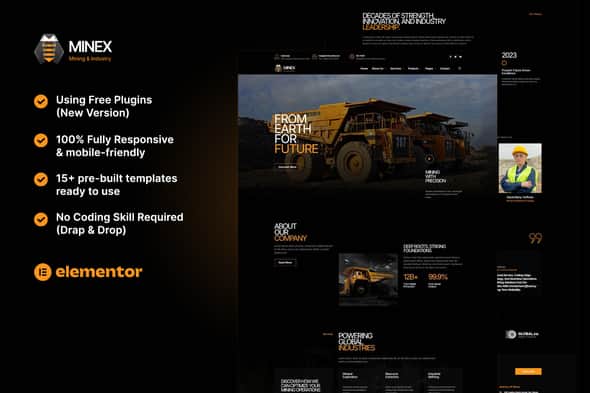
Minex – Mining & Industry Elementor Template Kit – Responsive
Original price was: $24.00.$4.80Current price is: $4.80.
Building an industrial or mining corporate website usually demands custom layouts for technical service breakdowns, project portfolios, and enterprise details. Minex provides a structured site architecture built specifically on Elementor for WordPress, skipping the overhead of custom theme development.
This package is an Elementor Template Kit tailored for industrial operators, mining enterprises, heavy equipment suppliers, and construction firms. Built for the free Hello Elementor theme, it leverages MetForm and ElementsKit Lite to deliver 15+ pre-designed page layouts without writing code. It is ideal for agency developers and site builders needing quick deployment. However, it is not a standalone WordPress theme and requires an active Elementor installation to function.
| Attribute | Specification |
|---|---|
| Product Type | Elementor Template Kit |
| Base Theme Compatibility | Hello Elementor (Free) |
| Pre-built Templates | 15+ Layouts |
| Required Addons | Elementor, ElementsKit Lite, MetForm |
| Design Architecture | Global Kit Styles (Fonts & Colors) |
| Layout Responsiveness | 100% Mobile & Tablet Friendly |
Key Design & Architectural Features
- Global Styling Control: Modify site-wide color palettes and typography settings in a single global menu without editing individual elements.
- Fully Responsive Layouts: Tested across multiple viewport sizes to maintain structural integrity on mobile, tablet, and desktop screens.
- Zero Code Customization: Utilizes Elementor visual drag-and-drop mechanics for complete drag-and-drop structural editing.
- Form Integration: Includes dedicated MetForm templates for industrial inquiries and newsletter subscriptions.
- Modular ElementsKit Setup: Customizable header and footer layouts built via ElementsKit Lite for flexible site navigation.
Included Layout Templates
- Core Pages: Homepage, About Us, Company History, Our Team, Pricing Plans, FAQ, Contact Us, 404 Error Page.
- Service & Project Views: Services Overview, Service Detail, Projects Portfolio, Project Detail layout options.
- Content & Dynamic Sections: Blog Archive Page, Custom Header Layout, Custom Footer Layout.
- Form Modules: Minex Contact MetForm, Minex Newsletter MetForm.
Setup and Import Guidance
MetForm Integration Steps
To active functional contact forms, edit your target page in Elementor and open the MetForm widget. Select New Form, choose a blank layout, and click Edit Form. From the template library modal, navigate to My Templates, choose your imported MetForm file, insert it, and save the page.
Header and Footer Configuration
Access ElementsKit > Header Footer in your WordPress dashboard and create a new template. Set the activation toggle to On, open the Elementor builder, and insert your header or footer from the My Templates tab. Ensure your page layout setting inside Elementor is set to Elementor Full Width for proper rendering.
Frequently Asked Questions
Frequently Asked Questions
Is Minex a standalone WordPress theme?
No, Minex is an Elementor Template Kit containing layout designs and static page assets. It requires WordPress with the Elementor plugin installed and works best alongside the free Hello Elementor theme.
Does customizing this template kit require coding skills?
No coding knowledge is necessary. All page structures, typography, and color schemes are fully editable through Elementor’s visual drag-and-drop editor and Global Style settings.
How are demo images handled during the kit import?
Demo images included in the preview are sourced from Envato Elements. You must acquire licenses for those stock assets to use them commercially, or replace them with your own proprietary media files.
1. Click Add to cart

2. Review your items and click Proceed to checkout

3. Fill in your billing details: Name, Email, and Password
4. Choose your preferred payment method
5. Click Pay via Paypal to proceed

6. Access Downloads to get your files

Related products


