
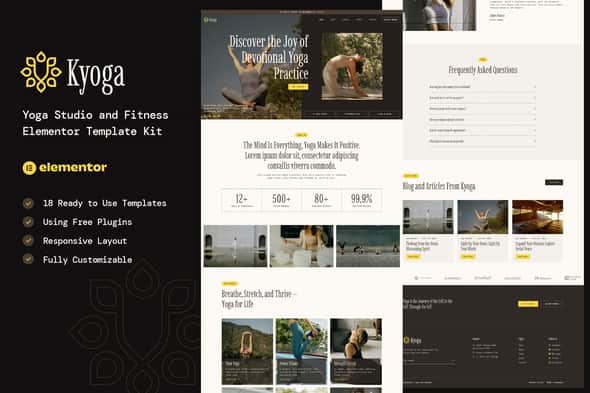
Kyoga – Yoga Studio & Fitness Elementor Template Kit
Original price was: $24.00.$4.80Current price is: $4.80.
Building a dedicated online presence for your yoga studio or fitness center can often be a complex and time-consuming endeavor. The Kyoga Elementor Template Kit offers a streamlined solution, specifically engineered for yoga studios, meditation centers, certified instructors, wellness coaches, and related health or mindfulness services. It’s important to note that Kyoga functions as a comprehensive Elementor template kit, distinct from a traditional WordPress theme.
Kyoga is designed with a contemporary, clean aesthetic, ensuring your website looks professional and inviting. Its fully responsive layout guarantees a flawless presentation across all devices, from desktops to smartphones. Crucially, this kit is built for ease of use, allowing complete customization without requiring any coding knowledge, making it accessible to users of all technical skill levels.
Accelerate your website development with Kyoga’s extensive collection of 14 pre-designed pages and 18 distinct templates. These professionally crafted assets enable you to launch a sophisticated online platform rapidly, providing a solid foundation for your digital presence.
Key Features & Benefits
- Free Elementor Compatibility: Harness the full power of Elementor’s free version; Elementor Pro is not a prerequisite.
- Unique & Modern Design: Present a professional and uncluttered image that resonates with your target audience.
- 14 Ready-to-Use Pages: Jumpstart your site with essential layouts for immediate content integration.
- 18 Versatile Templates: Expand your design possibilities with a rich library of ready-to-implement sections.
- Fully Responsive Layout: Ensure optimal viewing and functionality on any screen size, enhancing user experience.
- Comprehensive Customization: Adapt every element to perfectly match your brand identity without needing to write code.
- Broad Browser Compatibility: Guarantees consistent performance across major web browsers, including Chrome, Firefox, Safari, and Opera.
Included Templates & Layouts
The Kyoga kit provides a robust selection of templates to cover all aspects of a professional studio website:
- Global Theme Style
- Home 1 & Home 2
- About
- Classes & Class Details
- Career
- Testimonials
- FAQs
- Team
- Pricing
- Blog & Single Post
- Contact
- 404 Page
- Header & Footer
- Form Contact & Form Newsletter
Essential Plugins
To fully utilize the Kyoga Template Kit, the following plugins are required:
- Elementor
- ElementsKit Lite
- MetForm
- Gum Elementor Addon
Implementation Guide
It is crucial to understand that Kyoga is an Elementor Template Kit, not a standalone WordPress theme. It provides design data specifically for Elementor and requires installation via the Template Kit Import Plugin for WordPress, or direct import through Elementor’s interface.
Template Kit Installation Steps:
- Download your kit file (do not unzip). Safari users may need to disable “Open safe files after downloading.”
- Verify WordPress Permalinks are set to “Post Name” under Settings > Permalinks.
- Ensure the Hello Elementor theme is installed and active via Appearance > Themes > Add New. This will prompt Elementor installation if not already present.
- Confirm Elementor and Template Kit Import plugins are installed and updated in your WordPress Plugins section.
- Navigate to WordPress Dashboard > Tools > Template Kits, then click “Upload Template Kit Zip” (or select your kit).
- Look for the orange banner and click “Install Requirements” to load any necessary kit plugins.
- Initiate import with the Global Kit Styles first to establish site settings.
- Proceed to import individual templates one at a time, in the recommended order. These will be accessible under Elementor > Templates > Saved Templates.
Creating New Pages:
- Create a new page in WordPress, then select “Edit with Elementor.”
- Access page settings (gear icon, lower-left) and choose “Elementor Full Width,” then hide the page title.
- Click the gray folder icon to open the “My Templates” tab and import your desired page layout.
- Set your chosen home page under Settings > Reading by selecting “Static Front Page.”
Integrating MetForms:
If Elementor Pro is active, MetForm installation can be skipped.
- Import the MetForm block templates.
- Import the page template containing the form, then right-click to activate the Navigator.
- Select the MetForm widget, click “Edit Form,” choose “New,” then “Edit Form” to open the builder.
- Click the “Add Template” gray folder icon.
- Go to the “My Templates” tab.
- Select your imported MetForm template and click “Insert” (choose “No” for page settings).
- Customize as needed, then click “Update & Close” to integrate the form into the template.
- Finally, click “Update” for the page.
Global Header and Footer Configuration:
- Import the header and footer templates.
- Go to ElementsKit > Header Footer, select “Header,” and click “Add New.”
- Assign a title, ensure “Entire Site” is selected, and toggle “Activation” to “On.”
- Click the template title and “Edit Content.”
- Use the gray folder icon to import your header template, then “Update.”
- Repeat this process for the footer.
Note: Elementor Pro users manage headers and footers via Templates > Theme Builder.
Enabling Flexbox Container:
- From your WordPress Dashboard, navigate to Elementor > Settings > Features.
- Locate “Flexbox Container” and set its status to “Active.”
Important Considerations
This Template Kit utilizes demo images sourced from Envato Elements. To use these specific images on your live website, you will need to acquire appropriate licenses from Envato Elements, or alternatively, replace them with your own licensed imagery or stock photos.
For additional support, consult the Elementor > Get Help section within your WordPress menu.
1. Click Add to cart

2. Review your items and click Proceed to checkout

3. Fill in your billing details: Name, Email, and Password
4. Choose your preferred payment method
5. Click Pay via Paypal to proceed

6. Access Downloads to get your files

Related products


