
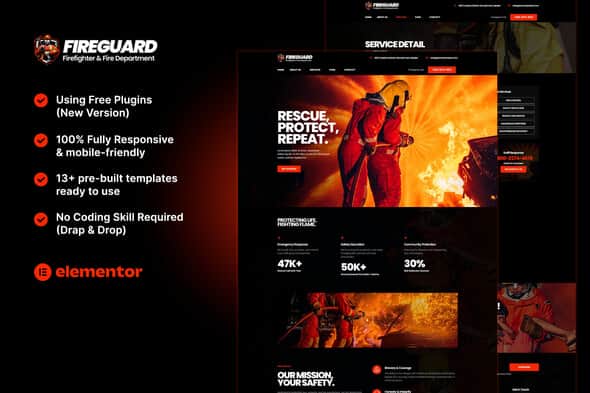
FireGuard – Firefighter & Fire Department Elementor Template Kit
Original price was: $24.00.$4.80Current price is: $4.80.
Setting up a dedicated website for emergency services or municipal fire departments requires structured layouts for team rosters, service breakdowns, and community alerts without bloated software dependencies. FireGuard provides a tailored set of pre-designed page layouts for Elementor, eliminating the need to build public safety websites from scratch.
FireGuard is a specialized Elementor template kit engineered for municipal fire departments, emergency response teams, and safety service providers. Built on the lightweight Hello Elementor theme, it utilizes Elementor, ElementsKit Lite, and MetForm to deliver 13+ customizable page layouts without writing code. This kit is best for web developers and agencies building community service portals, but it is not a standalone WordPress theme and requires an active Elementor installation.
| Technical Specification | Details |
|---|---|
| Product Type | Elementor Template Kit |
| Base Theme Compatibility | Hello Elementor (Free) |
| Pre-built Templates | 13+ Complete Page Layouts |
| Required Plugins | Elementor, ElementsKit Lite, MetForm |
| Layout Responsiveness | 100% Mobile-Friendly & Responsive |
| Customization System | Global Kit Style (Fonts & Colors) |
Core Architectural & Design Features
- 13+ Pre-designed Page Layouts: Includes ready-to-import templates for Home, About Us, History, Firefighters, Services, Service Detail, Career, Gallery, Testimonials, FAQ, Blog, 404 Page, and Contact.
- Global Style Controls: Adjust typography, primary accent colors, and layout spacing universally across all pages through the Global Kit Settings interface.
- Header & Footer Integration: Built to work directly with ElementsKit Lite header/footer builder or Elementor Pro Theme Builder for site-wide navigation control.
- Code-Free Customization: Fully operational via standard drag-and-drop editing mechanics, requiring zero custom PHP or CSS overrides.
- Optimized Structural Baseline: Configured for minimal asset overhead when paired with lightweight base themes like Hello Elementor.
Included Template Index
The kit delivers specialized page assets designed to cover standard public service communication requirements:
- Page Layouts: Home, About Us, History, Firefighters (Team Roster), Services, Service Detail, Career, Gallery, Testimonials, FAQ, Blog, 404 Page, Contact.
- Site Structure Assets: Global Header Template, Global Footer Template.
Setup and Integration Workflow
Importing FireGuard into WordPress follows standard template kit execution:
- Install and activate the free Hello Elementor theme alongside the required helper plugins (Elementor, ElementsKit Lite, and MetForm).
- Upload the template kit zip file using the Envato Elements plugin or Elementor’s native kit importer tool.
- Apply the Global Kit Styles to align site-wide color schemes and typography automatically.
- Assign the Header and Footer templates within ElementsKit Header Footer manager or Elementor Pro Theme Builder to activate site-wide headers and footers.
Frequently Asked Questions
Is FireGuard a standalone WordPress theme?
No, FireGuard is an Elementor Template Kit containing pre-designed page content and layout data. It must be imported into an existing WordPress site running Elementor and a compatible base theme such as Hello Elementor.
Do I need Elementor Pro to use this template kit?
No, the core templates and form integrations are configured to work with free Elementor, ElementsKit Lite, and MetForm. However, if you already use Elementor Pro, you can manage the global header and footer using the built-in Theme Builder.
How are demo images handled during the kit import?
The template kit uses placeholder visuals from Envato Elements for structural demonstration. Users should replace these demo images with their own official department photography or properly licensed stock assets prior to launching the site.
1. Click Add to cart

2. Review your items and click Proceed to checkout

3. Fill in your billing details: Name, Email, and Password
4. Choose your preferred payment method
5. Click Pay via Paypal to proceed

6. Access Downloads to get your files

Related products


