
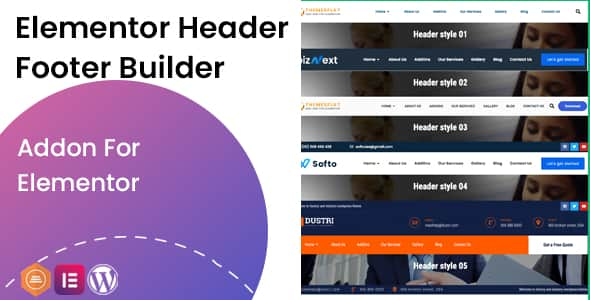
Elementor Header Footer Builder – Addon | Responsive Header & Footer
Original price was: $19.00.$3.80Current price is: $3.80.
Designing custom website headers and footers often requires heavy coding or cumbersome theme overwrites. The Elementor Header Footer Builder – Addon provides a straightforward WordPress extension that allows developers and site builders to construct custom headers, footers, top bars, and mobile menus directly inside Elementor using standard drag-and-drop widgets.
This plugin is designed for WordPress site developers, agency creators, and site owners who need global or page-specific header and footer control across any WordPress theme. Built as an Elementor extension, it removes theme header constraints by supporting blank Canvas Templates and pre-built JSON layouts. It is ideal for users seeking complete design control over site navigation and layout structures, but not suited for sites operating without the core Elementor page builder.
| Specification | Details |
|---|---|
| Product Type | WordPress Plugin Addon |
| Base Requirement | Elementor Page Builder |
| Latest Version | 1.0.3 |
| Theme Compatibility | Works with any WordPress Theme |
| Included Layouts | 8 Demo Header Styles (JSON Import Package) |
| Key Components | Top Bar, Nav Menu, Mobile Menu Panel, Dropdown Menu, Search Widget, Before Footer |
| Page Template Support | Global Display & Canvas Template (Per-page custom headers) |
Core Features and Customization Capabilities
- Global & Page-Specific Displays: Apply custom header and footer designs site-wide or assign individual layouts to specific pages using Canvas Templates.
- Elementor Nav Menu Integration: Full styling options for typography, margins, padding, background colors, drop-down hover states, and one-page navigation setups.
- Mobile Menu Panel: Dedicated mobile drawer customization including custom logo uploads, background overlays, padding adjustments, and responsive menu toggles.
- Top Bar & Before Footer Sections: Add specialized top bar messaging and before-footer content blocks across all pages from a single design template.
- JSON Import Package: Includes 8 pre-designed header demo styles available for instant import into Elementor page templates.
- Retina Logo & Search Widget: Built-in header widgets for search functionality and high-density retina image support.
Installation and Configuration Workflow
1. Installing the Plugin
Upload the tf-header-footer.zip package via your WordPress plugin installer and activate the addon. Ensure the core Elementor plugin is active prior to configuration.
2. Designing Headers and Footers
Create global template designs within the addon panel to automatically populate across the site. For unique page designs, switch the target page to an Elementor Canvas Template and assign a dedicated header and footer directly within that layout.
Version History
- Version 1.0.3: Fixed compatibility issue on Elementor version 3.6.1.
- Version 1.0.2: Added dependency notice requiring core Elementor installation upon addon activation.
- Version 1.0.1: Included JSON demo layout package for starter template imports.
Frequently Asked Questions
Does this addon work with any WordPress theme?
Yes, the addon is built to function independently of your active theme. It integrates with Elementor, allowing you to override standard theme headers and footers globally or on specific Canvas Template pages.
Are the menu layouts fully responsive for mobile screens?
Yes, the plugin includes specific mobile menu controls. You can configure dedicated mobile drawer panels, menu overlay backgrounds, responsive toggle icons, and logo displays tailored for handheld screens.
How do I import the included demo headers?
The package contains JSON layout files for 8 demo header styles. You can import these files directly through the standard Elementor template importer and apply them immediately to your site layout.
1. Click Add to cart

2. Review your items and click Proceed to checkout

3. Fill in your billing details: Name, Email, and Password
4. Choose your preferred payment method
5. Click Pay via Paypal to proceed

6. Access Downloads to get your files

Related products


