
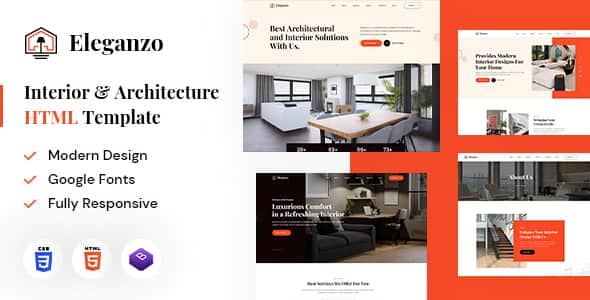
Eleganzo | Interior & Architecture HTML Template – Bootstrap 4
Original price was: $16.00.$3.20Current price is: $3.20.
Architecture firms and interior design agencies needing a structured front-end codebase can utilize Eleganzo to build custom business websites without building layouts from scratch. Built on Bootstrap 4.6.2, this static site template provides responsive grid layouts specifically tailored for showcasing portfolio galleries, client testimonials, and studio services.
Eleganzo is a 23-page HTML5 site template engineered for interior designers, architects, spatial planners, and residential decor studios. Powered by Bootstrap 4.6.2, jQuery 3.7.1, and AOS animations, it provides static front-end page layouts including 3 distinct homepage variations. It is best suited for web developers and agencies seeking a clean HTML/CSS framework to build custom client sites, but is not suitable for end-users expecting a drag-and-drop WordPress theme or integrated content management system.
Technical Specifications
| Feature | Specification details |
|---|---|
| Framework | Bootstrap 4.6.2 |
| Markup & Styling | HTML5, CSS3 |
| JavaScript Libraries | jQuery 3.7.1, Popper.js, AOS (Animate On Scroll) |
| Template Count | 23 Valid HTML5 Page Templates |
| Homepage Variations | 3 Layout Styles |
| Icon Suite | Font-Awesome |
| Typography | Playfair Display, DM Sans |
| Browser Support | Chrome, Firefox, Safari, Edge, Opera |
Key Features and Layout Structure
- Multi-Page Architecture: Includes 23 pre-designed HTML pages covering homepage alternatives, about pages, service listings, project portfolios, and contact forms.
- Responsive Grid System: Built on the Bootstrap 4.6.2 grid to adapt across desktop screens, tablets, and smartphones.
- On-Load Motion Effects: Integrated with
aos.jsfor scroll-triggered entrance animations across sections. - Typography Hierarchy: Pre-configured font sizing ranging from display headings (H1 at 72px) down to standard body paragraph text (20px).
- Cross-Browser Rendering: Standardized HTML5 boilerplate code ensures uniform visual presentation across modern web browsers.
Customization and Styling Guide
Customizing the visual style requires basic editing of the stylesheet files located within the template directory structure:
- Color Palette Adjustments: The default color scheme utilizes a primary tone (
#141430), secondary tone (#0f0200), neutral text color (#4c4c4c), and accent highlight (#f94a24). Openassets/css/style.cssin any code editor (such as VS Code or Notepad++) and run a find-and-replace command on these hex codes to match client branding. - Banner and Hero Sections: Hero section background images can be adjusted directly inside
style.cssby modifying the background property under the.architecture_banner_outerselector. - Animation Class Configuration: Scroll animations rely on AOS utility attributes. Modify or remove entrance transitions by editing the data-aos attributes on target HTML elements.
Frequently Asked Questions
Is Eleganzo a WordPress theme or a static HTML template?
Eleganzo is a static HTML5 and CSS3 website template built with Bootstrap 4.6.2. It requires manual code editing to update text or media content and does not include a CMS dashboard or WordPress database functionality.
How do I customize the default color scheme?
You can change the site colors by editing assets/css/style.css. Perform a search for the default primary color hex code (#141430) or accent color (#f94a24) and replace them with your desired brand colors.
Are the preview images included in the template download?
No, all stock photos shown in the live demonstration are used strictly for preview purposes. The download package contains structural template layouts with placeholder media blocks, requiring you to insert your own photography assets.
1. Click Add to cart

2. Review your items and click Proceed to checkout

3. Fill in your billing details: Name, Email, and Password
4. Choose your preferred payment method
5. Click Pay via Paypal to proceed

6. Access Downloads to get your files

Related products


