
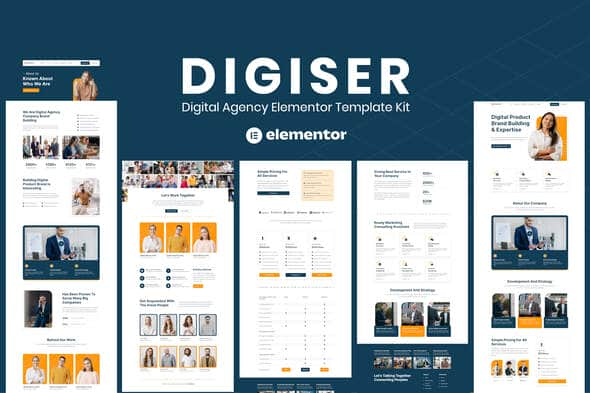
Digiser – Digital Agency Elementor Template Kit | Modern Agency UI
Original price was: $26.00.$5.20Current price is: $5.20.
Building a digital agency website often gets bogged down by repetitive design tasks and layout adjustments. Digiser provides a pre-structured set of page templates tailored specifically for corporate agencies, creative studios, and IT consultants using WordPress.
Product Summary: Digiser is a fully responsive Elementor Template Kit built for digital marketing agencies, software providers, and professional freelancers. Operating within the WordPress and Elementor page builder ecosystem, it resolves the need for custom frontend development by supplying 13 pre-designed page layouts and global styles. This kit is best suited for agency owners and site builders needing rapid visual deployment, but is not compatible with non-WordPress CMS platforms or static HTML systems.
Technical Specifications
| Feature / Specification | Details |
|---|---|
| Product Category | Elementor Template Kit |
| Base Platform | WordPress |
| Primary Page Builder | Elementor |
| Total Template Count | 13 Templates (Pages, Headers, Footers, Forms) |
| Required Extensions | Elementor, Elementor Header & Footer Builder, MetForm, ElementsKit Lite, Gum Addon |
| Design Responsiveness | Fully Responsive (Mobile, Tablet, Desktop) |
| Coding Knowledge Required | None (Drag-and-Drop Interface) |
Included Page Layouts & Global Elements
The Digiser kit comes equipped with essential agency site components out of the box:
- Home Page: Visual homepage structure focused on agency service presentation.
- About Us Page: Layout designed for company background and brand narrative.
- Our Team Page: Grid section to introduce staff and leadership team members.
- Our Services Page: Detailed view for core business offerings and solutions.
- Our Project Page: Portfolio display layout for showing agency case studies.
- Pricing & FAQ Pages: Dedicated pages for service tiers and common client inquiries.
- Blog & Single Post Pages: Clean editorial layouts for agency news and content marketing.
- Header & Footer Templates: Global navigation and footer elements built via Elementor Header & Footer Builder.
- Metform Integration: Customized form design for inquiry and project consultation management.
Setup and Import Instructions
Follow these standard steps to deploy the template kit on your WordPress installation:
- Install and activate the Template Kit Import plugin from the WordPress plugin directory.
- Navigate to Elements > Installed Kits and upload the downloaded template kit ZIP file directly (do not unzip before uploading).
- Click the Install Requirements button to automatically install and activate all required dependencies (Elementor, MetForm, ElementsKit Lite, Gum Addon).
- Import global styles first, then import individual page layouts one at a time for optimal site stability.
- To configure forms, import the MetForm block templates, open the destination page inside Elementor, edit the MetForm widget, and assign your imported form block from the saved library.
Frequently Asked Questions
Frequently Asked Questions
Does this template kit require Elementor Pro?
No, Digiser relies primarily on the free version of Elementor combined with open-source extensions like Elementor Header & Footer Builder, ElementsKit Lite, and MetForm. All header, footer, and form customization options function without a paid Elementor license.
Are stock images included in the template download?
The preview images used throughout the layout demos are sourced from Envato Elements. They are included as placeholders and should be replaced with your own media assets or properly licensed stock photos before launching your live site.
Can I modify the layout styles without editing CSS files?
Yes, all styling rules, colors, typography, and spacing are handled through Elementor’s visual settings and the included Global Style template, allowing you to rebrand the entire kit using native drag-and-drop controls.
1. Click Add to cart

2. Review your items and click Proceed to checkout

3. Fill in your billing details: Name, Email, and Password
4. Choose your preferred payment method
5. Click Pay via Paypal to proceed

6. Access Downloads to get your files

Related products


