
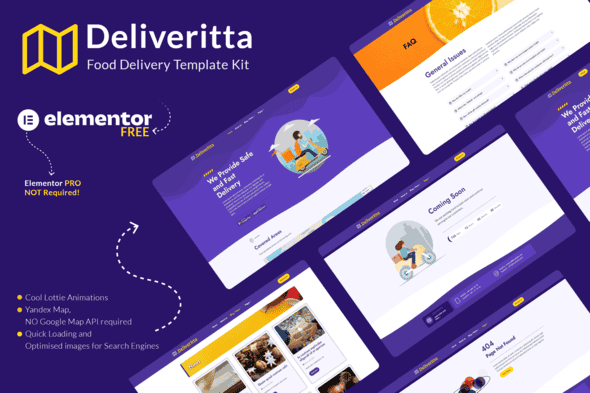
Deliveritta – Food Delivery Elementor Template Kit | Fast Load
Original price was: $15.00.$3.00Current price is: $3.00.
Setting up an online food delivery storefront requires a fast layout that handles local menu presentation without heavy third-party script overhead. Deliveritta provides a structured visual layout kit designed specifically for local restaurants, dark kitchens, and takeaway operations built on WordPress and Elementor.
Deliveritta is an Elementor Template Kit tailored for food ordering services, meal delivery, and local courier platforms. Utilizing lightweight dependencies such as ElementsKit Lite and Jeg Elementor Kit, it provides pre-built page structures alongside Yandex Map integration to bypass mandatory Google Maps API billing. This kit is best suited for food service owners and web designers looking for quick site assembly using drag-and-drop tools, while it is not suited for complex multi-vendor marketplaces that require native custom code architecture.
Technical Specifications
| Specification | Details |
|---|---|
| Product Type | Elementor Template Kit |
| Page & Block Count | 10+ Complete Templates & Sections |
| Mapping Engine | Yandex Maps Integration (No Google Maps API Required) |
| Primary Builder | Elementor (Free / Lite compatible) |
| Required Plugins | Element Pack Lite, ElementsKit Lite, Jeg Elementor Kit, Mihdan: Elementor Yandex Maps, WPForms Lite |
| Visual Elements | Lottie Animations, Google Fonts, Responsive Grids |
| Design Assets | Pixabay & Freepik Licensed Illustrations Included |
Included Layouts & Components
The kit features a comprehensive mix of full-page layouts and structural blocks tailored to food delivery business workflows:
- Core Pages: Main Homepage, About Us, News / Blog Index, Contact Us, FAQ, Maintenance Page, and Coming Soon Layout.
- System Templates: Global Header, Global Footer, Single Post Layout, Search Results, and Category Archive Template.
- Content Sections: Dual Page Top Titles (Left-Aligned and Right-Aligned), Meet Our Team Grid, Testimonials Carousel, and Partner Logo Display.
Setup & Import Process
Deploying Deliveritta into a WordPress installation takes a few straightforward steps using standard plugin tools:
- Install the Envato Elements plugin directly from the WordPress repository.
- Upload the provided template kit file through the Installed Kits dashboard without unzipping the archive.
- Execute the automatic plugin requirements installer to activate Element Pack Lite, ElementsKit Lite, Jeg Elementor Kit, Mihdan Yandex Maps, and WPForms Lite.
- Import the Global Kit Styles prior to applying individual page templates to ensure unified typography and color scheme settings.
- Create standard WordPress pages set to the Elementor Full Width page template, then insert desired layouts directly from your saved templates menu.
Frequently Asked Questions
Frequently Asked Questions
Does this template kit require an active Google Maps API key?
No. Deliveritta uses the Mihdan Elementor Yandex Maps integration, allowing you to embed interactive maps without creating a Google Cloud billing account or entering Google API keys.
Are visual page builders required to customize content?
Yes, content modification relies on the visual Elementor interface. You can adjust text, swap media assets, configure color schemes, and reorder content modules directly on screen without touching raw code.
Is demo blog content included in the template import?
The import files contain the layout frames and structure for blog posts, but sample post copy is not included. You will need existing WordPress posts published on your site for dynamic blog feeds to populate.
1. Click Add to cart

2. Review your items and click Proceed to checkout

3. Fill in your billing details: Name, Email, and Password
4. Choose your preferred payment method
5. Click Pay via Paypal to proceed

6. Access Downloads to get your files

Related products


